


KeepNote: Viable Alternative to NoteCase

Productivity Sauce
NoteCase has always been an indispensable application in my productivity toolbox. So the news that NoteCase's developer ceased its development sent me scrambling for a replacement for this excellent note-taking tool. It didn't take me long, though, to discover KeepNote. Similar to NoteCase, KeepNote is a hierarchical note manager, which means notes in the application are organized in notebooks and subnotebooks that act as nodes in an hierarchical tree. You can assign different icons to each notebook and note (or page, in KeeNote's terminology), which makes it easier to identify and find specific pages and folders.
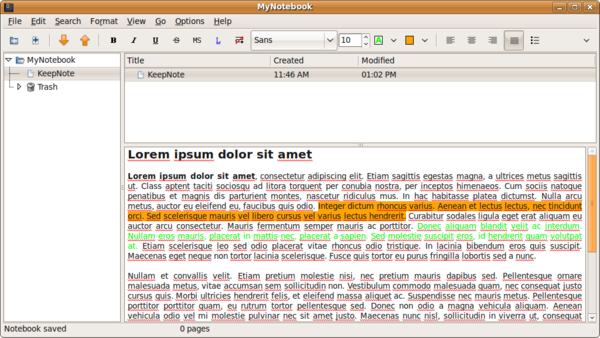
As you would expect from a note-taking application, KeepNote supports different text formatting options, including bold, italics, underlined, and monospaced. Using the available tools, you can also tweak font properties, apply different text and background colors, and choose between several text alignment options. Like any note-taking application worth its salt, KeepNote lets you insert links and images. In addition to that, KeepNote features its own screenshot tool. Choose Edit -> Insert Screenshot (or press Ctrl+Insert), and you can take a screenshot of any currently opened window. KeepNote then automatically inserts the screenshot into the currently opened note. Other nice touches include an integrated spell-check with automatic in-line spell check and a search feature that allows you to search the current page or all existing notes. All pages in KeepNote are stored in the HTML format, and you can view them in the browser or edit them in an external editor. The only missing feature here is the lack of import and export functionality and the ability to encrypt notebooks. There is, however, the Backup Notebook feature that can save the currently selected notebook as a tar.gz archive.
All in all, while KeepNote is still missing a few features some users might consider important, it already provides a viable alternative to the now-defunct NoteCase.
Comments
comments powered by DisqusSubscribe to our Linux Newsletters
Find Linux and Open Source Jobs
Subscribe to our ADMIN Newsletters
Support Our Work
Linux Magazine content is made possible with support from readers like you. Please consider contributing when you’ve found an article to be beneficial.

News
-
United Nations Open Source Portal Goes Live
A new open source portal seeks to coordinate and scale open source efforts across the United Nations system.
-
KDE Linux Drops AUR
KDE Linux developers have dropped the Arch User Repository from the build pipeline due to security concerns; other distributions should consider doing the same.
-
California May Exempt Linux from Its Age-Verification Law
After backlash from the Linux community, California may be backing off on its promise to force all operating systems to verify age, but one platform may still have to comply.
-
Another Logic Bug Found in Linux Kernel
Qualys has discovered a vulnerability in the Linux kernel that can be used to elevate standard user privileges.
-
Ubuntu Core 26 Offers Game-Changing Enterprise Features
Ubuntu Core 26 could be a game-changer for organizations looking for increased security and reliability.
-
AI Flooding the Linux Kernel Security Mailing List
AI is giving Linus Torvalds a headache, but not in the way you might think.
-
Top Priorities for Open Source Pros Seeking a New Job
Professional fulfillment tops the list, according to LPI report.
-
Container-Based Fedora Hummingbird Designed for Agent-First Builders
Fedora Hummingbird brings the same approach to the host OS as it does to containers to level up security.
-
Linux kernel Developers Considering a Kill Switch
With the rise of Linux vulnerabilities, the kernel developers are now considering adding a component that could help temporarily mitigate against them… in the form of a kill switch.
-
Fedora 44 Now Gaming Ready
The latest version of Fedora has been released with gaming support.
Keepnote not stable
This is a perfect no-go for the storage of important information I want to access in one year on the system I run in one year. I'm forced to stay with ugly notecase.
use Zim
NoteCase Pro Available
Yes, I know it costs money...but it's available, cross-platform, and supported with recent new release..has more features than NoteCase...
Also, NoteCase is still available, just not supported by developer....
Anyway, just curious....
the only missing feature here is ..