


Set up a Personal Microblog with Bilboblog

Productivity Sauce
There are many reasons why you would want to run your own private microblog, but how do you actually do that? The easiest way is to install Bilboblog, a tiny, no-frills PHP/MySQL-based microblogging engine.
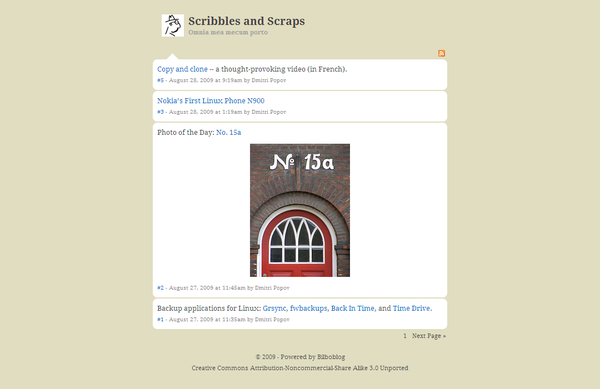
Although Bilboblog is described as a microblogging application, it's not a drop-in replacement for Twitter or Identi.ca. It's actually more of a hybrid between a microblog and tumblelog. Similar to a conventional microblogging engine, Bilboblog lets you limit post length, but it also supports text formatting and sports the ability to embed images and videos. Bilboblog's major advantage is simplicity: it works right out of the box without any tweaking and there is virtually no learning curve. Better yet, Bilboblog features a one-step installation procedure, so you can set up a personal microblog in a matter of minutes.
To install Bilboblog, create a MySQL database (e.g., bilboblog), grab the latest release of the application, unpack the downloaded archive and move the resulting bilboblog directory to the document root of your server. Make the bilboblog directory writable, and point your browser to http://yourserver/bilboblog. Fill out the required fields, and hit the Install button. Once Bilboblog is installed, you can switch to its administrator interface by navigating to http://yourserver/bilboblog/admin and logging in with the user name and password specified during installation. To create a new post, click on the Add new message link, add text, and format it using the available buttons. If you need help with formatting codes, press the Help button which opens a section containing brief descriptions of the supported formatting options and their usage. Press the Publish button to post the new entry. That's all there is to it. Since Bilboblog is a strictly single-user application, there are no complicated user and access management features, and you won't find any advanced content management features either. Some power users may consider Bilboblog somewhat limited for their needs, but if you want to set up a personal microblog with a minimum of fuss, then Bilboblog might be the right tool for the job.
When using Bilboblog, you'll notice that its English translation is sometimes incomplete and lacks consistency. So I spent an evening going through the language strings and fixing them to the best of my ability. I also did a few minor changes like replacing the default toolbar icons, adding a license to the footer, and slightly modifying the default theme. You can fetch the tweaked version of Bilboblog at my Google Code page. As an experiment, I also host my personal Bilboblog-based microblog on my Bubba Two server. Feel free to drop by.
Comments
comments powered by DisqusSubscribe to our Linux Newsletters
Find Linux and Open Source Jobs
Subscribe to our ADMIN Newsletters
Support Our Work
Linux Magazine content is made possible with support from readers like you. Please consider contributing when you’ve found an article to be beneficial.

News
-
United Nations Open Source Portal Goes Live
A new open source portal seeks to coordinate and scale open source efforts across the United Nations system.
-
KDE Linux Drops AUR
KDE Linux developers have dropped the Arch User Repository from the build pipeline due to security concerns; other distributions should consider doing the same.
-
California May Exempt Linux from Its Age-Verification Law
After backlash from the Linux community, California may be backing off on its promise to force all operating systems to verify age, but one platform may still have to comply.
-
Another Logic Bug Found in Linux Kernel
Qualys has discovered a vulnerability in the Linux kernel that can be used to elevate standard user privileges.
-
Ubuntu Core 26 Offers Game-Changing Enterprise Features
Ubuntu Core 26 could be a game-changer for organizations looking for increased security and reliability.
-
AI Flooding the Linux Kernel Security Mailing List
AI is giving Linus Torvalds a headache, but not in the way you might think.
-
Top Priorities for Open Source Pros Seeking a New Job
Professional fulfillment tops the list, according to LPI report.
-
Container-Based Fedora Hummingbird Designed for Agent-First Builders
Fedora Hummingbird brings the same approach to the host OS as it does to containers to level up security.
-
Linux kernel Developers Considering a Kill Switch
With the rise of Linux vulnerabilities, the kernel developers are now considering adding a component that could help temporarily mitigate against them… in the form of a kill switch.
-
Fedora 44 Now Gaming Ready
The latest version of Fedora has been released with gaming support.
even more steps
breathe
open pc
breathe
connect or check connection [if failing insert an ISO/OSI pile troubleshooting approach]breathebreathe
connect to the server where you intend to set up the software
breathe
breathe I cannot repeat it enough somebody still forget this step
mmm ok the rest is known but remember to add more point for the breathing task.
56465461
More than one installation step!
Tried it, didn't like it.
Re: 1 Step Install?
1 Step Install?
I beg to differ.
Quote:
"To install Bilboblog, create a MySQL database (e.g., bilboblog) (1), grab the latest release of the application (2), unpack the downloaded archive (3) and move the resulting bilboblog directory to the document root of your server (4). Make the bilboblog directory writable (5), and point your browser to http://yourserver/bilboblog (6). Fill out the required fields (7), and hit the Install button (8)."
I must say, that's a mighty long 'step'.