Seven principles for preventing vulnerabilities in PHP programming
Inviting theUninvited

Many web attacks are the result of programmer error. Sloppy code testing leaves a door open for the uninvited.
Today, attacks on web-based systems hardly target weaknesses in network protocols anymore but rather flaws in applications. Many of the spectacular security breaches in recent years, such as the one on the Sony PlayStation Network, took advantage of programming defects in web applications. The defects are rarely exotic and can be grouped into just a few categories; for example, the Sony hack succeeded with an SQL injection.
Modern operating systems do provide elaborate protective measures against vulnerabilities, such as address space layout randomization, but savvy attackers can circumvent these protections with a few tricks. The only real solution is to develop web applications without security vulnerabilities. Systematically avoiding programming defects is therefore the noble aim of any serious software quality management.
Secure programming begins long before the first line of code is written: In the design phase, developers should consider which safety issues could arise, which safety requirements are necessary, and under what conditions the software will be used. By then, at the latest, the project should specify coding standards so that tests and code reviews all speak the same language.
Engineers know that quality is a result of the production process and cannot be tested in the product afterward. OpenBSD is a positive example of building quality into the process. Many consider the OpenBSD version of Unix the most secure operating system, thanks to clear quality standards and tests. From the beginning, all developers involved in a project must take care to ensure safe and error-free code. In addition to providing continuing professional education, the OpenBSD team maintains a collection of routines for standard cases. These routines mean that developers won't have to re-invent the wheel and make mistakes that have already been corrected.
1. Do Not Reinvent Anything
New wheels and new software do not run as smoothly as projects already proven in practice. Many developers write their own routines for session management and login validation, often leaving the doors wide open for session surfing or SQL injections (Figures 1 and 2).
 Figure 1: Good tests would have brought to light that the login screen of the security demonstration site Badstore.net allows SQL injections; …
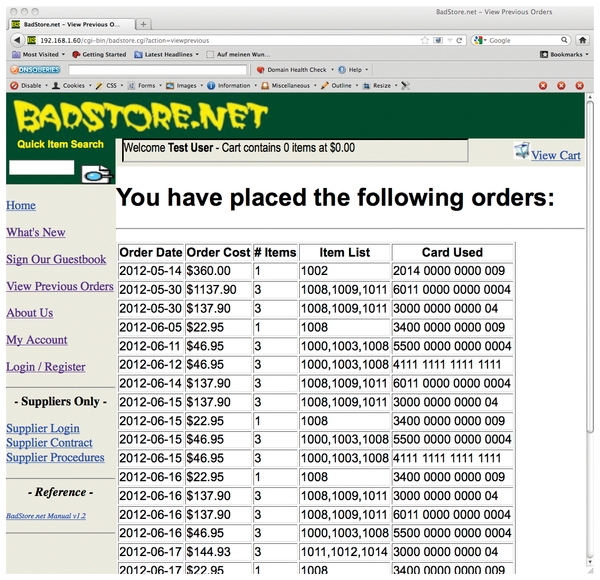 Figure 2: … thus, anyone can see what other customers have ordered. This harmless dry run also works with a frightening number of real shops.
2. Review Code
Two very simple measures protect against intrusions and inspire best practices: For one, it helps to agree within the project who will be responsible for which routines from which libraries. For another, having each of the developers audit the code of another also improves the quality. Agreements reduce the likelihood for redundant inventions because one person often will already have a solution for a standard problem.
At the same time, such agreements also lead to a second quality assurance effect: A developer who has to explain his code to someone else will document it better and be more thorough. Furthermore, the results of mutual code presentations can be used directly for the documentation – an issue that is often neglected.
Such consultations are far from being the systematic code reviews in which a second developer or even a whole team scrutinizes the programming of a colleague line by line. Such testing is very time consuming, but it promises – provided you have a good team – a very high chance of successfully finding errors. OpenBSD invests in this effort.
Intensive reviews don't just result in the discovery of security problems; they also help developers heighten awareness of critical programming errors, and they lead to improved documentation.
3. Check Input Effects with Data-Flow Analysis
A data-flow analysis in the framework of the code review is helpful in the search for security loopholes. For each piece of data that is entered, it is important to investigate whether and how it might influence other processes. This process is easily done for simple mail forms, but it is very time-consuming for database applications. Experience shows that a data-flow analysis is the best way to catch problems that might lead to cross-site scripting, code injections, and similar points of attack.
In such data-flow analyses, the extreme values are always of interest: For example, should an integer variable exceed PHP_INT_MAX, PHP automatically performs a typecast to float. This can have surprising effects should the value finds its way into a database field of the integer type. Integer overflows can happen easily in database systems such as MySQL that also use data types like tinyint.
When performing a data-flow analysis, developers must keep an eye on all calculations and manipulations of input data related to limits.
4. Configure Test Systems Properly
In the course of a data-flow analysis, missing URL encodings or double-escaping of SQL statements become apparent. Multiple escapes can also arise through inattentiveness when, in your own test environment, PHP is run with disabled magic quotes that are then enabled on the production system. Production and test systems should both be run with the same versions and configuration files. A cron job that runs a simple diff via an SSH connection can ensure that the configurations are consistent.
5. Remember Debug and Error Messages
Security problems often arise from forgotten debug messages. The more detailed these messages are, the greater their usefulness for attackers. For instance, an attacker could discover database and table names from a debug message. A simple remedy against forgotten debug messages is to use a keyword prefix, which will make the messages easy to discover through grep. Alternatively, developers can integrate a special debug output function into their test system via include that is left blank in the production system.
Like debug messages, error messages that find their way to the outside world also help attackers. In addition to revealing security problems to intruders, technical messages confuse users, which has a negative effect on usability. Detailed log entries or automatic email sent to the admin are a better solution. Good documentation, which is a prerequisite for software testing, includes creating a list of possible error messages and deciding under what conditions the web application will receive them.
6. Construct a Test Scenario
Test scenarios are combinations of specific initial conditions designed to illicit predictable behavior the program should demonstrate. Such a test scenario for a calculator could be 2+2 with the expected output of 4. The addition scenario is obvious for the tester and thus easy to apply, but who adds (231 – 1)+1 to see whether a 32-bit signed integer overflows?
An organized test, therefore, includes determining the limits of the system and testing them. As a rule, it is not very effective if the same developers who wrote the application define the test scenario – their familiarity with the code makes it likely that they will be blind to their own mistakes.
Tests should be extensive; there are test scenarios for each individual function, for each module, and for the completed system. These tests should also deliberately cover extreme situations. Developers should also include tests for every known bug. If the calculator had ignored the multiplication before addition rule at some time in the past because of a coding error, this bug should be covered by a test scenario.
A measure for the quality of the testing is the amount of code covered. A coverage of 100 percent is desirable but not always possible. In event-driven programming, or with exception handlers for errors that are difficult to provoke, some branches of code will remain virtually unreachable.
7. Use Test Programs
It is essential to use automated tests alongside manual testing. To test an individual feature, it is often sufficient to use a self-written test program that is familiar with a lot of input values and the corresponding output values and compare the test results with the real results.
However, if the program you are testing is a bit more elaborate, it is no longer effective to write your own test programs. Fortunately, PHP has many test systems, such as PHPUnit [1], SimpleTest [2], or TestPlan [3].
PHPUnit and SimpleTest both serve to test the individual functions and instructions of the program – for example, whether variable values are valid or whether functions and function blocks return correct values. Thus, both PHPUnit and SimpleTest are suitable only for PHP environments. The manual for PHPUnit [4] provides a very good introduction to automated testing – knowledge that is easily transferable to SimpleTest, which has sparse documentation. Both are functionally and conceptually comparable.
TestPlan, on the other hand, checks to see whether the program returns expected values with specific user input; that is, it tests the response to certain inputs. For this purpose, TestPlan has its own scripting language that is optimized for performing basic interactions on web pages, such as entering data in forms or clicking on links. The programmer can then search the output for key words or character strings. This way, programmers can easily check to see whether the application works from a user perspective. If you select the input values skillfully, you can also discover critical situations (see the box titled "TestPlan in Practice").
TestPlan in Practice
Installation of TestPlan is relatively simple and explained well on the homepage [3], except for how to set the TESTPLAN_HOME environment variable correctly; for this article, it would be:
export TESTPLAN_HOME=~/testplan-1-0-r6/
On the author's Fedora test computer, it was not necessary to set JAVA_HOME.
The first simple test in Listing 1 checks the number of links on the author's homepage, thereby demonstrating multiple items from TestPlan's scripting language: It supports loops, can count, extracts things from the output, and even generates output itself. Thus line 5 selects the links in the %Response% output with parameter a, which corresponds to the HTML tag for a link. The href parameter in line 6 points to the URL returned by line 7.
Listing 1
Count Links
01 default %Cmds.Site% http://www.eggendorfer.info/
02 GotoURL %Cmds.Site%
03
04 set %Count% 1
05 foreach %Link% in %Response://a%
06   set %URL% as selectIn %Link% @href
07   Notice %Count% Link: %Link% %URL%
08   set %Count% as binOp %Count% + 1
09 end
Listing 2 contains the simple counting test from Listing 1, but it is more complex: Here, TestPlan logs on to Facebook for the author and verifies whether HTTPS is enabled. This check is performed in two stages: First, the Check function ensures that the desired text is found on the page. If that is successful, the test script continues running. It then reads the message, removes the HTML from it, and uses a regular expression to check whether enabled is present. (Frequent tests in the form of Listing 2 will, however, cause Facebook to become suspicious, and it will require a CAPTCHA for login.)
Listing 2
Test Facebook
01 default %Cmds.Site% https://www.facebook.com 02 GotoURL %Cmds.Site% 03 04 SubmitForm with 05 %Form% id:login_form 06 %Params:email% someone@somewhere.com 07 %Params:pass% somesecurepassword 08 %Submit% key:enter 09 end 10 11 set %Count% 1 12 foreach %Link% in %Response://a% 13 set %URL% as selectIn %Link% @href 14 set %Count% as binOp %Count% + 1 15 end 16 17 Notice %Count% Links on Facebook homepage. 18 GotoURL https://www.facebook.com/settings?tab=security 19 20 Notice Check if HTTPS is enabled. 21 Check //span[contains(text(),'Secure browsing is currently')] 22 set %all% %Response://span[contains(text(),'Secure browsing is currently')]% 23 if strMatches %all% ^(Secure browsing is currently).* (enabled)\.$ 24 Pass HTTPS enabled 25 else 26 Notice HTTPS disabled 27 Notice Try to enable HTTPS. 28 Notice Subsequently start test again. 29 GotoURL https://www.facebook.com/settings?tab=security§ion=browsing&view 30 set %id% %Response://form[@action='/ajax/settings/security/browsing.php']/@id% 31 set %fb_dtsg% %Response://form[@action='/ajax/settings/security/browsing.php']/input[@name='fb_dtsg']/@value% 32 SubmitForm with 33 %Form% id:%id% 34 %Params:secure_browsing% 1 35 %Params:fb_dtsg% %fb_dtsg% 36 %Submit% value:Save changes 37 end 38 Notice Test HTTPS again 39 Fail HTTPS 40 end
If enabled is present, the script reports this test as having been passed (see Figure 3); otherwise, the test will automatically try to enable HTTPS itself (Figure 4, line 6-00). Because Facebook assigns a form a new, seemingly random ID on each new access, you'll have to employ a small trick. With the XPath expression in line 30, it is possible to read the ID. The result is deposited in the local variable %id%. This is also the case for the contents of a hidden input field in line 31. With these values, you can address the desired form on the page (line 33), filled out correctly and posted to Facebook.
If you now want to test automatically whether Facebook has really enabled HTTPS – which is necessary if the test is to continue, you must now write a small test to see whether Facebook has logged the user out again. Depending on the result, the script must log on again if necessary and then run the test again. The TestPlan language includes the possibility of calling up external test modules, so it is sufficient to implement the HTTPS test once – your own test script will then call up the module in several places. This approach simplifies the maintenance of the test.
Fundamentally, TestPlan's own language is powerful and easy to learn, but it is poorly documented. A bit of initial experimentation is therefore necessary. TestPlan is worth using because of its flexibility – and not just for your own web applications, but for small (and of course, legal) attacks as well.
In all cases, it must be clear in the developer's mind under which conditions the program runs correctly, where the limits are, and which inputs it will not tolerate. This knowledge is transferred into the tests, which reduces the likelihood of error.
Is All This Worthwhile?
Unfortunately, systematic testing of web applications is still not very widespread. Cost and time pressures are the most common reasons for the lack of focus on testing. That is strange, because as soon as attackers take over your website, nobody thinks about time and budgets anymore. Even those who do not want to include loss of revenue and reputation in the equation should keep in mind that, once suitable test processes are established, the overhead for maintaining those processes is quite manageable. The knowledge gained from systematic testing helps prevent the same mistakes from happening again, and the quality of future work improves.
Infos
- PHPUnit: https://github.com/sebastianbergmann/phpunit/
- SimpleTest: http://simpletest.org
- TestPlan: http://testplan.brainbrain.net
- PHPUnit manual: http://www.phpunit.de/manual/3.6/en/index.html