


A taste of tiling with X-Tile

Off the Beat: Bruce Byfield's Blog
For years, tiling window managers have been a popular, but minority interface choice for GNU/ Linux. Ion, dwm, awesome and others differ in implementation, but what all have in common is that they divide the desktop into separate frames to avoid problems with overlapping windows. You can even mimic tiling in Windows by selecting them in the taskbar while holding the Ctrl key, then making a choice from the context menu. Now, thanks to X-Tile (http://open.vitaminap.it/en/index.htm), you can mimic tiling in GNOME as well.
Why would you want tiling? The answer is that Metacity, GNOME's default window manager, does not open windows efficiently. Although Metacity makes some effort to avoid placing new windows on top of existing ones, it does not work with every application, particularly non-GNOME ones. Instead, far too many windows open in the upper left corner. At other times, intelligent placement of windows is thwarted by the fact that Metacity remembers the last position and size of a window. Search for solutions, and you find that the most common solutions are to use a patched version of Metacity, or another window manager (not that most other window managers do much better).
Of course, there are workarounds. You can use multiple workspaces with only one or two windows open on each, but that requires some organization as well as extra keystrokes or mouse-clicks. Similarly, while using Alt+Tab to cycle through the open windows on your desktop eliminates the need to sort windows, you may dislike working against the background of other windows, to say nothing of the concealment of any icons you might have on the desktop. For such reasons, X-Tile may be a welcome solution.
X-Tile takes the shape of a GNOME panel applet. It is available as a .DEB package for Ubuntu (which doesn't work in Debian), or source code. Since it is a small package, you can install it in less than ten seconds using dpkg -i, but you have to log out and back in before it is visible in the list of available panel applets.
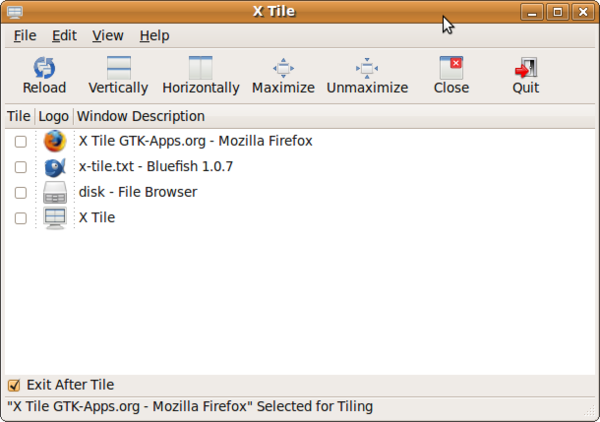
To use X-Tile, click its icon on the panel to open a window with a list of all windows open on the desktop. Select which windows you want to tile, then choose how you want to orient them -- vertically or horizontally -- or whether you want to maximize or minimize all of them. You also have the option of whether to keep the X-Tile window open after the selected windows are rearrange.
The one complication in this basic functionality is that, as in the Windows XP implementation of tiling that I suspect it is based on, X-Tile's choices of "Tile Horizontally" and "Tile Vertically" are confusing. For instance, if you select "Tile Vertically," then windows are stacked one above the other on the desktop, which gives each a horizontal orientation. Similarly, "Tile Horizontally" arranges windows side by side, which gives each a vertical orientation. However, once you use X-Tile a few times, this choice of terms should become less confusing.
Besides sorting windows, X-Tile is particularly useful for comparing two documents side by side. However, if you use it with more than two or three windows, then the resulting windows are likely to be too narrow or too long for you to work in any of them conveniently. Instead, you have to maximize one window or minimize the rest. The result is that, with multiple windows, X-Tile is mostly a way to sort windows to make them all visible at the same time -- and, since you already can see from the panel's Window List what windows are open, its usefulness seems limited.
As I used X-Tile, I found myself wishing that it included an option for dividing the screen into quarters, which is what most of the tiling window managers do. With this arrangement, windows arranged by X-Tile might actually have dimensions in which you could actually work without maximizing or minimizing anything. But, the way things are, X-Tile seems more a proof of concept than anything that most users will want on their desktops.
Comments
comments powered by DisqusSubscribe to our Linux Newsletters
Find Linux and Open Source Jobs
Subscribe to our ADMIN Newsletters
Support Our Work
Linux Magazine content is made possible with support from readers like you. Please consider contributing when you’ve found an article to be beneficial.

News
-
New Linux Flaw Lets Attackers Escape VMs
A 16-year-old vulnerability allows an attacker to escape a virtual machine, gain access to the host, and execute malicious code.
-
Hannah Montana Linux Is Back!
Developer Noah Cagle decided the world needed the once obscure but beloved Linux distribution and gave it a decidedly pink refresh.
-
System76 Refreshes the Lemur Laptop
If you're looking for a laptop with tons of power and battery, look no further than the latest iteration of the System76 Lemur Pro.
-
More than 43 Million Lines of Code in Linux Kernel 7.2
Using the cloc utility, Michael Larabel of Phoronix discovered that Linux kernel 7.2 has over 43 million lines of code.
-
Kubuntu Focus Goes Ultra
The Kubuntu Focus team has upped the performance ante of its M2 and Zr laptops with the latest, greatest CPUs from Intel.
-
Linux Gamers May Soon See Less Mouse Lag in KDE Plasma
Gamers using KDE’s Plasma desktop have been suffering from a slight input delay in mouse movement that could lead to getting fragged.
-
Three Lines of Code Improve Linux Storage Performance
A developer changed three lines of code, giving Linux storage performance a 5% bump.
-
AUR Hit Again with Malicious Packages
Once again the Arch User Repository is plagued by a high volume of malicious packages.
-
Alpine Linux 3.24 Features Fresh Desktops and a Newer Kernel
If you're a fan of Alpine Linux, it's time to upgrade because the latest version has been released with KDE Plasma 6.6, Gnome 50, and Linux kernel 6.18 LTS.
-
EU Open Source Strategy Plays Key Role in Tech Sovereignty Package
Comprehensive measures adopted by the European Commission aim to reduce dependency on non-EU countries.
Windows
http://www.qssupplies.co.uk
Linux and the confusion
Anyway, I still remember my first Ubuntu install and I've been reading your magazine ever since!
--
James from http://www.mondaynightout.co.uk
Yoga and computers
u do tiles too
i am a plumber with http://www.thetiledepot.co.uk/. and found u guys while searching for <a href="http://www.thetiledepot.co.uk/">cheap floor tiles</a>.
great to hear you do tiling too in ur field. i hope its as interesting as ours lol.
take care
X-tile
horizontally or vertically. Any similarity to another OS or windows manager is coincidental
and hardly surprising
http://www.blindsuk.net/ vertical blinds are horizontal strips *arranged* vertically,
nothing confusing there...
We allow more than 2 windows to tile as for all we know your monitor could be very wide!
Its up to the user to make a sensible determination of the number of windows to tile as trying
to come up with some kind of rule to decide how many we should allow them to tile
would be at best arbitrary and at worst removes choice.
I like the idea of dividing the screen into quarters and I'm off to implement that now...
Was really excited by the headline...