


GoldenDict: A Dictionary Nugget

Productivity Sauce
While StarDict touts itself as "the best dictionary program for Linux and Windows," it has a serious challenger to the title called GoldenDict. On the face of it, GoldenDict looks like any other dictionary application. But dig deeper, and you'll discover a few rather neat features that make it not only a rather competent dictionary but also an excellent research tool. For starters, GoldenDict supports a wide range of dictionary formats, including StarDict dictionaries, Babylon .BGL files, Dict dictionary files as well as ABBYY Lingvo source files and audio archives. In addition to that, GoldenDict supports MediaWiki-based references, which include both Wikipedia and Wiktionary. But that's not all. Since GoldenDict is based on the WebKit toolkit it can parse and display data from virtually any Web site, so you can use GoldenDict to look up words in many popular online references, as long as they support URL-based queries. GoldenDict's other comfort creatures include Scan Popup and global hotkeys. When the Scan Popup feature is enabled, GoldenDict pops up a dictionary article for the currently selected word, and you can use this functionality in any application. Thanks to the global hotkeys, you can evoke GoldenDict's main window from any application using the specified key combination as well as translate the word in the Clipboard.
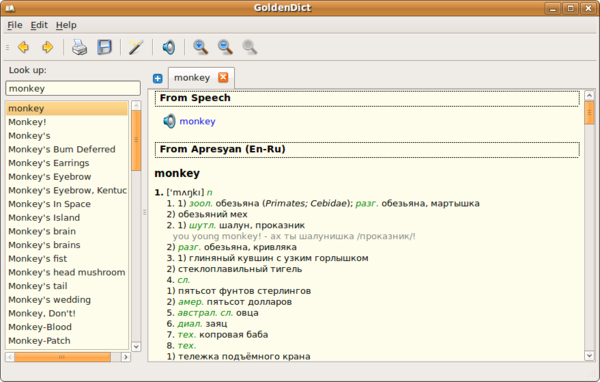 GoldenDict
Getting GoldenDict up and running on Linux is not particularly difficult. Download the latest tar.bz2 archive, unpack it, and run the goldendict-bin executable (or use the goldendic.sh script). The project's Web site also provides an excellent English-Russian dictionary, so if you are learning Russian or just need a good Russian dictionary, you might want to grab it as well. To install the dictionary (or any dictionary in one of the supported formats for that matter), choose Edit -> Dictionaries, switch to the Files section, and add the path to the directory containing dictionary files. Press OK, and GoldenDict processes and adds the dictionary. Besides the described feature set, GoldenDict sports two other rather nice touches. The main interface supports tabs, so you have several articles opened at the same time. And the Save article command lets you save the currently viewed article as an HTML file.
No matter whether you are on the market for a good dictionary application or you are looking for a research tool, you should take GoldenDict for a spin. Chances are it becomes an essential tool in your arsenal.
Comments
comments powered by DisqusSubscribe to our Linux Newsletters
Find Linux and Open Source Jobs
Subscribe to our ADMIN Newsletters
Digital Autonomy
• How the Fediverse Found Parts for Its Platforms
• The Answer Was Already on the Shelf
• Changing the Chip Industry: How Public Investment Has Grown Open Silicon
• United Nations Open Source Portal Goes Live
• EU Open Source Strategy Plays Key Role in Tech Sovereignty Package
• France Says “Au Revoir” to Microsoft
Support Our Work
Linux Magazine content is made possible with support from readers like you. Please consider contributing when you’ve found an article to be beneficial.

News
-
Bottlenecks Discovered by Meta Engineers Lead to Scalability Improvements
Thanks to a small group of engineers at Meta, the Linux kernel module kernfs has been improved, which has led to some serious gains.
-
PwnEscape Poses VM Vulnerability
A guest-to-host escape flaw in Linux KVM, named PwnEscape, might be yet another means of attacking Linux.
-
Linux Mint 27 Set for a Christmas Release
The developers behind Linux Mint have announced a Christmas release, and it looks like Santa's sack will be brimming with features.
-
Is Linus Torvalds Vibe Coding?
The creator of Linux has added AI into his process for Linux kernel development, and it's more than just for debugging.
-
openKylin 3.0 Released with Expanded AI Integration
The latest release features a pre-installed AI agent to help perform tasks.
-
DigitalOcean Ends Open Source Credits Program
In a change that has surprised many open source developers, DigitalOcean has decided to sunset its Open Source Credits Program.
-
Office 365 Available for Testing on Linux via Bottles
Linux users can now test the official Office 365, thanks to Mirko Brombin's work on Bottles.
-
Dutch Government Turns to Open Source for Digital Sovereignty
Following in the footsteps of other European countries, the Netherlands is looking to increase its sovereign digital infrastructure with open source software.
-
Linux May Soon Work on Snapdragon X2-Based PCs
If you're thinking about buying a Snapdragon X2-based desktop or laptop, Linux may soon be an option.
-
KDE for People Initiative Calls for AI Ban in Plasma
A new community of KDE wants the project to adopt a strict no-AI policy for KDE Plasma.
Goldendict and Artha
Actually this is an error - Artha is an excellent wordsmith tool (great for writing) but it's a Thesaurus, great for finding words (tabs include: Synonyms, Derivatives, Similar, Kinds, Part of..., Parts)
Artha is an incredible application - I'd dearly love to see it merged - it does indeed feature a dictionary of it's own and should be installed as default on any and every device - but Goldendict needs to go alongside (unless you have the skill to begin a project merging the two...).
Best of the Bests
GoldenDict is defenitely the best dictionary application
P.S
I dont know how come startdict is in competition. Stardict sucks. what is the point in pushing unnecessary info in which what we look for goes unnoticed? stardict is not at all a good application.
Best Dictionary for Linux
It supports .bgl and other dic file extensions that you usually must convert them to use them on other dicts.
Its well made( really !!!), easy to use and i never experienced a crash on it.
Very nice
Well, worth checking out!
thanks for the tip.
--Ted
Offline capable?
A Great Dictionary App for KDE4