


Installing Firefox on Puppy Linux

Productivity Sauce
SeaMonkey, the default browser in Puppy Linux, is good, but what if you prefer Firefox? No problem, it takes only a few simple steps to install your favorite browser onto Puppy Linux.
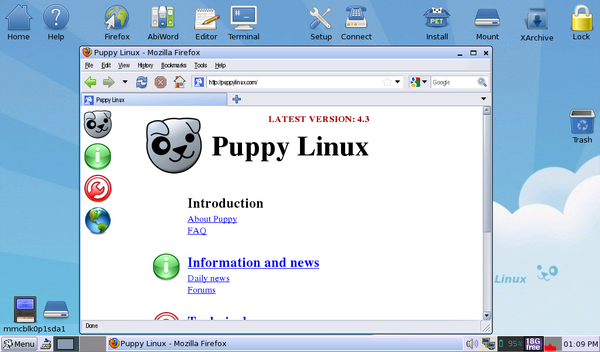
Download the latest version of Firefox from Mozilla's Web site. Use then the following command to unpack the downloaded archive into the root directory:
tar -jxvf firefox-x.x.x.tar.bz2
Launch then the Rxvt terminal and run the firefox command. Instead of launching Firefox from the command line, you can create a desktop shortcut. To do this, drag the firefox script in the firefox directory onto the desktop. To change the generic script icon, right-click on the shortcut, and choose File -> Set Icon. Drop then the desired icon onto the dialog window (you can find a large collection of ready-to-use icons in the /usr/local/lib/X11/pixmaps directory). That's all there is to it.
Comments
comments powered by DisqusSubscribe to our Linux Newsletters
Find Linux and Open Source Jobs
Subscribe to our ADMIN Newsletters
Digital Autonomy
• The Answer Was Already on the Shelf
• Changing the Chip Industry: How Public Investment Has Grown Open Silicon
• United Nations Open Source Portal Goes Live
• EU Open Source Strategy Plays Key Role in Tech Sovereignty Package
• France Says “Au Revoir” to Microsoft
Support Our Work
Linux Magazine content is made possible with support from readers like you. Please consider contributing when you’ve found an article to be beneficial.

News
-
Dutch Government Turns to Open Source for Digital Sovereignty
Following in the footsteps of European countries, the Netherlands is looking to increase its sovereign digital infrastructure with open source software.
-
Linux May Soon Work on Snapdragon X2-Based PCs
If you're thinking about buying a Snapdragon X2-based desktop or laptop, Linux may soon be an option.
-
KDE for People Initiative Calls for AI Ban in Plasma
A new community of KDE wants the project to adopt a strict no-AI policy for KDE Plasma.
-
KDE Sets Ambitious Goals for 2026 and Beyond
KDE Connect reveals the goals for the Linux desktop darling, with one of those goals long overdue.
-
It’s Time to Test Fedora 45 Beta
Fedora 45 beta has been released with updated Gnome, KDE Plasma, and kernel.
-
Ubuntu Stonking Stingray Gets Even Rustier
Ubuntu 26.10 has completed its migration to the Rust-based coreutils.
-
AI Fixes Linux Bottlenecks Using “Hideous” Code
A Linux developer used AI to fix bottlenecks that caused problems when building the kernel. The resulting AI-generated code needed a lot of work.
-
Advanced Video Coding Still Under Patent
Brazilian patent BRPI0109962B1 has expired, which means that DivX and Xvid are no longer problematic for Linux, but it doesn’t mean that video is all of a sudden fully unleashed.
-
2,000 Vulnerabilities per Linux Release
Thanks to AI bug hunters, the Linux kernel is seeing record numbers of vulnerabilities, and it's overwhelming developers.
-
Linux Exempt from California’s Age Verification Law
So long as Linux is distributed under the GPL, MIT, BSD, and Apache licenses, the OS is exempt from being required to verify the age of its users in California.
installing ffx on linux
I don't like people with an attitude like u sit wherever u r, get something fully furnished and only get surprises for the rest of your life.
Its for those people who want to get started in programming if they are really interested in it.
I had worked with a dos os [win xp, vista, 7] and came to a conclusion that its pure eye candy and your world just revolves within windows. Just because of eye candy and increased graphic options, they have more game programmers attracted towards them.
To the guys who like to workin in windows - Linux brings u forward the to the real world and programming. Linux is developed by non-profit organizations unlike Microsoft[where the pure intention is profit]. U must try and appreciate their work and respect them unlike cursing them for any of their mistakes.
If u fail to do so, I'd say - just bug us off.
I appreciate the work done by the article writer for taking a part of his valuable time for writing this article and I surely encourage you to continue doing so to help the ones who are beginning to explore Puppy Linux.
And I do appreciate the work done by the Community in successfully creating a functional website to help the needy.
email: wakingbavani@gmail.com
firefox install
just a small point that you would think that the would look at... but no.
what a complete and utter shambels it all this linux stuff is...
another thing is, when you expect people to enter a code, you should at least make it legible. A bunch of squiggles and other crap is displayed and you expect someone to enter some sort of code ?
What a completwe and utter joke, you guys are insane.
installing Firefox
''run this, rename that, move something else and then scratch your arse...''
Linux will ALWAYS be nothing because you cannot get it into your head that
all this command line stuff is BOLLOX.
You just live in a little world of your own with bits here and switches there... getting nowhere.
The rest of the world finds a file and clicks install. and (surprise, surprise) it is done...
The other joke was when I look for ''instructions'' to get a shortcut on the desktop....
Well I just fell about laughing at the ''get this file, edit this instruction... move it somewhere else...''
WHAT A COMPLETE AND UTTER JOKE LINUX IS
SymLink
PET Packages
missing libraries