


Knoppix 6.0: Perfect Distro (also for Netbooks)

Productivity Sauce
Knoppix has always been regarded as one of the most versatile Linux distros out there, but the latest version of the venerable Live CD Linux distribution has got yet another trick up its sleeve. Thanks to its excellent hardware detection, blazingly fast boot process, and the lightweight LXDE desktop environment, Knoppix 6.0 makes a perfect distro for netbooks. In fact, it supports all hardware on ASUS Eee PC 701 and 900 as well as Acer Aspire One right out of the box, including the wireless card. That's right, you don't have to fiddle with ndiswrapper or install a custom kernel in order to make your wireless card work. Knoppix 6.0 also detects the graphics card correctly, chooses the proper screen resolution, and enables Compiz Fusion 3D desktop effects. Even with 3D desktop effects enabled, the system feels very snappy.
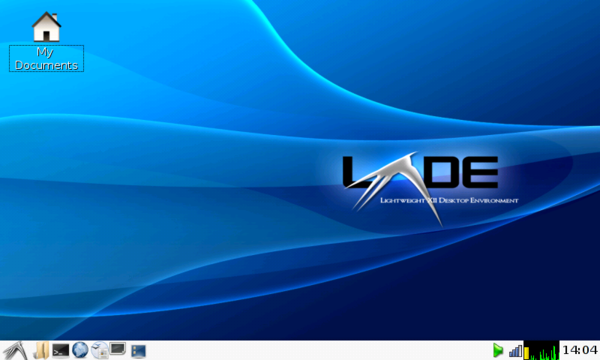
Compared to previous versions of Knoppix, the new release has lost a lot of weight in terms of bundled software. However, all the essential productivity applications are still there, including the OpenOffice.org 3.0 productivity suite, the Iceweasel Web browser (which is essentially rebranded Firefox), the Icedove (aka Thunderbird) email client, the Pidgin IM application, and the GIMP image editor. The Sun Java Runtime Environment is installed by default, so all OpenOffice.org applications are fully functional. Iceweasel doesn't include the Adobe Flash Player plugin, but installing it is a matter of executing the sudo apt-get install flash-nonfree command. Knoppix 6.0 features the flash-knoppix tool (LXDE -> System Tools -> Install KNOPPIX to flash disk) which allows you to install Knoppix on a USB stick. This is a boon for users who want to use Knoppix without installing it on the netbook. Better yet, Knoppix allows you to reserve some space on the stick for saving your preferences and configuration settings. Knoppix also includes a utility that can help you to set up a GPRS or UMTS connection (LXDE -> System Tools -> GPRS/UMTS connection), which can come in particularly handy when you are using your netbook on the move. There is also a handy hard disk installer (LXDE -> System Tools -> KNOPPIX HD Install) which walks you through the process of installing Knoppix on your netbook.
All in all, even though the latest version of Knoppix isn't designed specifically for netbooks, its netbook hardware support is excellent and the system runs smoothly even on the original ASUS Eee PC 701. The distro comes with key applications which can help you to stay productive when you are out and about. So if you are looking for a replacement for the distro that comes with your netbook, or you want to try something different, Knoppix 6.0 is definitely worth a closer look.
Comments
comments powered by DisqusSubscribe to our Linux Newsletters
Find Linux and Open Source Jobs
Subscribe to our ADMIN Newsletters
Support Our Work
Linux Magazine content is made possible with support from readers like you. Please consider contributing when you’ve found an article to be beneficial.

News
-
Linux Foundation Report Indicates AI Driving Tech Hiring
Within growing security and skills gaps, AI has been found to be a positive driving force behind tech hiring trends in Europe.
-
United Nations Open Source Portal Goes Live
A new open source portal seeks to coordinate and scale open source efforts across the United Nations system.
-
KDE Linux Drops AUR
KDE Linux developers have dropped the Arch User Repository from the build pipeline due to security concerns; other distributions should consider doing the same.
-
California May Exempt Linux from Its Age-Verification Law
After backlash from the Linux community, California may be backing off on its promise to force all operating systems to verify age, but one platform may still have to comply.
-
Another Logic Bug Found in Linux Kernel
Qualys has discovered a vulnerability in the Linux kernel that can be used to elevate standard user privileges.
-
Ubuntu Core 26 Offers Game-Changing Enterprise Features
Ubuntu Core 26 could be a game-changer for organizations looking for increased security and reliability.
-
AI Flooding the Linux Kernel Security Mailing List
AI is giving Linus Torvalds a headache, but not in the way you might think.
-
Top Priorities for Open Source Pros Seeking a New Job
Professional fulfillment tops the list, according to LPI report.
-
Container-Based Fedora Hummingbird Designed for Agent-First Builders
Fedora Hummingbird brings the same approach to the host OS as it does to containers to level up security.
-
Linux kernel Developers Considering a Kill Switch
With the rise of Linux vulnerabilities, the kernel developers are now considering adding a component that could help temporarily mitigate against them… in the form of a kill switch.
booting from flash drive
I could see that you don't have an option to boot from flash drive since your BIOS doesn't support it. There is a way to get around this.
You can install something called "Plop boot manager" into your PC. You can google for it to get more information.
You can also watch a video demo here.
http://www.youtube.com/watch?v=N51B0gi-g0U
Thanks,
Balaji.
In reply to MaximB
RE: LinuxNewbie Sep 09, 2009 1:55pm GMT
a little late but hopefully this helps you
Knoppix 6.0 installation on hard disk on laptop
many thx for Your help
brgds Sulejman
MaximB reply
According to synaptic, there is 29,420 packages to choose from (everything under the sun). Add "deb http://ftp.us.debian.org/debian lenny main" to your /etc/apt/sources.list. Use this mirror or another of the many debian mirrors.
My computer's bios doesn't allow booting from flash so I have a problem because knoppix 6.01 doesn't have persistent storage except on flash or hard drive. I store a little script on my hard drive or flash that I run that copies the source.list file, recovers the updated package lists at /var/lib/apt/lists, stores those settings if updated, copies any debs from /var/cache/apt/archives after installing programs, installs most used debs, sets aumix the sound mixer, sets up firefox with a profile that I like, sets up wallpapers and wallpaper screensaver, and a cleanup which runs apt-get clean to clean out those debs after having them copied to my working directory either on my flash or hard drive. It does this very fast, like a normal boot. I like the setup because very easily I can have exactly the installation that I prefer. Even programs like d4x (nt) that have to be run to setup their config files, my script runs the program, kills the program, and then copies the config files that I prefer to /etc. The other reason I like Knoppix is that it bypasses the sysvinit files by using the /etc/inittab file to run /etc/init.d/knoppix-autoconfig. I like to know what's going on, here is one file that runs the whole show. Another reason I like knoppix 6.01 cd is there is plenty of room 1024 MB to play with. I can install all the programs I want and my script stores the debs in either a master deb location or a directory by itself. I install in seperate directories and then if its something I want to keep and is only 1 or 2 debs I put in the main deb directory. Anything in the main deb directory gets loaded with a quick change in script. I never have to worry about getting a messed up system by installing. One neat trick that I learned is if you have the debs in the archive and you have no internet connection you can still install using sudo apt-get --ignore-missing --no-download install packagename. Of course my usual method is to cd "$WORKDIR"\deb and then deb -i package.deb. Anyway, I have 4 different distros on my computer but all I use is knoppix. It's fun to use and its solid.
Until I can afford a newer computer, If anyone out there knows a way to use a special CD to start a flash drive for knoppix, let me know. Knoppix installs the flash drive but my bios does not boot flash drives.
Knoppix 6
Where's the compiler
But, it does load fast, and it's pretty cool otherwise.
knoppix 6.0 on eee 700 and 900
Knoppix 6. Really unbelievable
In reply to 'darkstar'
Knoppix 6 lxde
Come to think of it only one distro that you can see on distrowatch did get it right..!!
Why can't the rest get it right too..?
What's so exotic about this type of screen..?? Not much I would guess.
The only one to get it right was Mandriva 2009 Gnome.
Cheers all you penguins.
Knoppix on Eee PC
Re: Knoppix6
Knoppix6
The latest Knoppix6 failed to recognize my Video Card on Optiplex 755 PC which was very disappointing.
But luckily it has a non-gui recovery tools which helped me a lot.
The Total-Commander clone was very useful in recovering my files but I wouldn't use this distro other then for recovery purposes as one of the major thing about distro is packages.
Debian/Ubuntu/CentOS/Fedora/SuSe are very popular therefore they also have tons of packages.
Knoppix on the other hand doesn't have as much packages as some other distro's.
I am not saying this distro isn't good, I'm just saying that this distro was built for recovery purposes and good at it.
Also if you want a distro for a netbook I suggest easypeasy which was built for Asus and Acer netbooks.