


StrongVPN on Ubuntu: Simple VPN Solution That Works

Productivity Sauce
Ask any knowledgeable mobile user, and they will tell you that the best way to securely access the Internet in public places is through a VPN (virtual private network) connection. So if you enjoy sipping coffee at a local cafe while checking email and browsing the Web, a secure VPN connection is a good solution to protect the data traveling to and from your machine. Although you can go the DIY way and set up your own VPN server, using a dedicated VPN service provider would save you a lot of work and time. There are a few reputable VPN service providers out there, but for my money, StrongVPN is the best of the bunch. It offers reliable service and excellent support at competitive prices. I'm not affiliated with StrongVPN in any way, but I've been using their VPN solution for almost a year, and it has been a smooth ride so far.
To make your Ubuntu machine play nicely with StrongVPN, you have to configure a VPN connection using Gnome Network Manager. But before you can do that, you have to install the network-manager-pptp package which enables support for the PPTP protocol used by StrongVPN. To do this, run the following command in the terminal:
sudo apt-get install network-manager-pptp
Now click on the Network Manager icon in the top panel (this will display a list of available network interfaces and wireless networks) and choose VPN Connections -> Configure VPN. Press the Add button, select the Point-to-Point Tunneling Protocol (PPTP) from the Connection Type drop-down list and press Create. Give the new VPN connection a name and fill out the Gateway, Username, and Password fields. Press the Advanced button and tick the Use Point-to-point encryption (MPPE) check box. Press OK and then Apply to save the settings and close the configuration window.
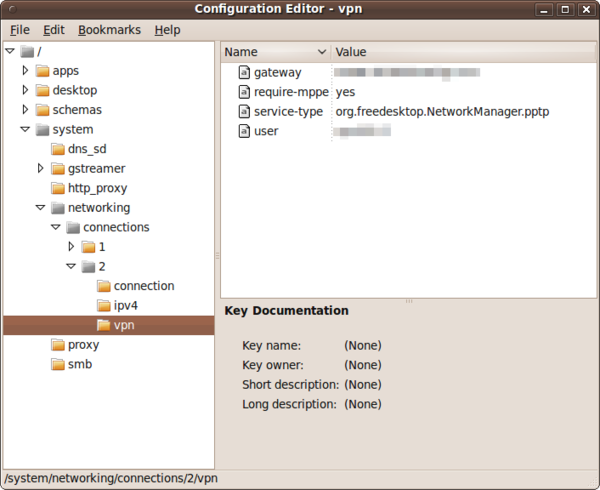
Before you can use the created connection, there is one more thing you have to do. In the terminal, run the gconf-editor command to launch the Gnome configuration editor. Navigate to system -> networking -> connections and select the vpn item. Right-click somewhere in the right pane and select New Key. Configure the new key as follows:
Name: refuse-eap
Type: String
Value: yes
Press OK and close the editor. Reboot the machine and your VPN connection is ready to go. By the way, the described technique works not only with StrongVPN, but also with any PPTP-based VPN providers.
Comments
comments powered by DisqusSubscribe to our Linux Newsletters
Find Linux and Open Source Jobs
Subscribe to our ADMIN Newsletters
Digital Autonomy
• How the Fediverse Found Parts for Its Platforms
• The Answer Was Already on the Shelf
• Changing the Chip Industry: How Public Investment Has Grown Open Silicon
• United Nations Open Source Portal Goes Live
• EU Open Source Strategy Plays Key Role in Tech Sovereignty Package
• France Says “Au Revoir” to Microsoft
Support Our Work
Linux Magazine content is made possible with support from readers like you. Please consider contributing when you’ve found an article to be beneficial.

News
-
Office 365 Available for Testing on Linux via Bottles
Linux users can now test the official Office 365, thanks to Mirko Brombin's work on Bottles.
-
Dutch Government Turns to Open Source for Digital Sovereignty
Following in the footsteps of other European countries, the Netherlands is looking to increase its sovereign digital infrastructure with open source software.
-
Linux May Soon Work on Snapdragon X2-Based PCs
If you're thinking about buying a Snapdragon X2-based desktop or laptop, Linux may soon be an option.
-
KDE for People Initiative Calls for AI Ban in Plasma
A new community of KDE wants the project to adopt a strict no-AI policy for KDE Plasma.
-
KDE Sets Ambitious Goals for 2026 and Beyond
KDE Connect reveals the goals for the Linux desktop darling, with one of those goals long overdue.
-
It’s Time to Test Fedora 45 Beta
Fedora 45 beta has been released with updated Gnome, KDE Plasma, and kernel.
-
Ubuntu Stonking Stingray Gets Even Rustier
Ubuntu 26.10 has completed its migration to the Rust-based coreutils.
-
AI Fixes Linux Bottlenecks Using “Hideous” Code
A Linux developer used AI to fix bottlenecks that caused problems when building the kernel. The resulting AI-generated code needed a lot of work.
-
Advanced Video Coding Still Under Patent
Brazilian patent BRPI0109962B1 has expired, which means that DivX and Xvid are no longer problematic for Linux, but it doesn’t mean that video is all of a sudden fully unleashed.
-
2,000 Vulnerabilities per Linux Release
Thanks to AI bug hunters, the Linux kernel is seeing record numbers of vulnerabilities, and it's overwhelming developers.
VPN
http://www.sunvpn.com/
AplusVPN on Internet
I heard that they are also going to offer PPTP VPN service for iPad, iPhone, iPod, and Android VPN connections.
Would highly recommend trying www.aplusvpn.com
comment
VPN Providers List
Nice artcile !!!
To complet the article, I can say just that you can Find a VPN Providers List and Consumers Reviews on
http://www.start-vpn.com/
Appreciate the StrongVPN review
Definitely put this on my short list of top VPN providers to try. http://besthubris.com/entre...ecurity-vpn-internet-services/
Thanks again for the info.
WG Hubris
besthubris.com
VPN
Thanks
Viola from http://www.mp3hounddog.com
Mad
cp /root/resolv.conf_B /etc/resolv.conf # _B has the vpn's own dns servers...
cd /etc/openvpn # where the .ovpn file and its stuff reside.
openvpn --config myconf.ovpn # launch old and reliable openvpn
And thats all.. it works (Just dont kill it and it will be... working nicely)
Again shell beats 'icons'...
Enjoy
PPTP is FAIL
http://en.wikipedia.org/wik...nt-to-Point_Tunneling_Protocol
Why its not a good product
What is most unfortunate is that almost all of the open-source related journalism is oblivious of this fact and is promoting GNOME as the face of the linux desktop. In a mad rush to get to joe-average's desktop, a lot has been compromised, IMHO. The fear is, if and when it does reach its target audience, there will be nothing to differentiate it from the incumbents, with the exception of a 'brown' theme .....
She -> They
Cerebral-palsy-school-of-cinematography comes to blogging
You should probably try to find some more substantial way of increasing our awareness and raising our consciousness; this way just makes it easy to ignore the very real and hurtful consequences of gender-bias by presenting the matter as an easy target for (fully justified) mockery.
He? She? There's already a perfectly acceptable word for gender-based neutrality:
I *hate* Grammar Nazi discussion over whether he/she. If it's wrong (2+2=5), fine, gripe. If it's a confusing or misleading mistake ("We're at war!" vs "We're NOT at war!"
If you're going to debate lexicon, at least provide some references, then we can debate over whether their authority.
Sheesh!
they: often used with an indefinite third person singular antecedent
http://www.merriam-webster.com/dictionary/they
he: used in a generic sense or when the sex of the person is unspecified
http://www.merriam-webster.com/dictionary/he%5B1%5D
Grammar Nazi: Someone who believes it's their duty to attempt to correct any grammar and/or spelling mistakes they observe.
http://www.urbandictionary....define.php?term=Grammar%20Nazi
PS -- you want a gender neutral word: Mailman, Chairman, Flagman? Try IT, let's "generalize" everything and BE DONE with it. "Watch out! Don't run over the flag-it!"
Gender-neutral language: linguistic prescriptivism that aims at minimizing assumptions regarding the gender of human referents.
http://en.wikipedia.org/wiki/Gender-neutral_language
Gender and pronouns
P.S. about the actual content of the article, is pptp + mpe encryption really that secure? I was always under the impression that it isn't that secure, hence the reason things like ipsec were preferred? Can anyone comment about just how secure pptp + mpe really is?
English
little typo at the top where you have put 'she' not 'he'.
In English 'he' is used until the gender of the person(s) is known.