


Artha: A GUI for WordNet

Productivity Sauce
Although WordNet comes with a graphical browser, it can only be described as bare-bones. The browser doesn't offer any kind of desktop integration, and there is no support for color coding, rich text formatting, or hyperlinking. But thanks to Artha, you don't have to put up with these limitations. This nifty little dictionary tool wraps the WordNet database into a user-friendly interface and offers a few neat features that can help you to make the most of WordNet.
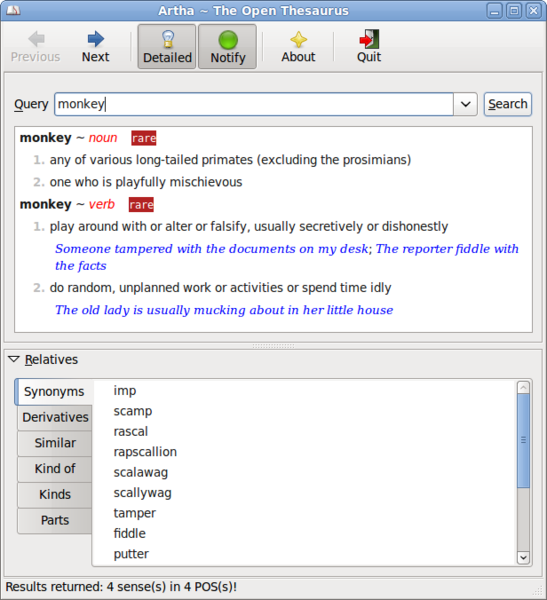
If you've ever used a dictionary application, you won't have problems figuring out how to use Artha. Enter a search term into the Query field, hit the Search button, and the matching article appears in the pane below. The Relatives section lists the related entries for the specific word, including synonyms, derivatives, similar words, etc. These entries are grouped into tabs, which makes it easier for you to view and manage the available data. Each entry in the Relatives section acts as a hyperlink, so you can use Artha as a sort of dictionary browser. For example, when viewing the "monkey" article you can look up the word "rascal" by double-clicking on it in the Synonyms tab of the Relatives section. Similar to a regular browser, Artha sports Back and Forward buttons which you can use to navigate through articles.
In addition to the conventional search, Artha supports fuzzy searches using regular expressions such as wild cards, jokers, ranges, and limits. For example, if you want to find all articles that start with "monkey", you can use the * wild card, for example: monkey*. This returns a list of matching articles which include monkey -bread tree, monkey-wrench, monkey business, etc.
Artha also comes with a few simple but useful creature comforts. If you enter a misspelled word into the Query field, Artha offers you a list of possible spelling suggestions. You can look up a word in Artha from within any application using the Ctrl+Alt+W keyboard shortcut which evokes Artha's window containing the matching article. Alternatively, you can enable the notification feature by pressing the Notify button in Artha's main toolbar. This way, Artha displays the definition of the currently selected word as a discrete notification bubble.
Comments
comments powered by DisqusSubscribe to our Linux Newsletters
Find Linux and Open Source Jobs
Subscribe to our ADMIN Newsletters
Support Our Work
Linux Magazine content is made possible with support from readers like you. Please consider contributing when you’ve found an article to be beneficial.

News
-
Container-Based Fedora Hummingbird Designed for Agent-First Builders
Fedora Hummingbird brings the same approach to the host OS as it does to containers to level up security.
-
Linux kernel Developers Considering a Kill Switch
With the rise of Linux vulnerabilities, the kernel developers are now considering adding a component that could help temporarily mitigate against them… in the form of a kill switch.
-
Fedora 44 Now Gaming Ready
The latest version of Fedora has been released with gaming support.
-
Manjaro 26.1 Preview Unveils New Features
The latest Manjaro 26.1 preview has been released with new desktop versions, a new kernel, and more.
-
Microsoft Issues Warning About Linux Vulnerability
The company behind Windows has released information about a flaw that affects millions of Linux systems.
-
Is AI Coming to Your Ubuntu Desktop?
According to the VP of Engineering at Canonical, AI could soon be added to the Ubuntu desktop distribution.
-
Framework Laptop 13 Pro Competes with the Best
Framework has released what might be considered the MacBook of Linux devices.
-
The Latest CachyOS Features Supercharged Kernel
The latest release of CachyOS brings with it an enhanced version of the latest Linux kernel.
-
Kernel 7.0 Is a Bit More Rusty
Linux kernel 7.0 has been released for general availability, with Rust finally getting its due.
-
France Says "Au Revoir" to Microsoft
In a move that should surprise no one, France announced plans to reduce its reliance on US technology, and Microsoft Windows is the first to get the boot.
KDE 4.3 Issue Fixed
Editing the query field
Any suggestions?
I'm running Artha 0.9.1 on KDE4.3 / Opensuse 11.2
Artha is great