


Do Python Coding with NINJA-IDE

Productivity Sauce
I'm not a programmer, but when I need to cobble together a Python script, I find a dedicated IDE (integrated development environment) a better tool for the job than a regular text editor. After I've tried several existing IDEs, I settled for a relatively new software called NINJA-IDE, which stands for Ninja-IDE Is Not Just Another IDE.
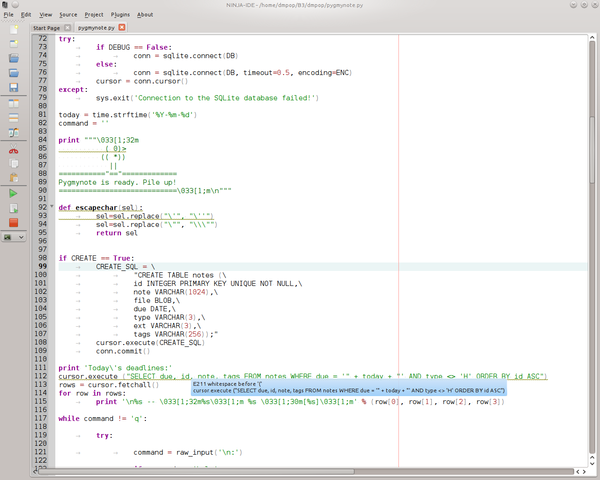
For starters, NINJA-IDE allows you to work with single scripts as well as manage complex projects consisting of multiple files and libraries. As you would expect, NINJA-IDE features a number of creature comforts that make coding more efficient. This includes code completion and syntax coloring as well as error warnings. The latter is a rather clever feature which detects and highlights common formatting problems like excessive or missing white spaces, incorrect indentation, long lines, etc. Hover the mouse over a highlighted code, and you will see a pop-up with a brief description of the problem. NINJA-IDE comes with an embedded Python console, so you can run and troubleshoot your scripts from within the application. The main window can be split in two, so you can work with two files side-by-side. NINJA-IDE also sports a so-called Follow Mode, which lets you view the same file in two panes and scroll them simultaneously. Finally, NINJA-IDE's default functionality can be extended with plugins. The current version of the IDE comes with only three plugins -- including the one that allows you to post code to Pastebin -- but expect this to change as the application matures. All in all, NINJA-IDE is a rather likable IDE for casual coders and serious programmers alike.
Comments
comments powered by DisqusSubscribe to our Linux Newsletters
Find Linux and Open Source Jobs
Subscribe to our ADMIN Newsletters
Digital Autonomy
• The Answer Was Already on the Shelf
• Changing the Chip Industry: How Public Investment Has Grown Open Silicon
• United Nations Open Source Portal Goes Live
• EU Open Source Strategy Plays Key Role in Tech Sovereignty Package
• France Says “Au Revoir” to Microsoft
Support Our Work
Linux Magazine content is made possible with support from readers like you. Please consider contributing when you’ve found an article to be beneficial.

News
-
Dutch Government Turns to Open Source for Digital Sovereignty
Following in the footsteps of European countries, the Netherlands is looking to increase its sovereign digital infrastructure with open source software.
-
Linux May Soon Work on Snapdragon X2-Based PCs
If you're thinking about buying a Snapdragon X2-based desktop or laptop, Linux may soon be an option.
-
KDE for People Initiative Calls for AI Ban in Plasma
A new community of KDE wants the project to adopt a strict no-AI policy for KDE Plasma.
-
KDE Sets Ambitious Goals for 2026 and Beyond
KDE Connect reveals the goals for the Linux desktop darling, with one of those goals long overdue.
-
It’s Time to Test Fedora 45 Beta
Fedora 45 beta has been released with updated Gnome, KDE Plasma, and kernel.
-
Ubuntu Stonking Stingray Gets Even Rustier
Ubuntu 26.10 has completed its migration to the Rust-based coreutils.
-
AI Fixes Linux Bottlenecks Using “Hideous” Code
A Linux developer used AI to fix bottlenecks that caused problems when building the kernel. The resulting AI-generated code needed a lot of work.
-
Advanced Video Coding Still Under Patent
Brazilian patent BRPI0109962B1 has expired, which means that DivX and Xvid are no longer problematic for Linux, but it doesn’t mean that video is all of a sudden fully unleashed.
-
2,000 Vulnerabilities per Linux Release
Thanks to AI bug hunters, the Linux kernel is seeing record numbers of vulnerabilities, and it's overwhelming developers.
-
Linux Exempt from California’s Age Verification Law
So long as Linux is distributed under the GPL, MIT, BSD, and Apache licenses, the OS is exempt from being required to verify the age of its users in California.
About NINJA-IDE 2.0
Thanks for the review of NINJA-IDE!
About Zenettii comment, I would like to add that we are actually working in NINJA-IDE 2.0, and all of this things have been fixed.
Also, the proper place to report an issue should be this: http://code.google.com/p/ninja-ide/issues/list
We heard several times about the execution of a program with inputs via console, and now that is fixed and you can try it out in the new version 2.0 (UNDER DEVELOPMENT - You will need to grab the code from the repository). This version is going to be released in November, with a first Beta at September 23rd.
We have an IRC channel too, for any problem that the user has: #ninja-ide (at Freenode)
All of this information is listed in: http://code.google.com/p/ninja-ide/
Also I would like to share some of the new features that we have for NINJA-IDE 2.0, you can read about them here:
http://www.diegosarmentero....adelantos-de-ninja-ide-20.html (SPANISH)
But I can tell you that we've added several awesome features, that do python coding faster and more efficient. Also we have improved the plugins support.
You can check all about this features that has been added in the Release Notes: http://code.google.com/p/ninja-ide/wiki/ReleaseNotes
Regards!
Ninja-IDE
Ninja has sat on 1.1 for some time now, and anyone who has used Ninja for more than a day will have come across the really annoying issue of not being able to always run their code. I believe it's code that requires user input, the integrated console just sits there with a spinning loading sign and offers no input from the user at all, meaning the intepreter just looks like it's stuck in a loop forever.
Very frustrating. The team coding it offered no feedback when I raised this bug in their very frustrating google group which is the worth possible way to handle issues.
Potential was/is high, but so far the team are failing to get there. I understand 2.x will be a re-write?
Lets hope this one will work.