


Five Nifty Ubiquity Scripts

Productivity Sauce
The default Ubiquity commands make this Firefox extension one of the niftiest tools around, and the 15 Ubiquity Commands to Enhance Your Web Experience post on the Tools for Thought blog can help you to get the most out of the available commands. While the default commands allow you to perform quite a few actions, the extensible and open nature of Ubiquity means that you can easily expand its functionality by installing additional scripts that add new commands. There are dozens of Ubiquity scripts floating on the Web, but here are a few that you might find particularly useful.
Bit.ly is a relatively new URL shortening service which sports some useful features such as history, automatic Web site thumbnail creation, and click tracking. You can use Bit.ly with Ubiquity to shorten the currently selected URL courtesy of the Bit.ly Ubiquity script.
If you use the ingenious TiddlyWiki one-file wiki, you will appreciate the TiddlyWiki Ubiquity script. Using the script, you can create a new tiddler (the tw-new command), search TiddlyWiki (the tw-search command), and open TiddlyWiki (the tw-open command).
The Jetable Ubiquity script lets you use the Jetable anti-spam service without leaving the convenience of your browser. Using the scripts you can create a temporary email address that expires after a specified period of time. Use the jetable command followed by your real email address and the expiration time, and the script returns a temporary email address that links to the real one.
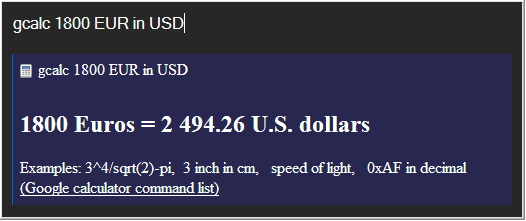
You probably know that Google's search engine contains a simple yet flexible calculator. Type, for example, 100 EUR in USD in Google's search field, and the engine performs currency conversion. The Google Guide provides a detailed overview of the available Google Calculator commands, and using the Gcalc Ubiquity script you can perform all the available operations from the command line.
The World Clock Ubiquity script does exactly what its name says: type time command followed by the desired location, and the script shows the time in the specified city along with the flag of the country.
You can find even more Ubiquity scripts at the project's wiki and at the Herd page.
If the script you need doesn't exist, you can easily create it yourself. In fact, you don't even have to create a script from scratch: you can simply tweak one of the existing Ubiquity scripts. For example, to create a Ubiquity script that allows me to look up a word in WordNet, I just tweaked the Dictionary script by Lukasz Tyrala, so it looks like this:
CmdUtils.CreateCommand({

name: "wn",

homepage: "http://writertools.googlecode.com",

author: { name: "Dmitri Popov", email: "writertools@gmail.com"},

license: "MPL",

description: "Look up definitions in the WordNet dictionary.",

  takes: {"word to look up": noun_arb_text},

  icon: "http://wordnet.princeton.edu/favicon.ico",

  preview:  function( pblock, theChecked ) {

    pblock.innerHTML = "Word to look up: " + theChecked.text + "";

    },

  execute: function( wordToCheck ) {

    var url = "http://wordnet.princeton.edu/perl/webwn?s={QUERY}";

    var urlString = url.replace("{QUERY}", wordToCheck.text);

    Utils.openUrlInBrowser(urlString);

    }

})
To use the created script, you can either paste in the Command Editor (to open it, point your browser to chrome://ubiquity/content/editor.html) or embed the script in a Web page, so others can subscribe to it. To do the latter, save the script as a wn.js file and add the following line to the Web page (make sure that the path to the wn.js file is correct):
<link rel="commands" href="wn.js" type="text/javascript" name="Ubliquity WordNet Command" />comments powered by Disqus
Subscribe to our Linux Newsletters
Find Linux and Open Source Jobs
Subscribe to our ADMIN Newsletters
Digital Autonomy
• How the Fediverse Found Parts for Its Platforms
• The Answer Was Already on the Shelf
• Changing the Chip Industry: How Public Investment Has Grown Open Silicon
• United Nations Open Source Portal Goes Live
• EU Open Source Strategy Plays Key Role in Tech Sovereignty Package
• France Says “Au Revoir” to Microsoft
Support Our Work
Linux Magazine content is made possible with support from readers like you. Please consider contributing when you’ve found an article to be beneficial.

News
-
Bottlenecks Discovered by Meta Engineers Lead to Scalability Improvements
Thanks to a small group of engineers at Meta, the Linux kernel module kernfs has been improved, which has led to some serious gains.
-
PwnEscape Poses VM Vulnerability
A guest-to-host escape flaw in Linux KVM, named PwnEscape, might be yet another means of attacking Linux.
-
Linux Mint 27 Set for a Christmas Release
The developers behind Linux Mint have announced a Christmas release, and it looks like Santa's sack will be brimming with features.
-
Is Linus Torvalds Vibe Coding?
The creator of Linux has added AI into his process for Linux kernel development, and it's more than just for debugging.
-
openKylin 3.0 Released with Expanded AI Integration
The latest release features a pre-installed AI agent to help perform tasks.
-
DigitalOcean Ends Open Source Credits Program
In a change that has surprised many open source developers, DigitalOcean has decided to sunset its Open Source Credits Program.
-
Office 365 Available for Testing on Linux via Bottles
Linux users can now test the official Office 365, thanks to Mirko Brombin's work on Bottles.
-
Dutch Government Turns to Open Source for Digital Sovereignty
Following in the footsteps of other European countries, the Netherlands is looking to increase its sovereign digital infrastructure with open source software.
-
Linux May Soon Work on Snapdragon X2-Based PCs
If you're thinking about buying a Snapdragon X2-based desktop or laptop, Linux may soon be an option.
-
KDE for People Initiative Calls for AI Ban in Plasma
A new community of KDE wants the project to adopt a strict no-AI policy for KDE Plasma.