


Hassle-free Backup with Déjà Dup

Productivity Sauce
The Déjà Dup backup utility may not be the most powerful or flexible backup tool out there, but it does have its advantages. Its straightforward interface makes it dead-easy to configure backups, while the support for the Amazon S3 storage back-end is a boon for users looking for unlimited backup storage on the cheap. In addition to that, Déjà Dup supports incremental backups, and it can encrypt and compress data during the backup operation. Besides Amazon S3, Déjà Dup supports other types of remote storage, including FTP, Windows shares, WebDAV, and SSH. And you can use Déjà Dup to perform scheduled backups.
To install Déjà Dup on Ubuntu, you have to add the project's repository first using the following command:
sudo apt-add-repository ppa:deja-dup-team/ppa
Use then the commands below to install Déjà Dup on your machine:
sudo apt-get update
sudo apt-get install deja-dup
Once Déjà Dup has been installed, launch it by choosing Applications | System Tools | Déjà Dup Backup Tool. Hit the Backup button to open a wizard which helps you to configure the backup.
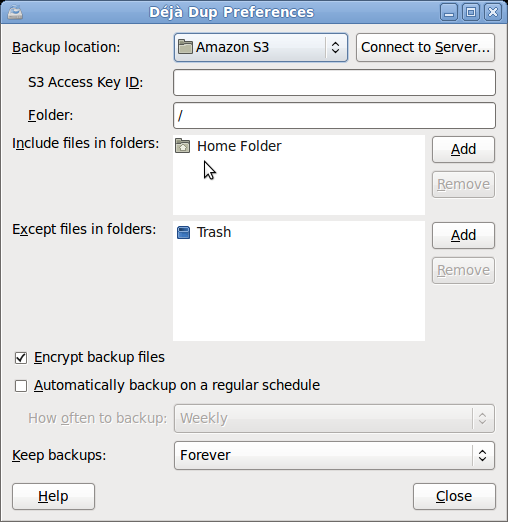
Most of the options in the wizard are self-explanatory, so you shouldn't have problems configuring the backup settings (you can edit them later by choosing Edit | Preferences). Once you've configured the backup settings, you can start using Déjà Dup. Since there are only two buttons -- Backup and Restore -- using Déjà Dup is as easy as it gets. Better yet, if you enabled the scheduled backup option, the utility will perform the backup operation automatically.
Comments
comments powered by DisqusSubscribe to our Linux Newsletters
Find Linux and Open Source Jobs
Subscribe to our ADMIN Newsletters
Digital Autonomy
• How the Fediverse Found Parts for Its Platforms
• The Answer Was Already on the Shelf
• Changing the Chip Industry: How Public Investment Has Grown Open Silicon
• United Nations Open Source Portal Goes Live
• EU Open Source Strategy Plays Key Role in Tech Sovereignty Package
• France Says “Au Revoir” to Microsoft
Support Our Work
Linux Magazine content is made possible with support from readers like you. Please consider contributing when you’ve found an article to be beneficial.

News
-
Office 365 Available for Testing on Linux via Bottles
Linux users can now test the official Office 365, thanks to Mirko Brombin's work on Bottles.
-
Dutch Government Turns to Open Source for Digital Sovereignty
Following in the footsteps of European countries, the Netherlands is looking to increase its sovereign digital infrastructure with open source software.
-
Linux May Soon Work on Snapdragon X2-Based PCs
If you're thinking about buying a Snapdragon X2-based desktop or laptop, Linux may soon be an option.
-
KDE for People Initiative Calls for AI Ban in Plasma
A new community of KDE wants the project to adopt a strict no-AI policy for KDE Plasma.
-
KDE Sets Ambitious Goals for 2026 and Beyond
KDE Connect reveals the goals for the Linux desktop darling, with one of those goals long overdue.
-
It’s Time to Test Fedora 45 Beta
Fedora 45 beta has been released with updated Gnome, KDE Plasma, and kernel.
-
Ubuntu Stonking Stingray Gets Even Rustier
Ubuntu 26.10 has completed its migration to the Rust-based coreutils.
-
AI Fixes Linux Bottlenecks Using “Hideous” Code
A Linux developer used AI to fix bottlenecks that caused problems when building the kernel. The resulting AI-generated code needed a lot of work.
-
Advanced Video Coding Still Under Patent
Brazilian patent BRPI0109962B1 has expired, which means that DivX and Xvid are no longer problematic for Linux, but it doesn’t mean that video is all of a sudden fully unleashed.
-
2,000 Vulnerabilities per Linux Release
Thanks to AI bug hunters, the Linux kernel is seeing record numbers of vulnerabilities, and it's overwhelming developers.
Missing capability
easy backup script
yes it works on windows if you install cygwin and install rsync, too.
#!/bin/bash
backup=/media/backup/ # change this to reflect your backup drive.
home=/home/neal/ # change this to reflect your home directory.
if [ -d "$backup" ]
then
/usr/bin/rsync -vaxE --delete --ignore-errors "$home" "$backup"
else
echo "Mount backup drive!"
fi
# end script
Read man rsync to find out what those flags do. Basically, it copies the files and permissions, skips files that have not changed and deletes files that no longer exist in your home directory and continues if there are errors. If you need to retrieve something, mount the drive and find the file you need and copy it back.
Deja-dup looks nice, but what if ... ?
Will you lose the password, and therefore all of the encrypted backups elsewhere ?
Making backups of your own home directory onto some other media seems still needed for this.
Cutting Out Other Distributions
I guess the developers may welcome some help from someone who may offer to package for other systems.
Cutting Out Other Distributions
Fedora 13 and deja-dup
Looks good so far
It is a bit disheartening, though, when good projects limit themselves to only Ubuntu packages. There are as many desktop systems based on rpm out there as their are Ubuntu and tremendously more servers. This isn't a "distro war flame" thing as I am distro/package agnostic, myself. It is simply an issue of common sense. Why cut out 50% or more of your potential market? If I were able I'd take a shot at making a spec file for this. I might still try, though my spec skills are woefully inadequate, I fear.
Joe