


Instant Photo Sharing with Min.us

Productivity Sauce
Photo sharing services are a dime a dozen these days, but Min.us stands out from the crowd for two reasons. Firstly, it makes the process of sharing photos ridiculously simple. Secondly, it offers software for the Linux desktop and the Android platform, so you can share photos directly from your machine or mobile device.
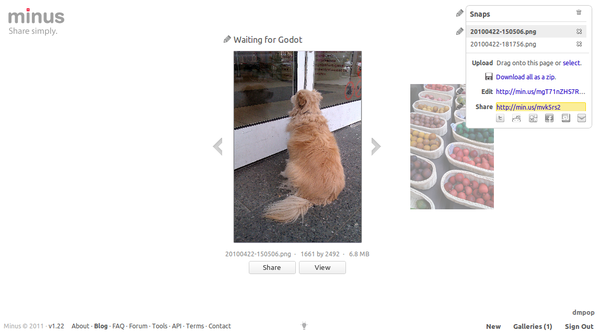
Sharing photos using Min.us is a one-step procedure. Point your browser to http://min.us and drag the photos you want to share onto the Web page. This automatically creates a new gallery and uploads the selected photos to it. That's all there is to it. Minus generates short URLs for each photo and the entire gallery which you can share via Twitter or Facebook.
If you want to upload photos to Minus without switching to the browser, you can use a simple Linux desktop applet. When you launch the applet on your desktop, it places an icon in the system tray. Drag the photos you want to upload onto the icon,and the applet takes care of the rest. Once the photos have been uploaded, you can see their short links in the applet's main window. The Min.us service also provides an Android app, so you can share mobile snaps taken with your Android device. The app lets you take a photo and share it with Min.us as well as share any existing photos stored on your device.
comments powered by DisqusSubscribe to our Linux Newsletters
Find Linux and Open Source Jobs
Subscribe to our ADMIN Newsletters
Support Our Work
Linux Magazine content is made possible with support from readers like you. Please consider contributing when you’ve found an article to be beneficial.

News
-
Two New Distros Adopt Enlightenment
MX Moksha and AV Linux 25 join ranks with Bodhi Linux and embrace the Enlightenment desktop.
-
Solus Linux 4.8 Removes Python 2
Solus Linux 4.8 has been released with the latest Linux kernel, updated desktops, and a key removal.
-
Zorin OS 18 Hits over a Million Downloads
If you doubt Linux isn't gaining popularity, you only have to look at Zorin OS's download numbers.
-
TUXEDO Computers Scraps Snapdragon X1E-Based Laptop
Due to issues with a Snapdragon CPU, TUXEDO Computers has cancelled its plans to release a laptop based on this elite hardware.
-
Debian Unleashes Debian Libre Live
Debian Libre Live keeps your machine free of proprietary software.
-
Valve Announces Pending Release of Steam Machine
Shout it to the heavens: Steam Machine, powered by Linux, is set to arrive in 2026.
-
Happy Birthday, ADMIN Magazine!
ADMIN is celebrating its 15th anniversary with issue #90.
-
Another Linux Malware Discovered
Russian hackers use Hyper-V to hide malware within Linux virtual machines.
-
TUXEDO Computers Announces a New InfinityBook
TUXEDO Computers is at it again with a new InfinityBook that will meet your professional and gaming needs.
-
SUSE Dives into the Agentic AI Pool
SUSE becomes the first open source company to adopt agentic AI with SUSE Enterprise Linux 16.