


Practice the Pomodoro Technique with Tomighty

Productivity Sauce
Devised by Francesco Cirillo in the late 1980s, the pomodoro technique gathered many followers. The popularity of this time management method lies in its simplicity: work on a single task for 25 minutes and then take a 5-minute break. After four 25-minute sessions, take a 15-minute break. Not exactly rocket science.
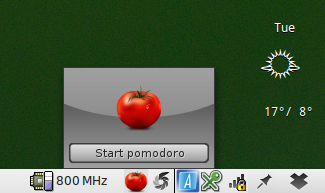
The only thing you need to practice the pomodoro way of working is a timer. You can use a kitchen timer, or you can opt for a more high-tech tool like Tomighty. Similar to an analog timer, Tomighty is not a particularly sophisticated tool. Once activated, it sits in the system tray counting down time. When the time is up, it displays a notification. You can modify the default time periods as well as change default sounds, or disable them altogether. Tomighty is written in Java, which means that you need the Java Runtime environment installed on your machine to make the utility work. Tomighty is distributed as a single .jar file, so there is nothing to install. Make the file executable, then double-click on it to launch Tomighty.
Comments
comments powered by DisqusSubscribe to our Linux Newsletters
Find Linux and Open Source Jobs
Subscribe to our ADMIN Newsletters
Digital Autonomy
• The Answer Was Already on the Shelf
• Changing the Chip Industry: How Public Investment Has Grown Open Silicon
• United Nations Open Source Portal Goes Live
• EU Open Source Strategy Plays Key Role in Tech Sovereignty Package
• France Says “Au Revoir” to Microsoft
Support Our Work
Linux Magazine content is made possible with support from readers like you. Please consider contributing when you’ve found an article to be beneficial.

News
-
The Bullet-Proof KDE Software Initiative Is Coming
KDE, Techpaladin, and Kubuntu Focus have announced a new initiative that will provide at least three years of support for KDE Plasma 6.6 LTS and related software.
-
Linux Mint Shares a Possible Kernel Cleanup Solution
For those on Linux Mint who like to keep multiple kernels around but don't want them to take up too much space, you might be getting a new automated tool.
-
CachyOS Gets an Update
CachyOS August 2026 release is now available with the latest version of KDE, some new features, and plenty of improvements.
-
The Linux Kernel Dev Staging Area Now Rejects AI-Generated Patches
Unless a kernel patch is a valid security fix, it will be rejected if it was created using AI.
-
Linux Surpasses Double-Digit Market Share
According to two sources, the Linux operating system has hit a major milestone in market share that naysayers thought would never happen.
-
AI Helped Develop a Linux Exploit
A use-after-free race exploit was discovered and exploited on CentOS Stream 9.
-
Yet Another Linux Kernel Vulnerability Discovered
Affecting millions of systems, a kernel flaw discovered by Qualys could allow users to gain root privileges.
-
Ubuntu 26.10 to Include Ubuntu Certified Hardware Check
If you've ever wondered if your laptop or PC is officially certified to run Ubuntu, that curiosity will soon be met.
-
Substantial Update to IPFire Now Available
The lastest version of IPFire features a fundamental change to how the system handles DNS.
-
Gnome Working on Test Center App to Make Testing Easier
It's now possible to test experimental features on the Gnome desktop without worrying that you'll break things.
ORKANIZER
I'll wait your feedback! thank you.
Growl Script
For example, you could run it like this: ./timer.rb 25 &
#!/opt/local/bin/ruby
minutes = ARGV[0]
if minutes.nil?
minutes = 10
else
minutes = minutes.to_i
end
seconds = minutes * 60
while true
counter = 0
while counter < seconds
sleep 1
counter += 1
end
`/usr/local/bin/growlnotify -m "Time's up!"`
end