


Scribble Notes with SimpleText

Productivity Sauce
Here is a genuinely useful Web-based application -- SimpleText. It is, indeed, a rather simple online note-taking application that is positively light on features. It doesn't offer any fancy text formatting tools, and you won't find any advanced sharing capabilities in it either. So what's so "genuinely useful" about it, then? Again, it's simplicity. I find it particularly useful for drafting articles and blog posts. It allows me to quickly jot down ideas, save useful links and text snippets without much fuss. Since I spend most of my time in Firefox, SimpleText is only a tab away, and I don't have to launch OpenOffice.org Writer or switch to another application.
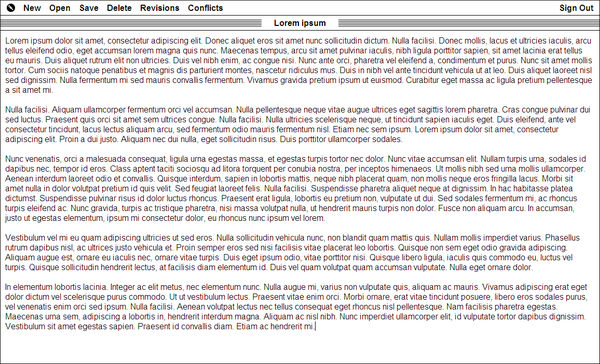
To start using SimpleText, you don't even need to create a separate account: if you already have an account with Google, you can use your Google credentials to log into SimpleText. Despite it's simplicity, SimpleText offers two neat features: Revisions and Conflicts. The former lets you revert the file to any previous version, while the latter checks for conflicts (useful when you are editing the same note on several machines). SimpleText is open source and you can run it on your own server or using the Google App Engine platform.
comments powered by DisqusSubscribe to our Linux Newsletters
Find Linux and Open Source Jobs
Subscribe to our ADMIN Newsletters
Digital Autonomy
• How the Fediverse Found Parts for Its Platforms
• The Answer Was Already on the Shelf
• Changing the Chip Industry: How Public Investment Has Grown Open Silicon
• United Nations Open Source Portal Goes Live
• EU Open Source Strategy Plays Key Role in Tech Sovereignty Package
• France Says “Au Revoir” to Microsoft
Support Our Work
Linux Magazine content is made possible with support from readers like you. Please consider contributing when you’ve found an article to be beneficial.

News
-
Is Linus Torvalds Vibe Coding?
The creator of Linux has added AI into his process for Linux kernel development, and it's more than just for debugging.
-
openKylin 3.0 Released with Expanded AI Integration
The latest release features a pre-installed AI agent to help perform tasks.
-
DigitalOcean Ends Open Source Credits Program
In a change that has surprised many open source developers, DigitalOcean has decided to sunset its Open Source Credits Program.
-
Office 365 Available for Testing on Linux via Bottles
Linux users can now test the official Office 365, thanks to Mirko Brombin's work on Bottles.
-
Dutch Government Turns to Open Source for Digital Sovereignty
Following in the footsteps of other European countries, the Netherlands is looking to increase its sovereign digital infrastructure with open source software.
-
Linux May Soon Work on Snapdragon X2-Based PCs
If you're thinking about buying a Snapdragon X2-based desktop or laptop, Linux may soon be an option.
-
KDE for People Initiative Calls for AI Ban in Plasma
A new community of KDE wants the project to adopt a strict no-AI policy for KDE Plasma.
-
KDE Sets Ambitious Goals for 2026 and Beyond
KDE Connect reveals the goals for the Linux desktop darling, with one of those goals long overdue.
-
It’s Time to Test Fedora 45 Beta
Fedora 45 beta has been released with updated Gnome, KDE Plasma, and kernel.
-
Ubuntu Stonking Stingray Gets Even Rustier
Ubuntu 26.10 has completed its migration to the Rust-based coreutils.