


Searching Inside Documents with DocFetcher

Productivity Sauce
There are plenty of tools that you can use to find a specific file or document by its name on your local hard disk or remote share. But what if you need to find a document containing a word or text fragment? Enter DocFetcher, a graphical desktop search application that can search inside documents. It supports a wide range of popular document formats, including Microsoft Office, HTML, PDF, RTF, plain text, and OpenOffice.org. If you are running Ubuntu, you can install DocFetcher using its .deb package. For other Linux distributions, you can download an archived version of the application, unpack it, and launch DocFetcher using the DocFetcher.sh script.
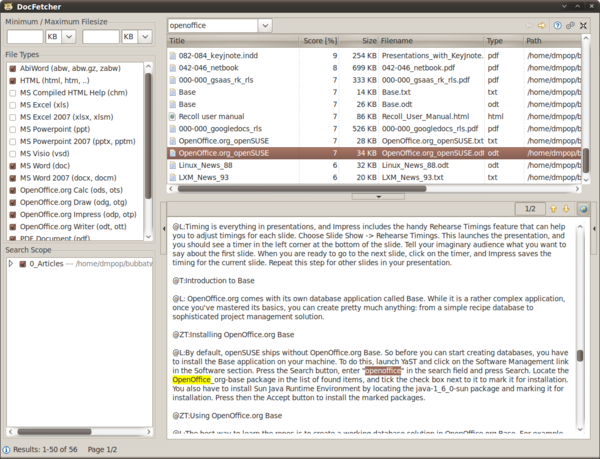
Before you can put DocFetcher to use, you have to index the directory containing documents. To do this, right-click on the Search Scope pane and choose Create Index. Select the desired directory, and wait till DocFetcher finishes the indexing operation. You can then search through the indexed documents by specifying the search term you want in the Search field and pressing Enter. DocFetcher returns a list of matching documents sorted by relevance. Select the document you want, and you can see its content with highlighted occurrences of the search string in the Preview pane. Use the Next and Previous buttons to quickly jump to the previous or next occurrence of the search string. Besides simple searches, you can use a variety of supported parameters. For example, to include or exclude a search term you can use the plus (+) and minus (-) operators. You can also use wild cards and limit searches to specific file extensions.
comments powered by DisqusSubscribe to our Linux Newsletters
Find Linux and Open Source Jobs
Subscribe to our ADMIN Newsletters
Digital Autonomy
• How the Fediverse Found Parts for Its Platforms
• The Answer Was Already on the Shelf
• Changing the Chip Industry: How Public Investment Has Grown Open Silicon
• United Nations Open Source Portal Goes Live
• EU Open Source Strategy Plays Key Role in Tech Sovereignty Package
• France Says “Au Revoir” to Microsoft
Support Our Work
Linux Magazine content is made possible with support from readers like you. Please consider contributing when you’ve found an article to be beneficial.

News
-
Bottlenecks Discovered by Meta Engineers Lead to Scalability Improvements
Thanks to a small group of engineers at Meta, the Linux kernel module kernfs has been improved, which has led to some serious gains.
-
PwnEscape Poses VM Vulnerability
A guest-to-host escape flaw in Linux KVM, named PwnEscape, might be yet another means of attacking Linux.
-
Linux Mint 27 Set for a Christmas Release
The developers behind Linux Mint have announced a Christmas release, and it looks like Santa's sack will be brimming with features.
-
Is Linus Torvalds Vibe Coding?
The creator of Linux has added AI into his process for Linux kernel development, and it's more than just for debugging.
-
openKylin 3.0 Released with Expanded AI Integration
The latest release features a pre-installed AI agent to help perform tasks.
-
DigitalOcean Ends Open Source Credits Program
In a change that has surprised many open source developers, DigitalOcean has decided to sunset its Open Source Credits Program.
-
Office 365 Available for Testing on Linux via Bottles
Linux users can now test the official Office 365, thanks to Mirko Brombin's work on Bottles.
-
Dutch Government Turns to Open Source for Digital Sovereignty
Following in the footsteps of other European countries, the Netherlands is looking to increase its sovereign digital infrastructure with open source software.
-
Linux May Soon Work on Snapdragon X2-Based PCs
If you're thinking about buying a Snapdragon X2-based desktop or laptop, Linux may soon be an option.
-
KDE for People Initiative Calls for AI Ban in Plasma
A new community of KDE wants the project to adopt a strict no-AI policy for KDE Plasma.