


Translate Text Snippets with ASTranslator

Productivity Sauce
Google Translate is a really handy service for translating text fragments, but wouldn't it be nice if you could access it directly from your desktop? If the idea makes sense to you, then you'll appreciate the ASTranslator utility. Although the project's Web site is in Russian, the application's interface is in English, so you can use ASTranslator even if your Russian is a bit rusty. To install ASTranslator, add the project's PPA archive to your sources list. To do this, launch Synaptic and choose Settings -> Repositories -> Other Software. Press the Add button, and enter the following APT line:
ppa:samrog131/ppa
Press Add Source, then Close to save the settings, and hit the Reload button. Locate and install the astranslator package. You can then launch the utility by selecting it from the Applications -> Accessories menu.
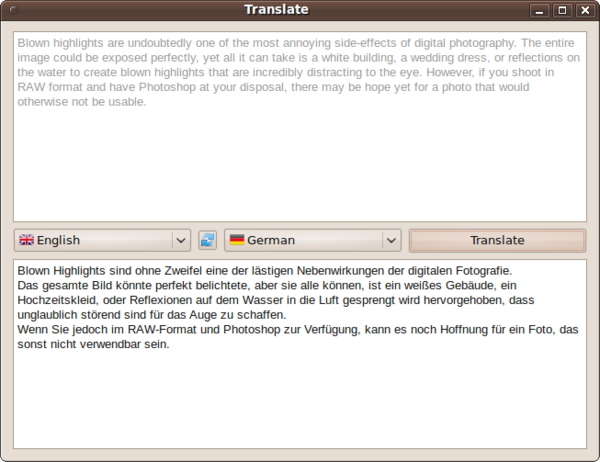
Using ASTranslator is as easy as it gets. Enter the source text snippet into the upper pane, select the desired language pair, and press the Translate button. Being a bare-bones tool, ASTranslator is not very customizable, but you can specify a font and font size as well as proxy server settings in the Options dialog window. To open it, click on the ASTranslator icon in the system tray and select Settings.
comments powered by DisqusSubscribe to our Linux Newsletters
Find Linux and Open Source Jobs
Subscribe to our ADMIN Newsletters
Support Our Work
Linux Magazine content is made possible with support from readers like you. Please consider contributing when you’ve found an article to be beneficial.

News
-
AUR Hit Again with Malicious Packages
Once again the Arch User Repository is plagued by a high volume of malicious packages.
-
Alpine Linux 3.24 Features Fresh Desktops and a Newer Kernel
If you're a fan of Alpine Linux, it's time to upgrade because the latest version has been released with KDE Plasma 6.6, Gnome 50, and Linux kernel 6.18 LTS.
-
EU Open Source Strategy Plays Key Role in Tech Sovereignty Package
Comprehensive measures adopted by the European Commission aim to reduce dependency on non-EU countries.
-
Linux Foundation Report Indicates AI Driving Tech Hiring
Within growing security and skills gaps, AI has been found to be a positive driving force behind tech hiring trends in Europe.
-
United Nations Open Source Portal Goes Live
A new open source portal seeks to coordinate and scale open source efforts across the United Nations system.
-
KDE Linux Drops AUR
KDE Linux developers have dropped the Arch User Repository from the build pipeline due to security concerns; other distributions should consider doing the same.
-
California May Exempt Linux from Its Age-Verification Law
After backlash from the Linux community, California may be backing off on its promise to force all operating systems to verify age, but one platform may still have to comply.
-
Another Logic Bug Found in Linux Kernel
Qualys has discovered a vulnerability in the Linux kernel that can be used to elevate standard user privileges.
-
Ubuntu Core 26 Offers Game-Changing Enterprise Features
Ubuntu Core 26 could be a game-changer for organizations looking for increased security and reliability.
-
AI Flooding the Linux Kernel Security Mailing List
AI is giving Linus Torvalds a headache, but not in the way you might think.