


co-ment: Document Collaboration and Annotation Tool

Productivity Sauce
Google Docs is maybe the king among Web-based collaborative editing and document sharing applications, but the productivity suite from the all-mighty giant is not the only fish in the sea. An open source Web-based solution, co-ment provides an efficient document collaboration environment which offers everything you need to edit, annotate, and share documents. co-ment is not just a mere Web-based word processor, though. While you can use co-ment as a no-frills Web-based word processor, it's designed for easy and efficient document annotation.
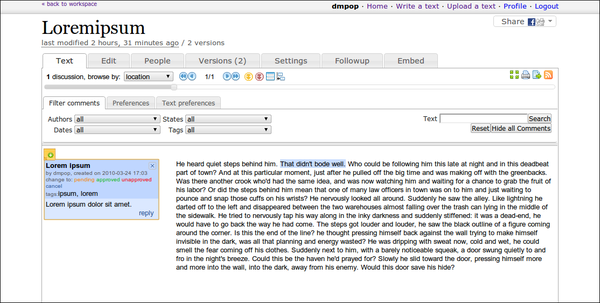
You can create documents from scratch in co-ment, or you can import existing documents. co-ment uses OpenOffice.org as its conversion back-end, so you can upload documents in virtually any format supported by the productivity suite. co-ment supports three different markup systems for formatting your documents: markdown, RST, and HTML. However, you don't have to apply formatting manually, as co-ment's editor sports a graphical toolbar which gives you quick access to all essential formatting options. co-ment also features version tracking functionality; every time you save the document, the system automatically creates a separate version of the document, and you can revert the document to a previous version at any time.
When it comes to annotating, co-ment really shines. In the view mode, users can add an annotation to any part of the text. Each annotation appears as a note to the left of the document. Users can assign multiple tags to each note, and you, as the document owner, can change the note's status (Pending, Approved, Unapproved, and Cancel). Any user can attach a reply to a note, so notes can be used as threaded conversations. co-ment provides filtering options which can help you to quickly locate specific notes, and you can use the navigation buttons to jump between the notes. These features can come in handy when you have to deal with dozens and even hundreds of annotations in a single document.
Using co-ment's user management capabilities, you can invite new users and specify their roles. And, when needed, you can export the final document (with or without the annotations) in the HTML, PDF, or ODT formats.
The hosted version of co-ment is not free. But if you want to try the service, you can either use the older or lite version of co-ment. Alternatively, you can download co-ment and install it on your own machine. The latest development release of the software is available at http://www.co-ment.org/.
Comments
comments powered by DisqusSubscribe to our Linux Newsletters
Find Linux and Open Source Jobs
Subscribe to our ADMIN Newsletters
Digital Autonomy
• How the Fediverse Found Parts for Its Platforms
• The Answer Was Already on the Shelf
• Changing the Chip Industry: How Public Investment Has Grown Open Silicon
• United Nations Open Source Portal Goes Live
• EU Open Source Strategy Plays Key Role in Tech Sovereignty Package
• France Says “Au Revoir” to Microsoft
Support Our Work
Linux Magazine content is made possible with support from readers like you. Please consider contributing when you’ve found an article to be beneficial.

News
-
PwnEscape Poses VM Vulnerability
A guest-to-host escape flaw in Linux KVM, named PwnEscape, might be yet another means of attacking Linux.
-
Linux Mint 27 Set for a Christmas Release
The developers behind Linux Mint have announced a Christmas release, and it looks like Santa's sack will be brimming with features.
-
Is Linus Torvalds Vibe Coding?
The creator of Linux has added AI into his process for Linux kernel development, and it's more than just for debugging.
-
openKylin 3.0 Released with Expanded AI Integration
The latest release features a pre-installed AI agent to help perform tasks.
-
DigitalOcean Ends Open Source Credits Program
In a change that has surprised many open source developers, DigitalOcean has decided to sunset its Open Source Credits Program.
-
Office 365 Available for Testing on Linux via Bottles
Linux users can now test the official Office 365, thanks to Mirko Brombin's work on Bottles.
-
Dutch Government Turns to Open Source for Digital Sovereignty
Following in the footsteps of other European countries, the Netherlands is looking to increase its sovereign digital infrastructure with open source software.
-
Linux May Soon Work on Snapdragon X2-Based PCs
If you're thinking about buying a Snapdragon X2-based desktop or laptop, Linux may soon be an option.
-
KDE for People Initiative Calls for AI Ban in Plasma
A new community of KDE wants the project to adopt a strict no-AI policy for KDE Plasma.
-
KDE Sets Ambitious Goals for 2026 and Beyond
KDE Connect reveals the goals for the Linux desktop darling, with one of those goals long overdue.
Pandoc (not OpenOffice.org)
co-ment 2 uses Pandoc markdown (not OpenOffice.org) as its pivot format.