


Automate your color correction with a Perl script
Nicely Out of Focus
Before a script can reliably identify the three areas at the center of the image, you need to make some preparations. Figure 2 clearly shows how much the graph fluctuates, and this is obviously going to make it difficult to identify the somewhat flatter areas. Thus, the cardfind detection script (Listing 2) needs to run a blur filter that uses the "Gaussian Blur" method with a radius of 10 to defocus the image (lines 15ff.).
In an out-of-focus image (see Figure 3), the color transitions between individual pixels are less abrupt. Instead of jumping directly from a white to black pixel, an out-of-focus image will show a transition with several gray scale values. The graph shown in Figure 4, which represents the pixel values on the same horizontal line, is far smoother as a result of this, and also simplifies the task of identifying the three areas to be identified.
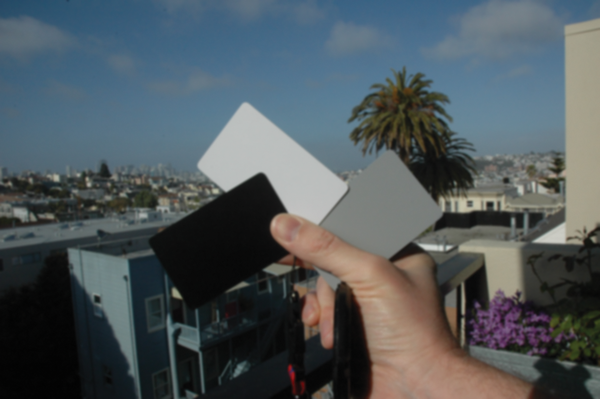 Figure 3: Setting the blur filter to "Gaussian Blur" with a radius of 10 pixels defocuses the image and smoothes the pixel values.
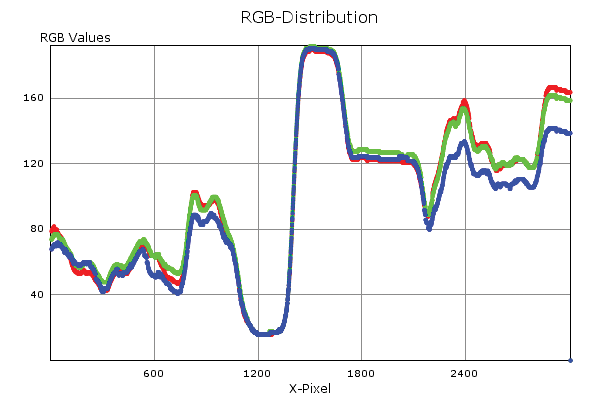 Figure 4: The image, defocused with the blur filter, has smoother graphs, making it easier to identify the flat spots caused by the three cards.
Listing 2
cardfind
Back to School?
In these card areas, the curve is fairly flat over a length of hundreds of pixels. If you remember your math from school, you might recall that the first derivative of a graph like this at flat spots is constant and about zero, whereas the values will be far higher and fluctuate significantly everywhere else.
Figure 5 shows the first derivative of intensity values, which are calculated by adding the pixel values for the red, green, and blue channels. The recorded values are indicative of the fluctuation of the original graph and drop to zero over quite considerable distances.
 Figure 5: The first derivative of the intensity graph tends toward zero for homogeneous sections of the image.
The cards, with their homogeneous gray scales, occupy these positions in the original image. Thus, the script just needs to follow this graph, create a ring buffer of about 50 investigated values, and alert when the buffer average drops to a value close to zero. When it does so, it has located a card.
Return to Search
When the buffer values start to fluctuate again, the script has left the card area and returns to the state "search for the next homogeneous location." The script should be able to find all three regions you are looking for and return the RGB values it finds there in YAML format. This lets the picfix script I discussed in last month's Perl column adjust the white balance of other images with the same light conditions.
« Previous 1 2 3 Next »
Buy this article as PDF
(incl. VAT)
Buy Linux Magazine


US / Canada
UK / Australia
Subscribe to our Linux Newsletters
Find Linux and Open Source Jobs
Subscribe to our ADMIN Newsletters
Support Our Work
Linux Magazine content is made possible with support from readers like you. Please consider contributing when you’ve found an article to be beneficial.

News
-
So Long Neofetch and Thanks for the Info
Today is a day that every Linux user who enjoys bragging about their system(s) will mourn, as Neofetch has come to an end.
-
Ubuntu 24.04 Comes with a “Flaw"
If you're thinking you might want to upgrade from your current Ubuntu release to the latest, there's something you might want to consider before doing so.
-
Canonical Releases Ubuntu 24.04
After a brief pause because of the XZ vulnerability, Ubuntu 24.04 is now available for install.
-
Linux Servers Targeted by Akira Ransomware
A group of bad actors who have already extorted $42 million have their sights set on the Linux platform.
-
TUXEDO Computers Unveils Linux Laptop Featuring AMD Ryzen CPU
This latest release is the first laptop to include the new CPU from Ryzen and Linux preinstalled.
-
XZ Gets the All-Clear
The back door xz vulnerability has been officially reverted for Fedora 40 and versions 38 and 39 were never affected.
-
Canonical Collaborates with Qualcomm on New Venture
This new joint effort is geared toward bringing Ubuntu and Ubuntu Core to Qualcomm-powered devices.
-
Kodi 21.0 Open-Source Entertainment Hub Released
After a year of development, the award-winning Kodi cross-platform, media center software is now available with many new additions and improvements.
-
Linux Usage Increases in Two Key Areas
If market share is your thing, you'll be happy to know that Linux is on the rise in two areas that, if they keep climbing, could have serious meaning for Linux's future.
-
Vulnerability Discovered in xz Libraries
An urgent alert for Fedora 40 has been posted and users should pay attention.