


Freeing Your Music Player with Rock

Musical Freedom

© Lead Image © digifuture, 123RF.com
Turn your music player into open hardware with Rockbox's free firmware.
If you have a large music collection or care about sound quality, just any mobile computing device won't do. However, while most music players support free-licensed formats like.flac, and a few even support.ogg, you won't find any that are sold with free-licensed firmware. That's where Rockbox [1]comes in. Rockbox is a project that develops free firmware, as well as an installer for adding the firmware to your music player. The process is the equivalent of rooting your phone, giving you complete control over a device. In effect, it creates a piece of open hardware where none existed before. Rockbox's small team of developers has been at work since 2001. Today, the project fully supports several dozen different models of music players, including Apple, Samsung, and SanDisk. Another dozen models are partially supported, and several others are in early development. However, if a music player is not listed as being supported on the project site's home page, check the forums. Sometimes, a model may be a repackaging of an earlier device. For example, while the SanDisk Clip Sport is not listed as supported, it turns out to be merely a rebranded SanDisk Clip Zip. As with any effort to replace firmware, the possibility exists that you could brick a device by installing Rockbox on it. The chance is slim, since Rockbox generally works by bypassing rather replacing a device's bootloader, and the installer includes an uninstaller that (at least in my limited experience) works perfectly well. All the same, disabling the music player remains a possibility. To avoid complete disasters, make sure that you have copies of all the files on a music player before you attempt to install Rockbox, and remember that you install at your own risk.
Downloading and Installing Rockbox
To install Rockbox, download the stable version for your music player model to your home directory. Uncompress the archived file, and the Rockbox utility is ready to use. You can also install manually using your music player's online manual [2], but, for most cases, the Rockbox utility is easier and quicker to use (Figure 1).
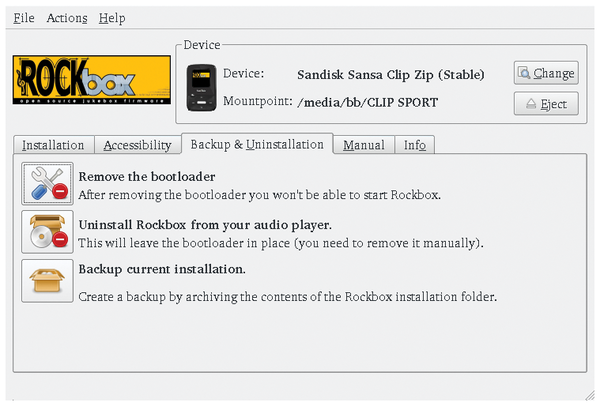 Figure 1: The Rockbox utility simplifies installing the free firmware.
[...]
Buy this article as PDF
(incl. VAT)
Buy Linux Magazine
Subscribe to our Linux Newsletters
Find Linux and Open Source Jobs
Subscribe to our ADMIN Newsletters
Support Our Work
Linux Magazine content is made possible with support from readers like you. Please consider contributing when you’ve found an article to be beneficial.

News
-
New Linux Flaw Lets Attackers Escape VMs
A 16-year-old vulnerability allows an attacker to escape a virtual machine, gain access to the host, and execute malicious code.
-
Hannah Montana Linux Is Back!
Developer Noah Cagle decided the world needed the once obscure but beloved Linux distribution and gave it a decidedly pink refresh.
-
System76 Refreshes the Lemur Laptop
If you're looking for a laptop with tons of power and battery, look no further than the latest iteration of the System76 Lemur Pro.
-
More than 43 Million Lines of Code in Linux Kernel 7.2
Using the cloc utility, Michael Larabel of Phoronix discovered that Linux kernel 7.2 has over 43 million lines of code.
-
Kubuntu Focus Goes Ultra
The Kubuntu Focus team has upped the performance ante of its M2 and Zr laptops with the latest, greatest CPUs from Intel.
-
Linux Gamers May Soon See Less Mouse Lag in KDE Plasma
Gamers using KDE’s Plasma desktop have been suffering from a slight input delay in mouse movement that could lead to getting fragged.
-
Three Lines of Code Improve Linux Storage Performance
A developer changed three lines of code, giving Linux storage performance a 5% bump.
-
AUR Hit Again with Malicious Packages
Once again the Arch User Repository is plagued by a high volume of malicious packages.
-
Alpine Linux 3.24 Features Fresh Desktops and a Newer Kernel
If you're a fan of Alpine Linux, it's time to upgrade because the latest version has been released with KDE Plasma 6.6, Gnome 50, and Linux kernel 6.18 LTS.
-
EU Open Source Strategy Plays Key Role in Tech Sovereignty Package
Comprehensive measures adopted by the European Commission aim to reduce dependency on non-EU countries.