


Baking Bits

Beagleblog
To build the Angstrom distribution from source you need to set up the Openembedded environment. With help from the build tool Bitbake it can cross compile software for many embedded targets on a host PC. You will find Bitbake in the repositories of many standard Linux distributions. However I had some problems with the tool shipped in Ubuntu 9.10 Karmic Koala, so I just downloaded the Bitbake source and installed it. Just download the package from the web site, unpack it and execute »python setup.py install« as root.
You can get the Openembedded environment from the Git repository. For this I created a directory called »OE« in my home directory:
cd
mkdir OE
cd OE
git clone git://git.openembedded.org/openembedded.git openembedded
Now you need to edit the configuration file that determines the target system and some other parameters. Simply copy the sample configuration and edit it.
mkdir -p build/conf
cp openembedded/conf/local.conf.sample build/conf/local.conf
I had to change the following variables in the configuration:
MACHINE = "beagleboard"
BBFILES := "/home/oliver/OE/openembedded/recipes/*/*.bb"
DISTRO = "angstrom-2008.1"
TMPDIR = /home/oliver/OE/tmp
Additionally you need to remove the last line in the file starting with »REMOVE_THIS_LINE«, otherwise the build process will fail.
One the documentation web page on Openembedded and Angstrom you will find a link to a small file called »source-me.txt« which sets the required environment variables for the build process. I only changed the variable that points to the Openembedded tree:
export OETREE=/home/oliver/OE
Make the changes effective by executing »source source-me.txt« in the Bash shell.
With all requirements fulfilled the build process starts with the command »bitbake base-image« which builds a minimal image. To build Angstrom with a graphical user interface you can use »bitbake x11-image«. The Bitbake tool will complain if there are still requirements missing. For instance I had to set the kernel variable »/proc/sys/vm/mmap_min_addr« and install some more tools on the Ubuntu host PC, among them »texinfo« for the »makeinfo« requirement.
When Angstrom starts to build you need some patience if you don't own a fast PC. On my home machine with and Athlon 2800+ and 1 GB of RAM it took several days, including sleeping breaks. You should install the Python Psyco extension to speed up the process at least a little bit. And be sure to build only the required locales by setting the appropriate variable in your »local.conf«:
GLIBC_GENERATE_LOCALES = "en_US.UTF-8 en_GB.UTF-8 de_DE.UTF-8"
When the build completes successfully you need to copy the distribution files and the bootloader to the SD card you are using for the Beagleboard file systems. In my case I had the root fs mounted on »/media/ALINUX« and the VFAT boot fs mounted on »/media/BOOT«:
tar xf ./tmp/deploy/glibc/images/beagleboard/console-image-beagleboard.tar -C /media/ALINUX
cp ./tmp/deploy/glibc/images/beagleboard/uImage-beagleboard.bin /media/BOOT/
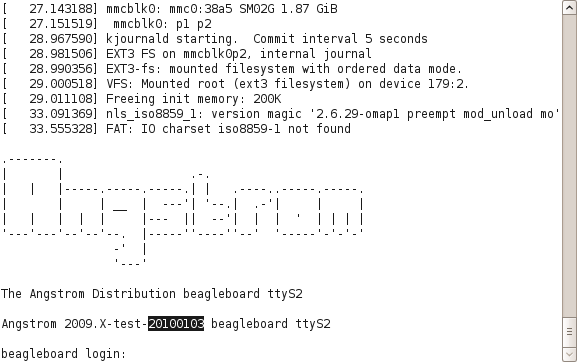
Plug the SD card back into the Beagleboard slot and happily boot your self-compiled Angstrom distribution:
Comments
comments powered by DisqusSubscribe to our Linux Newsletters
Find Linux and Open Source Jobs
Subscribe to our ADMIN Newsletters
Support Our Work
Linux Magazine content is made possible with support from readers like you. Please consider contributing when you’ve found an article to be beneficial.

News
-
Hannah Montana Linux Is Back!
Developer Noah Cagle decided the world needed the once obscure but beloved Linux distribution and gave it a decidedly pink refresh.
-
System76 Refreshes the Lemur Laptop
If you're looking for a laptop with tons of power and battery, look no further than the latest iteration of the System76 Lemur Pro.
-
More than 43 Million Lines of Code in Linux Kernel 7.2
Using the cloc utility, Michael Larabel of Phoronix discovered that Linux kernel 7.2 has over 43 million lines of code.
-
Kubuntu Focus Goes Ultra
The Kubuntu Focus team has upped the performance ante of its M2 and Zr laptops with the latest, greatest CPUs from Intel.
-
Linux Gamers May Soon See Less Mouse Lag in KDE Plasma
Gamers using KDE’s Plasma desktop have been suffering from a slight input delay in mouse movement that could lead to getting fragged.
-
Three Lines of Code Improve Linux Storage Performance
A developer changed three lines of code, giving Linux storage performance a 5% bump.
-
AUR Hit Again with Malicious Packages
Once again the Arch User Repository is plagued by a high volume of malicious packages.
-
Alpine Linux 3.24 Features Fresh Desktops and a Newer Kernel
If you're a fan of Alpine Linux, it's time to upgrade because the latest version has been released with KDE Plasma 6.6, Gnome 50, and Linux kernel 6.18 LTS.
-
EU Open Source Strategy Plays Key Role in Tech Sovereignty Package
Comprehensive measures adopted by the European Commission aim to reduce dependency on non-EU countries.
-
Linux Foundation Report Indicates AI Driving Tech Hiring
Within growing security and skills gaps, AI has been found to be a positive driving force behind tech hiring trends in Europe.
Thanks but why not Ubuntu?
I understand that Angstrom works out of the box with gui and such, but is there no possibility to get that functionality from the Karmic ARM port?
Thanks