


GNOME's new Font Manager

Off the Beat: Bruce Byfield's Blog
One key configuration tool that has been missing from GNOME for years is a font manager. In fact, years ago, I often installed KDE primarily so I would have a graphical font manager. In recent years, the situation has improved with applications like Fonty Python and Fontmatrix, but I'm always watching for new applications that will save the drudgery of manual installation and management. Font Manager is a relatively new effort, but, at 0.3 release, is already showing the promise of becoming one of the simplest font managers available.
Font Manager is available as source code, and in packages for Fedora 11 and Ubuntu 9.04. It is designed for GNOME, but works with both KDE and Xfce so long as PyGTK is installed and you are willing to do without some links to GNOME-specific utilities (see below).
Like other font managers for GNU/Linux, Font Manager traces its designs back to the ancient Adobe Type Manager for Windows. Since Windows loads all installed fonts into memory, and memory was often at a premium in the past, one of the main purposes of the Adobe Type manager was to allow designers to efficiently enable and disable typefaces so as not to overwhelm the available memory. Its main way of doing so was to allow users to arrange fonts in groups -- usually typefaces or the fonts used in a specific project.
To the best of my information, the X Window System simply accesses fonts as they are needed, rather than loading all of them permanently into memory (although I could be wrong). For this reason, GNU/Linux has less need for enabling and disabling fonts or arranging them in groups. At any rate, when two gigabytes of RAM are the norm, no one going to be very concerned about a few thousand kilobytes for font files -- even if the files include extended support for Unicode characters.
Still, there is something to be said about not cluttering your system with thousands of fonts, especially when you have to scroll through a combo box to select them. Besides, font managers have long since become an accepted tool of design work, so there is something to be said for giving designers what they expect.
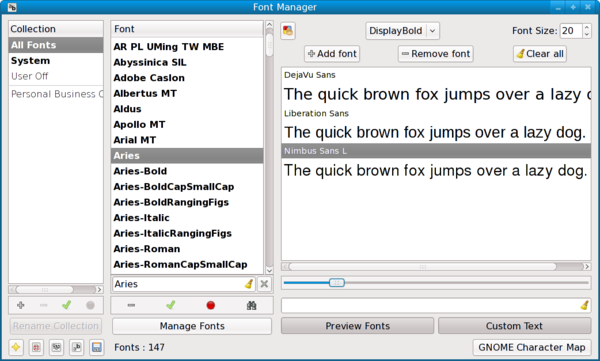
Although still in development, Font Manager organizes this practice effectively. In the left is a list of collections, including the two pre-defined collections, All Fonts and Systems at the top. Below the two pre-defined collections, users can remove, enable, or disable collections for themselves.
Alternatively, users can work with individual fonts in the middle pane. You might be confused momentarily by the fact that in neither the collection nor the font panes is there an incon for adding fonts -- but all you need to do is drop and drag fonts from an open file manager window. The font pane also includes a simple search utility comparable to the one in FireFox, that jumps to the first match of what you have typed.
Along the bottom are several icons for utilities. They include a well-illustrated and formatted Help, and a set of configuration options that include the path for Font-Manager's files and editing access to the application's database. Icons are also available for jumping to the font preferences for the GNOME desktop and to GNOME's Character Map.
However, the most useful auxilary feature in Font Manager is in the right pane of the window. From there, you can view a font selected in the middle pane at any size that you want, or compare several fonts together -- for instance, you might want to compare DejaVu Sans, Nimbus Sans, and Liberation Sans to decide which one to use in a document. The sample defaults to the old pangram (or sentence with all the letters of the alphabet), "The quick brown fox jumps over the lazy dog," but the pane includes a field for viewing your own text or numbers. At the top of the pane, you can set the exact characteristics of the displayed typefaces, while, at the bottom, you can change the size of the displayed letters with a slider bar.
The front page of the Font Manager web site promises more extras in upcoming releases, including the ability to print out sample booklets of fonts. This kind of addition would be welcome, but, as things are, Font Manager is already a tool worth considering, with an interface that you should be able to navigate without difficulties and a logical left to right workflow. Even without extras, Font Manager is well worth considering, and deserves to be a part of upcoming GNOME desktops.
Comments
comments powered by DisqusSubscribe to our Linux Newsletters
Find Linux and Open Source Jobs
Subscribe to our ADMIN Newsletters
Digital Autonomy
• The Answer Was Already on the Shelf
• Changing the Chip Industry: How Public Investment Has Grown Open Silicon
• United Nations Open Source Portal Goes Live
• EU Open Source Strategy Plays Key Role in Tech Sovereignty Package
• France Says “Au Revoir” to Microsoft
Support Our Work
Linux Magazine content is made possible with support from readers like you. Please consider contributing when you’ve found an article to be beneficial.

News
-
AI Helped Develop a Linux Exploit
A use-after-free race exploit was discovered and exploited on CentOS Stream 9.
-
Yet Another Linux Kernel Vulnerability Discovered
Affecting millions of systems, a kernel flaw discovered by Qualys could allow users to gain root privileges.
-
Ubuntu 26.10 to Include Ubuntu Certified Hardware Check
If you've ever wondered if your laptop or PC is officially certified to run Ubuntu, that curiosity will soon be met.
-
Substantial Update to IPFire Now Available
The lastest version of IPFire features a fundamental change to how the system handles DNS.
-
Gnome Working on Test Center App to Make Testing Easier
It's now possible to test experimental features on the Gnome desktop without worrying that you'll break things.
-
New Vulnerability Discovered in Linux Kernel
Hiding out for nearly 15 years, the Ghostlock vulnerability allows a standard logged-in user to gain root privileges.
-
New Linux Flaw Lets Attackers Escape VMs
A 16-year-old vulnerability allows an attacker to escape a virtual machine, gain access to the host, and execute malicious code.
-
Hannah Montana Linux Is Back!
Developer Noah Cagle decided the world needed the once obscure but beloved Linux distribution and gave it a decidedly pink refresh.
-
System76 Refreshes the Lemur Laptop
If you're looking for a laptop with tons of power and battery, look no further than the latest iteration of the System76 Lemur Pro.
-
More than 43 Million Lines of Code in Linux Kernel 7.2
Using the cloc utility, Michael Larabel of Phoronix discovered that Linux kernel 7.2 has over 43 million lines of code.
Gnome
http://hubshout.com/?p=services
great post
http://www.gucciguccis.com
http://www.urboots.com
http://www.handbags2012.com
http://www.louisvuittonslv.com
rapid share downlpads
Taylor
rapid share downloads
full download
Investment
<a href="http://www.locations4busine...pe/netherlands">Inward investment Holland </a>