


Add a Grammar Checker to OpenOffice.org using the After the Deadline Extension

Productivity Sauce
The lack of a grammar checker is a pet peeve of many OpenOffice.org users. But there is a solution for those who are in desperate need of grammar checking capabilities in the productivity suite. The After the Deadline (AtD) extension adds a grammar checking feature based on the open source language checking server developed and maintained by Automattic (the company behind the popular WordPress software). The AtD server uses a combination of artificial intelligence and natural language processing technology to find writing errors and offer smart suggestions.
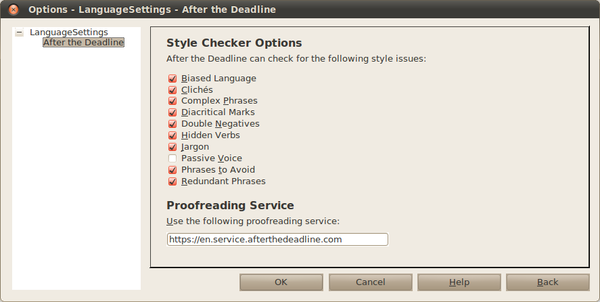
To make use of the AtD extension, you need OpenOffice.org 3.2 or later and Sun Java Runtime Environment 1.5 or higher. Installing the AtD extension is a pretty straightforward affair. Grab the latest version of the extension. In OpenOffice.org, choose Tools | Extension Manager, press the Add button, select the downloaded .oxt file, and press Open. Restart OpenOffice.org, and you are done. Before you start using AtD, you have to specify what kind of grammatical and style issues it should detect. To do this, choose Tools | Extension Manager, select the AtD extension, and press the Options button. Enable then the desired options by ticking the appropriate check boxes. Press OK when done. That's it, AtD is ready to go. Start typing, and when AtD detects a grammatical issue, it highlights it using a blue wavy line. Right-click on the highlighted fragment to view a brief description of the issue and its possible solution.
By default, the AtD extension uses the official AtD server, which requires an Internet connection. But you can also deploy the AtD server on your machine, which lets you use the service even when you are offline. To install the AtD server, download the latest AtD distribution from the project's Web site, unpack the downloaded archive, switch to the resulting directory in the terminal, and run the ./run.sh command (or ./run-lowmem.sh command if your machine has no more than 1.5GB RAM). Next, choose Tools | Extension Manager, select the AtD extension, press the Options button, and replace the default URL in the Proofreading Service section with http://127.0.0.1:1049. Press OK, and you are done.
Comments
comments powered by DisqusSubscribe to our Linux Newsletters
Find Linux and Open Source Jobs
Subscribe to our ADMIN Newsletters
Support Our Work
Linux Magazine content is made possible with support from readers like you. Please consider contributing when you’ve found an article to be beneficial.

News
-
New Linux Flaw Lets Attackers Escape VMs
A 16-year-old vulnerability allows an attacker to escape a virtual machine, gain access to the host, and execute malicious code.
-
Hannah Montana Linux Is Back!
Developer Noah Cagle decided the world needed the once obscure but beloved Linux distribution and gave it a decidedly pink refresh.
-
System76 Refreshes the Lemur Laptop
If you're looking for a laptop with tons of power and battery, look no further than the latest iteration of the System76 Lemur Pro.
-
More than 43 Million Lines of Code in Linux Kernel 7.2
Using the cloc utility, Michael Larabel of Phoronix discovered that Linux kernel 7.2 has over 43 million lines of code.
-
Kubuntu Focus Goes Ultra
The Kubuntu Focus team has upped the performance ante of its M2 and Zr laptops with the latest, greatest CPUs from Intel.
-
Linux Gamers May Soon See Less Mouse Lag in KDE Plasma
Gamers using KDE’s Plasma desktop have been suffering from a slight input delay in mouse movement that could lead to getting fragged.
-
Three Lines of Code Improve Linux Storage Performance
A developer changed three lines of code, giving Linux storage performance a 5% bump.
-
AUR Hit Again with Malicious Packages
Once again the Arch User Repository is plagued by a high volume of malicious packages.
-
Alpine Linux 3.24 Features Fresh Desktops and a Newer Kernel
If you're a fan of Alpine Linux, it's time to upgrade because the latest version has been released with KDE Plasma 6.6, Gnome 50, and Linux kernel 6.18 LTS.
-
EU Open Source Strategy Plays Key Role in Tech Sovereignty Package
Comprehensive measures adopted by the European Commission aim to reduce dependency on non-EU countries.
After the Deadline compared to Language Tool
1. After the Deadline uses a statistical language model to detect misused words and present appropriate grammar/style suggestions. Language Tool is rule-based. This means that After the Deadline will find a broader range of English errors and present fewer false positive suggestions.
2. After the Deadline is English-only (as far as OOo is concerned). LT supports many languages. If this is important to you, then this is an important point in LT's favor.
3. After the Deadline's English rule-coverage is more comprehensive than LT. It's easier to support one language well and I had a year and a half to work on AtD full-time.
4. AtD requires an English checker because it communicates with the AtD software service. The AtD service is open source and you can run your server locally (requiring no internet then to use it). This is up to you. LT scores points because it doesn't require this. The reason for the server requirement is AtD's statistical language model. This model is huge and loading the whole thing takes up a lot of memory. If you run AtD locally, there is a low memory mode, and it works--but it's slower.
Lnaguage tools
I've using Language Tools for a while in OOorg and I don't need Internet for it :P
GL HF
Axel