


Astrid: Probably the Best Task Manager for the Android Platform

Productivity Sauce
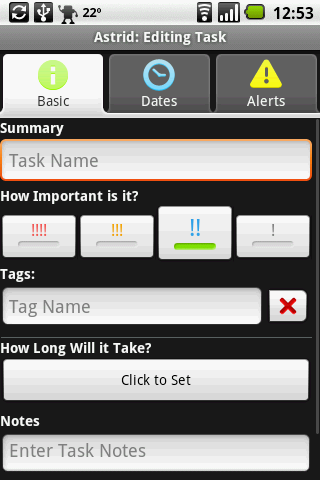
A task manager is probably the first thing you might want to install on your Android device, and you won't find a better tool for the job than Astrid. This open source task management utility sports not only a cute application icon -- it also offers all the tools you need to efficiently manage your tasks. A user-friendly interface makes it extremely easy to create new tasks and edit existing ones. The task editing screen of Astrid's interface is split into three sections: Basic, Dates, and Alarms. The Basic section allows you to set the task's priority, assign tags, specify the time it would take to complete the task, and attach a note to it. In the Dates section, you can specify a deadline and configure recurring events. Here you can also specify time already spent on the task. If you enable the Add Task To Calendar option, Astrid conveniently adds the task to your Google Calendar. As the name suggests, the Alerts section lets you configure periodic and fixed reminders as well as specify when you want the reminder to kick in.
To keep tabs on your tasks, Astrid offers the Tags and the Sort/Filter features. The former lets you quickly locate tasks containing a specific tag, while the latter can be used to sort tasks using available sorting criteria (e.g., Sort By Name, Sort By Due Date, Sort Reverse, etc). All these are nice features, but what makes Astrid really shine, is its ability to synchronize data with Remember The Milk, one of the most popular task managers on the Web. This effectively turns Astrid into a mobile client which beats even Remember The Milk's own iPhone application.
comments powered by DisqusSubscribe to our Linux Newsletters
Find Linux and Open Source Jobs
Subscribe to our ADMIN Newsletters
Support Our Work
Linux Magazine content is made possible with support from readers like you. Please consider contributing when you’ve found an article to be beneficial.

News
-
Fedora 44 Now Gaming Ready
The latest version of Fedora has been released with gaming support.
-
Manjaro 26.1 Preview Unveils New Features
The latest Manjaro 26.1 preview has been released with new desktop versions, a new kernel, and more.
-
Microsoft Issues Warning About Linux Vulnerability
The company behind Windows has released information about a flaw that affects millions of Linux systems.
-
Is AI Coming to Your Ubuntu Desktop?
According to the VP of Engineering at Canonical, AI could soon be added to the Ubuntu desktop distribution.
-
Framework Laptop 13 Pro Competes with the Best
Framework has released what might be considered the MacBook of Linux devices.
-
The Latest CachyOS Features Supercharged Kernel
The latest release of CachyOS brings with it an enhanced version of the latest Linux kernel.
-
Kernel 7.0 Is a Bit More Rusty
Linux kernel 7.0 has been released for general availability, with Rust finally getting its due.
-
France Says "Au Revoir" to Microsoft
In a move that should surprise no one, France announced plans to reduce its reliance on US technology, and Microsoft Windows is the first to get the boot.
-
CIQ Releases Compatibility Catalog for Rocky Linux
The company behind Rocky Linux is making an open catalog available to developers, hobbyists, and other contributors, so they can verify and publish compatibility with the CIQ lineup.
-
KDE Gets Some Resuscitation
KDE is bringing back two themes that vanished a few years ago, putting a bit more air under its wings.