


Blogging on the Move with wpToGo

Productivity Sauce
Feel the urge to update your blog while on the move? As an Android user, you'll be pleased to learn that you can manage your WordPress blog from your device courtesy of the wpToGo application. This nifty blogging client lets you manage multiple blogs and it has a few clever features up its sleeve. On the first run, you are prompted to configure a new blog account. To do that, you have to enter your login credentials and specify the exact path to the xmlrpc.php interface of your blog. If you have a hosted WordPress blog, then the path to xmlrpc.php is yourblogname.wordpress.com/xmlrpc.php
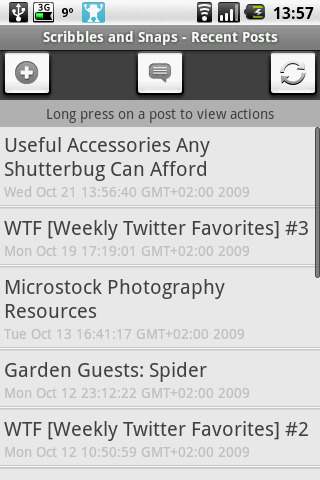
Once the account has been configured, you can enable a comment notification feature which alerts you when new comments appear on your blog. To do this, press the Menu button on your device and choose Notification Settings. Select the desired blog account, specify update intervals, and press Save. Using wpToGo to create new posts and edit the existing ones is rather easy. To add a new blog post, select the desired blog account, press the Add button, and write to your heart's content. The editing area contains buttons for bold, italics, links, and block quotes. You can also add pictures stored on your device, tags, assign categories, and specify the post status (i.e., published or draft).
Of course, you wouldn't want to edit longer posts using wpToGo, but the application can come in handy when you need to quickly post a photo, tweak the existing posts, and moderate comments. If your blog is powered by the WordPress engine, wpToGo is simply a must-have application.
comments powered by DisqusSubscribe to our Linux Newsletters
Find Linux and Open Source Jobs
Subscribe to our ADMIN Newsletters
Digital Autonomy
• The Answer Was Already on the Shelf
• Changing the Chip Industry: How Public Investment Has Grown Open Silicon
• United Nations Open Source Portal Goes Live
• EU Open Source Strategy Plays Key Role in Tech Sovereignty Package
• France Says “Au Revoir” to Microsoft
Support Our Work
Linux Magazine content is made possible with support from readers like you. Please consider contributing when you’ve found an article to be beneficial.

News
-
AI Helped Develop a Linux Exploit
A use-after-free race exploit was discovered and exploited on CentOS Stream 9.
-
Yet Another Linux Kernel Vulnerability Discovered
Affecting millions of systems, a kernel flaw discovered by Qualys could allow users to gain root privileges.
-
Ubuntu 26.10 to Include Ubuntu Certified Hardware Check
If you've ever wondered if your laptop or PC is officially certified to run Ubuntu, that curiosity will soon be met.
-
Substantial Update to IPFire Now Available
The lastest version of IPFire features a fundamental change to how the system handles DNS.
-
Gnome Working on Test Center App to Make Testing Easier
It's now possible to test experimental features on the Gnome desktop without worrying that you'll break things.
-
New Vulnerability Discovered in Linux Kernel
Hiding out for nearly 15 years, the Ghostlock vulnerability allows a standard logged-in user to gain root privileges.
-
New Linux Flaw Lets Attackers Escape VMs
A 16-year-old vulnerability allows an attacker to escape a virtual machine, gain access to the host, and execute malicious code.
-
Hannah Montana Linux Is Back!
Developer Noah Cagle decided the world needed the once obscure but beloved Linux distribution and gave it a decidedly pink refresh.
-
System76 Refreshes the Lemur Laptop
If you're looking for a laptop with tons of power and battery, look no further than the latest iteration of the System76 Lemur Pro.
-
More than 43 Million Lines of Code in Linux Kernel 7.2
Using the cloc utility, Michael Larabel of Phoronix discovered that Linux kernel 7.2 has over 43 million lines of code.