


Creating Ebooks with Sigil

Productivity Sauce
There are plenty of places on the Web where you can find ebooks in the EPUB format, but what if you need to create an ebook yourself? Sigil can help you with that. This nifty application allows you to create ebooks using the graphical interface without getting your hands dirty with coding. Despite being a relatively new application, Sigil already sports all the essential features that simplify the process of formatting ebooks and generating ready-to-use EPUB files.
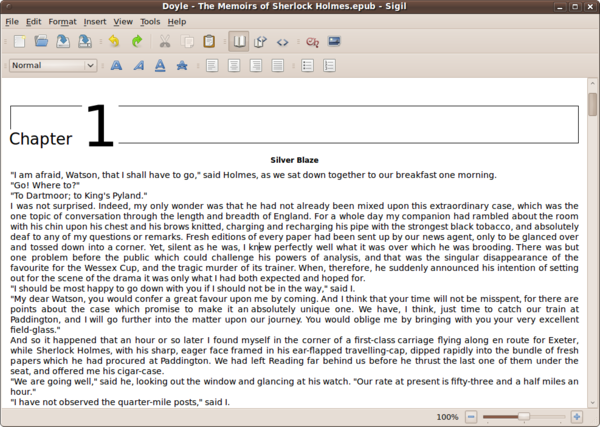
Installing Sigil is as easy as it gets. Download the installer .bin file. and run it in the terminal as root:
./Sigil-x.x.x-Linux-x86-Install.bin
Sigil supports most common formatting options such as bold, italics, and underlined as well as different text aligning options. All these features can be accessed via the buttons on the main toolbar. With Sigil, you don't have to start from scratch: the application can import files in the TXT, HTML and EPUB formats. Using the built-in HTML Tidy module, Sigil cleans the imported documents, removing all the cruft and fixing broken code. Sigil's interface sports three views. The Book View lets you edit the book graphically, hiding the underlying code behind the WYSIWYG interface. If you want to keep an eye on the code, you can switch to Split View, and in case you prefer to code your book by hand, there is the Code View that allows you to do just that. Sigil also comes with a metada editor which supports more than 200 entries and lets you provide a comprehensive description of your book. And you can use the Table of Contents editor to easily generate a multi-level Table of Contents for your book. Once your book is ready, you can save it as an EPUB file that can be viewed in any ebook reader application that supports the popular format.
comments powered by DisqusSubscribe to our Linux Newsletters
Find Linux and Open Source Jobs
Subscribe to our ADMIN Newsletters
Digital Autonomy
• How the Fediverse Found Parts for Its Platforms
• The Answer Was Already on the Shelf
• Changing the Chip Industry: How Public Investment Has Grown Open Silicon
• United Nations Open Source Portal Goes Live
• EU Open Source Strategy Plays Key Role in Tech Sovereignty Package
• France Says “Au Revoir” to Microsoft
Support Our Work
Linux Magazine content is made possible with support from readers like you. Please consider contributing when you’ve found an article to be beneficial.

News
-
PwnEscape Poses VM Vulnerability
A guest-to-host escape flaw in Linux KVM, named PwnEscape, might be yet another means of attacking Linux.
-
Linux Mint 27 Set for a Christmas Release
The developers behind Linux Mint have announced a Christmas release, and it looks like Santa's sack will be brimming with features.
-
Is Linus Torvalds Vibe Coding?
The creator of Linux has added AI into his process for Linux kernel development, and it's more than just for debugging.
-
openKylin 3.0 Released with Expanded AI Integration
The latest release features a pre-installed AI agent to help perform tasks.
-
DigitalOcean Ends Open Source Credits Program
In a change that has surprised many open source developers, DigitalOcean has decided to sunset its Open Source Credits Program.
-
Office 365 Available for Testing on Linux via Bottles
Linux users can now test the official Office 365, thanks to Mirko Brombin's work on Bottles.
-
Dutch Government Turns to Open Source for Digital Sovereignty
Following in the footsteps of other European countries, the Netherlands is looking to increase its sovereign digital infrastructure with open source software.
-
Linux May Soon Work on Snapdragon X2-Based PCs
If you're thinking about buying a Snapdragon X2-based desktop or laptop, Linux may soon be an option.
-
KDE for People Initiative Calls for AI Ban in Plasma
A new community of KDE wants the project to adopt a strict no-AI policy for KDE Plasma.
-
KDE Sets Ambitious Goals for 2026 and Beyond
KDE Connect reveals the goals for the Linux desktop darling, with one of those goals long overdue.