


Extension Watch: The Great Suspender for Chrome and Chromium

Productivity Sauce
If you have a nagging feeling that the Chrome or Chromium browser has an unhealthy appetite for system resources, you have every right to be concerned. Since the browser runs each tab as a separate process, the more tabs you keep opened, the more resources the browser consumes and the less stable it becomes. The Great Suspender extension provides a not very elegant but workable solution to the problem. Once installed, the extension suspends any tab that has been inactive for a specific period of time, thus freeing up unused RAM and resources.
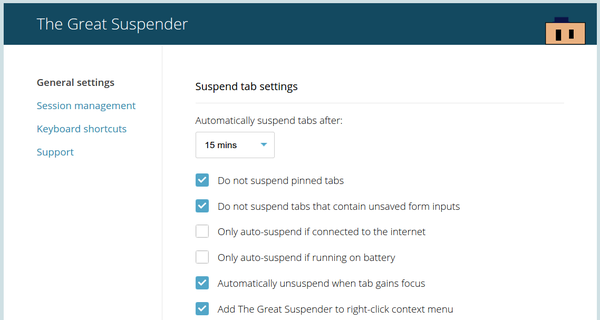
The extension also adds a button to the main toolbar that lets you suspend the current tab immediately, pause the suspension as well as suspend and unsuspend all tabs in one go. The extension's Settings section lets you specify the period of inactivity before suspending tabs, enable the option to automatically unsuspend a tab when it's in focus, and whitelist specific sites from being suspended. Obviously, it would have been better if Chrome and Chromium could manage resources more efficiently on their own, but for lack of better options, The Great Suspender is probably the next best thing.
comments powered by DisqusSubscribe to our Linux Newsletters
Find Linux and Open Source Jobs
Subscribe to our ADMIN Newsletters
Digital Autonomy
• How the Fediverse Found Parts for Its Platforms
• The Answer Was Already on the Shelf
• Changing the Chip Industry: How Public Investment Has Grown Open Silicon
• United Nations Open Source Portal Goes Live
• EU Open Source Strategy Plays Key Role in Tech Sovereignty Package
• France Says “Au Revoir” to Microsoft
Support Our Work
Linux Magazine content is made possible with support from readers like you. Please consider contributing when you’ve found an article to be beneficial.

News
-
Linux Mint 27 Set for a Christmas Release
The developers behind Linux Mint have announced a Christmas release, and it looks like Santa's sack will be brimming with features.
-
Is Linus Torvalds Vibe Coding?
The creator of Linux has added AI into his process for Linux kernel development, and it's more than just for debugging.
-
openKylin 3.0 Released with Expanded AI Integration
The latest release features a pre-installed AI agent to help perform tasks.
-
DigitalOcean Ends Open Source Credits Program
In a change that has surprised many open source developers, DigitalOcean has decided to sunset its Open Source Credits Program.
-
Office 365 Available for Testing on Linux via Bottles
Linux users can now test the official Office 365, thanks to Mirko Brombin's work on Bottles.
-
Dutch Government Turns to Open Source for Digital Sovereignty
Following in the footsteps of other European countries, the Netherlands is looking to increase its sovereign digital infrastructure with open source software.
-
Linux May Soon Work on Snapdragon X2-Based PCs
If you're thinking about buying a Snapdragon X2-based desktop or laptop, Linux may soon be an option.
-
KDE for People Initiative Calls for AI Ban in Plasma
A new community of KDE wants the project to adopt a strict no-AI policy for KDE Plasma.
-
KDE Sets Ambitious Goals for 2026 and Beyond
KDE Connect reveals the goals for the Linux desktop darling, with one of those goals long overdue.
-
It’s Time to Test Fedora 45 Beta
Fedora 45 beta has been released with updated Gnome, KDE Plasma, and kernel.