


Hotot: A Stylish Twitter Client That Packs Power

Productivity Sauce
Here is a question: Why would you want to try Hotot when there is a plethora of other Twitter clients out there? The answer is simple: Hotot offers a perfect mix of style and useful features. A pleasant interface gives you quick access to essential features and it sports slick transitions between screens. For each item in the timeline, Hotot provides shortcuts which you can use to retweet (Hotot supports both classic and new retweets) the tweet, mark it as favorite, and reply to it. Like any Twitter clients worth its salt, Hotot supports link shortening, although it can only use the default Bit.ly service.
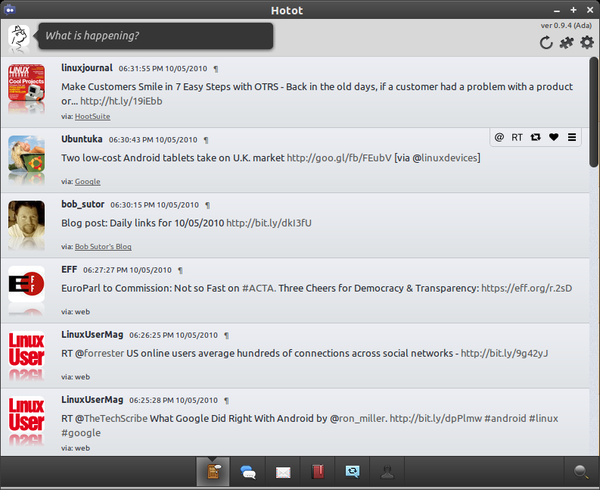
Hotot's default functionality can be expanded using extensions, and the current version of the Twitter client ships with three modules: Gmaps can be used to display the geolocation data of a particular tweet on Google Maps, Image Preview lets you preview attached images, Image Upload allows you to use Hotot to upload images to one of several supported services such as Twitpic and Twitgoo.
Similar to other Twitter clients, Hotot lets you view mentions, favorites, and direct messages, but that's not all. Hotot also sports the Retweets and Retweeted screen where you can view your tweets retweeted by others, tweets retweeted by you, and tweets retweeted by people you follow. The Search screen lets you find users and view their profiles and recent tweets.
Installing Hotot is not particularly difficult. If you are using Ubuntu, you can install the Twitter client using the following commands:
sudo add-apt-repository ppa:hotot-team
sudo apt-get update
sudo apt-get install hotot
The Installation How-to page provides detailed information on how to install Hotot on other Linux distributions. And using a simple trick, you can make Hotot work with Identi.ca. Open the Preferences window, switch to the Networks section, and replace the default URL in the API Base field with http://identi.ca/api.
Hotot is still at a very early stage of development, so it does lack some key features like the ability to handle multiple accounts. But even in its current form, it's a pretty capable and stylish Twitter client which deserves a closer look.
Comments
comments powered by DisqusSubscribe to our Linux Newsletters
Find Linux and Open Source Jobs
Subscribe to our ADMIN Newsletters
Digital Autonomy
• The Answer Was Already on the Shelf
• Changing the Chip Industry: How Public Investment Has Grown Open Silicon
• United Nations Open Source Portal Goes Live
• EU Open Source Strategy Plays Key Role in Tech Sovereignty Package
• France Says “Au Revoir” to Microsoft
Support Our Work
Linux Magazine content is made possible with support from readers like you. Please consider contributing when you’ve found an article to be beneficial.

News
-
KDE for People Initiative Calls for AI Ban in Plasma
A new community of KDE wants the project to adopt a strict no-AI policy for KDE Plasma.
-
KDE Sets Ambitious Goals for 2026 and Beyond
KDE Connect reveals the goals for the Linux desktop darling, with one of those goals long overdue.
-
It’s Time to Test Fedora 45 Beta
Fedora 45 beta has been released with updated Gnome, KDE Plasma, and kernel.
-
Ubuntu Stonking Stingray Gets Even Rustier
Ubuntu 26.10 has completed its migration to the Rust-based coreutils.
-
AI Fixes Linux Bottlenecks Using “Hideous” Code
A Linux developer used AI to fix bottlenecks that caused problems when building the kernel. The resulting AI-generated code needed a lot of work.
-
Advanced Video Coding Still Under Patent
Brazilian patent BRPI0109962B1 has expired, which means that DivX and Xvid are no longer problematic for Linux, but it doesn’t mean that video is all of a sudden fully unleashed.
-
2,000 Vulnerabilities per Linux Release
Thanks to AI bug hunters, the Linux kernel is seeing record numbers of vulnerabilities, and it's overwhelming developers.
-
Linux Exempt from California’s Age Verification Law
So long as Linux is distributed under the GPL, MIT, BSD, and Apache licenses, the OS is exempt from being required to verify the age of its users in California.
-
Roll Out the Cake: Linux Turns 35
35 years ago, a Finnish student began a humble project that would forever change the course of technology.
-
China Switching from Windows to Linux
China has ordered several government agencies to drop a Chinese-developed version of Windows 10 in favor of either KylinOS or UOS.
Hotot potential
Side note: It would be nice if Linux resources like Linux Magazine would stop leaving out half of the Linux world in their articles.
.deb != Linux