


LibreOffice 3.3 is Ready for Public Consumption

Productivity Sauce
Good news for those who have been waiting for a stable release of the LibreOffice fork of OpenOffice.org. The wait is over: The Document Foundation has announced the availability of LibreOffice 3.3.
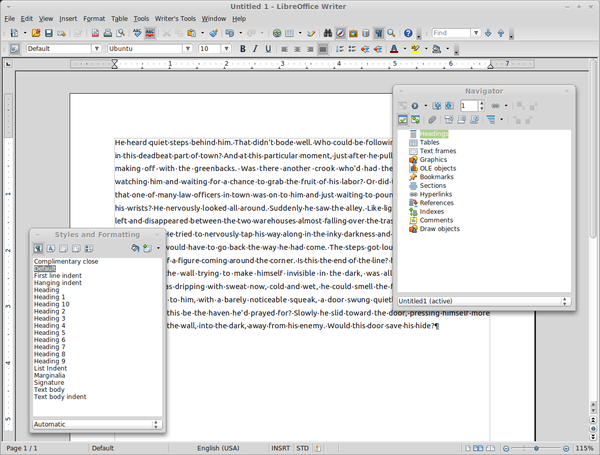
Although at first sight LibreOffice 3.3 looks pretty much like the previous versions, the new release sports a handful of new features and under-the-hood improvements. The most notable additions include new Microsoft Works and Lotus Word Pro document import filters, support for SVG graphics, an improved Navigator tool in Writer, and a slew of tweaks in the Calc spreadsheet application. A list of all tweaks and improvements is available for your perusal at the project's official Web site.
The download page provides binary packages of the latest LibreOffice release for major Linux distributions along with the source code for those who are brave enough to compile the productivity suite on their machines.
Ubuntu users will appreciate the fact that LibreOffice can be installed using a dedicated PPA. So if you are running Ubuntu Linux or any of its derivatives, you can install LibreOffice using two commands:
sudo add-apt-repository ppa:libreoffice/ppa
sudo apt-get update && sudo apt-get install libreoffice libreoffice-gnome
In case you are using a KDE-based Ubuntu spinoff, you need to install the libreoffice-kde package instead of libreoffice-gnome. Note that this will automatically remove OpenOffice.org from your system. Personally, I consider it a convenience, since I don't have to do it manually.
comments powered by DisqusSubscribe to our Linux Newsletters
Find Linux and Open Source Jobs
Subscribe to our ADMIN Newsletters
Support Our Work
Linux Magazine content is made possible with support from readers like you. Please consider contributing when you’ve found an article to be beneficial.

News
-
Container-Based Fedora Hummingbird Designed for Agent-First Builders
Fedora Hummingbird brings the same approach to the host OS as it does to containers to level up security.
-
Linux kernel Developers Considering a Kill Switch
With the rise of Linux vulnerabilities, the kernel developers are now considering adding a component that could help temporarily mitigate against them… in the form of a kill switch.
-
Fedora 44 Now Gaming Ready
The latest version of Fedora has been released with gaming support.
-
Manjaro 26.1 Preview Unveils New Features
The latest Manjaro 26.1 preview has been released with new desktop versions, a new kernel, and more.
-
Microsoft Issues Warning About Linux Vulnerability
The company behind Windows has released information about a flaw that affects millions of Linux systems.
-
Is AI Coming to Your Ubuntu Desktop?
According to the VP of Engineering at Canonical, AI could soon be added to the Ubuntu desktop distribution.
-
Framework Laptop 13 Pro Competes with the Best
Framework has released what might be considered the MacBook of Linux devices.
-
The Latest CachyOS Features Supercharged Kernel
The latest release of CachyOS brings with it an enhanced version of the latest Linux kernel.
-
Kernel 7.0 Is a Bit More Rusty
Linux kernel 7.0 has been released for general availability, with Rust finally getting its due.
-
France Says "Au Revoir" to Microsoft
In a move that should surprise no one, France announced plans to reduce its reliance on US technology, and Microsoft Windows is the first to get the boot.