


Replace Last.fm with VLC

Productivity Sauce
Nothing boosts my productivity more than good music. That's why I always keep Last.fm radio running when I'm working. Or rather, used to keep it running: Last.fm has announced that the company starts charging international users for streaming music. It's not a big deal, except that the service will remain free in the US, UK, and Germany. For me it's as insulting as Windows-only applications. It's not the end of the world, though: as always, the VLC comes to the rescue.
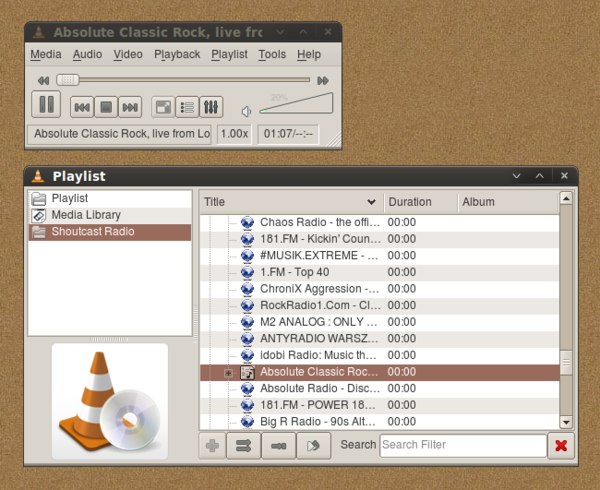
This excellent media player provides native support for Internet radio streaming and it comes with a huge selection of radio stations for every taste. To start the radio stream, launch VLC, and choose Playlist -> Additional Sources > Shoutcast radio listings. Choose then Playlist -> Show Playlist, switch to the Shoutcast Radio. Double-click on the music genre you like to view a list of available radio stations. You can also use the Search field to locate the station or genre you want. Double-click on the desired radio station and enjoy the music. VLC even supports scrobbling, so you can still get recommendations and use other Last.fm services which remain free of charge. To enable scrobbling, choose Tools -> Preferences -> Audio, tick the Enable last.fm submission check box, specify your Last.fm credentials, and press Save. You can also save your favorite radio stations as a playlist. To do this, drag the stations you want to the Playlist folder, then choose Save Playlist to File.
Although VLC doesn't allow you to skip tracks, it allows you to record the stream. To start recording, right-click on the desired radio station in the Shoutcast Radio section and select Save. Configure the streaming settings and hit the Save button. That's it! Bye-bye Last.fm, hello VLC!
Comments
comments powered by DisqusSubscribe to our Linux Newsletters
Find Linux and Open Source Jobs
Subscribe to our ADMIN Newsletters
Digital Autonomy
• How the Fediverse Found Parts for Its Platforms
• The Answer Was Already on the Shelf
• Changing the Chip Industry: How Public Investment Has Grown Open Silicon
• United Nations Open Source Portal Goes Live
• EU Open Source Strategy Plays Key Role in Tech Sovereignty Package
• France Says “Au Revoir” to Microsoft
Support Our Work
Linux Magazine content is made possible with support from readers like you. Please consider contributing when you’ve found an article to be beneficial.

News
-
Is Linus Torvalds Vibe Coding?
The creator of Linux has added AI into his process for Linux kernel development, and it's more than just for debugging.
-
openKylin 3.0 Released with Expanded AI Integration
The latest release features a pre-installed AI agent to help perform tasks.
-
DigitalOcean Ends Open Source Credits Program
In a change that has surprised many open source developers, DigitalOcean has decided to sunset its Open Source Credits Program.
-
Office 365 Available for Testing on Linux via Bottles
Linux users can now test the official Office 365, thanks to Mirko Brombin's work on Bottles.
-
Dutch Government Turns to Open Source for Digital Sovereignty
Following in the footsteps of other European countries, the Netherlands is looking to increase its sovereign digital infrastructure with open source software.
-
Linux May Soon Work on Snapdragon X2-Based PCs
If you're thinking about buying a Snapdragon X2-based desktop or laptop, Linux may soon be an option.
-
KDE for People Initiative Calls for AI Ban in Plasma
A new community of KDE wants the project to adopt a strict no-AI policy for KDE Plasma.
-
KDE Sets Ambitious Goals for 2026 and Beyond
KDE Connect reveals the goals for the Linux desktop darling, with one of those goals long overdue.
-
It’s Time to Test Fedora 45 Beta
Fedora 45 beta has been released with updated Gnome, KDE Plasma, and kernel.
-
Ubuntu Stonking Stingray Gets Even Rustier
Ubuntu 26.10 has completed its migration to the Rust-based coreutils.
Replace Last.fm with VLC
this is how you do it
http://thebestbestblogblog....our-complete-music-keeper.html
Search in google
for dummies: keywords: vlc through proxy
keynote if your network admin is blocking http, search for http tunneling with putty and open ssh
shoutcast proxy
install moc then mocp in a terminal
h brings up Help
less resources
Songbird?
Rhythmbox
Amarok
Thanks