


Tracking Time with Rachota

Productivity Sauce
Keeping track of time you spend on specific tasks is essential if you are paid by the hour. Moreover, knowing exactly how you spend your working time can help you to optimize your workflow and be more productive. There are quite a few time tracking solutions out there, including the nifty Rachota utility which not only makes it easy to track time spent on different tasks but also helps you to analyze the collected data.
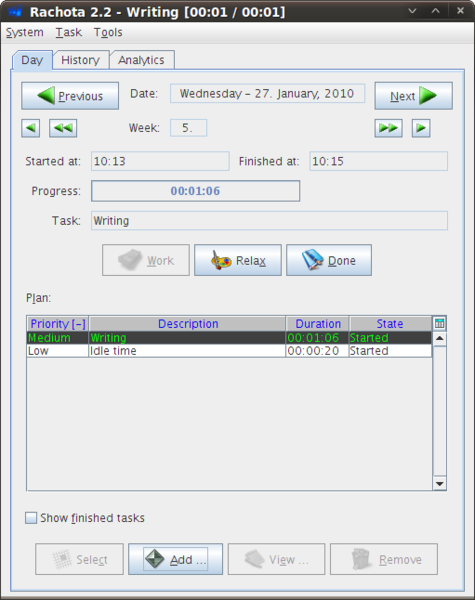
Rachota is written in Java, so you need to install the Java Runtime Environment before you can run the application on your system. Using Rachota is pretty straightforward. To add a task, press the Add button, fill out the required fields, and hit OK. Press the Select button, and hit Work to activate the task. When you take a break from the active task, press the Relax button. Use the Done button to finish the task. You can add as many tasks as you want, but you can only have one active task at a time. Using the navigation buttons, you can quickly jump to a specific day, which can come in handy when you need to see what tasks you worked on that day and how much time you spent on each task.
Rachota features rather nifty reporting capabilities that give you an instant overview of the tracked data and can help you to analyze that information. The Times section under the History tab presents all the tasks as a bar chart, while the Tasks section lets you view only specific tasks using user-defined filters. The Projects section displays all the tasks grouped by category, and you can also generate an HTML report based on the collected data. The Analytics section offers a brief analysis based on the tracked data divided into several categories, including Effectivity (how effectively you use your working hours), Prioritization (distribution of priorities across tasks) and Granularity (average time required to complete a task).
Tracking time with Rachota (or any time tracking tool for that matter) requires self-discipline. But if you are willing to put some work into it, Rachota will reward you with some valuable insights about your working habits and will help to make your daily work more efficient.
Comments
comments powered by DisqusSubscribe to our Linux Newsletters
Find Linux and Open Source Jobs
Subscribe to our ADMIN Newsletters
Digital Autonomy
• The Answer Was Already on the Shelf
• Changing the Chip Industry: How Public Investment Has Grown Open Silicon
• United Nations Open Source Portal Goes Live
• EU Open Source Strategy Plays Key Role in Tech Sovereignty Package
• France Says “Au Revoir” to Microsoft
Support Our Work
Linux Magazine content is made possible with support from readers like you. Please consider contributing when you’ve found an article to be beneficial.

News
-
The Linux Kernel Dev Staging Area Now Rejects AI-Generated Patches
Unless a kernel patch is a valid security fix, it will be rejected if it was created using AI.
-
Linux Surpasses Double-Digit Market Share
According to two sources, the Linux operating system has hit a major milestone in market share that naysayers thought would never happen.
-
AI Helped Develop a Linux Exploit
A use-after-free race exploit was discovered and exploited on CentOS Stream 9.
-
Yet Another Linux Kernel Vulnerability Discovered
Affecting millions of systems, a kernel flaw discovered by Qualys could allow users to gain root privileges.
-
Ubuntu 26.10 to Include Ubuntu Certified Hardware Check
If you've ever wondered if your laptop or PC is officially certified to run Ubuntu, that curiosity will soon be met.
-
Substantial Update to IPFire Now Available
The lastest version of IPFire features a fundamental change to how the system handles DNS.
-
Gnome Working on Test Center App to Make Testing Easier
It's now possible to test experimental features on the Gnome desktop without worrying that you'll break things.
-
New Vulnerability Discovered in Linux Kernel
Hiding out for nearly 15 years, the Ghostlock vulnerability allows a standard logged-in user to gain root privileges.
-
New Linux Flaw Lets Attackers Escape VMs
A 16-year-old vulnerability allows an attacker to escape a virtual machine, gain access to the host, and execute malicious code.
-
Hannah Montana Linux Is Back!
Developer Noah Cagle decided the world needed the once obscure but beloved Linux distribution and gave it a decidedly pink refresh.
Re: no .deb package for it?
Kind regards,
Dmitri
no .deb package for it?
# NO RESULTS
Sadly, I can't find it as a native package for ubuntu (yet). Hopefully it is coming soon!
Very nice review!
thank you very much for your excellent review of my Rachota Timetracker which is rapidly becoming an important source of new visitors! I am its author and it's very encouraging to see the hard work appreciated. It's great you see both History and Analytics views as useful features. In my opinion, these are true differentiators from other timetrackers.
Should you have any problems [1] with Rachota or have an idea for improvement [2], don't hesitate to provide your feedback! In addition to that if you are interested in what's coming in Rachota 2.3, take a look at its concept [3].
[1] https://sourceforge.net/tra...roup_id=144949&atid=760391
[2] https://sourceforge.net/tra...roup_id=144949&atid=760394
[3] https://sourceforge.net/app....php?title=Rachota_2.3_Concept
Thanks again,
-Jirka