


Writebox: Almost Perfect Chrome/Chromium Text Editor

Productivity Sauce
While it might look like yet another lightweight text editor for Google Chrome and Chromium, Writebox features functionality essential for any writing professional. For starters, Writebox works offline, which makes it a perfect text editor for working on text files while offline -- especially if you happen to use Chromebook. The editor has an unobtrusive interface, and it supports line, word, and character count. Better still, Writebox lets you specify the desired font and configure a handful of other formatting options, such as background and text color, font size, line spacing, and the width of the writing area.
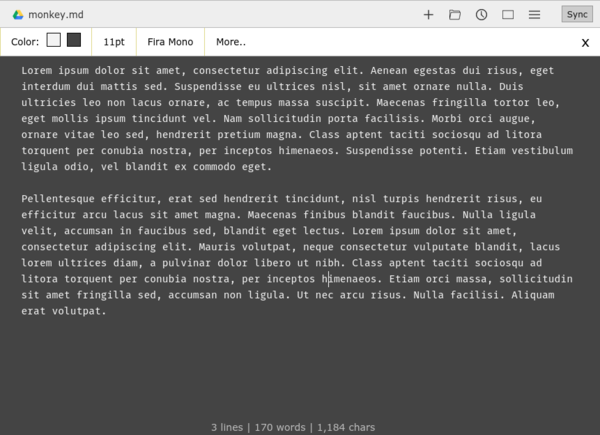
All text files created with Writebox are stored locally, but the editor can also use Dropbox and Google Drive for synchronization and storage. In other words, you can save your text files on any (or both) of these services as well as open existing files in the editor. While Writebox doesn't support syntax highlighting, it offers a feature for previewing Markdown-formatted text files. And as any modern text editor, Writebox provides extensive support for keyboard shortcuts.
Since Writebox doesn't support line numbering and syntax highlighting, it might not appeal to casual coders and developers. But if you write for profit or fun, the editor would make a perfect addition to your writing toolbox.
comments powered by DisqusSubscribe to our Linux Newsletters
Find Linux and Open Source Jobs
Subscribe to our ADMIN Newsletters
Digital Autonomy
• How the Fediverse Found Parts for Its Platforms
• The Answer Was Already on the Shelf
• Changing the Chip Industry: How Public Investment Has Grown Open Silicon
• United Nations Open Source Portal Goes Live
• EU Open Source Strategy Plays Key Role in Tech Sovereignty Package
• France Says “Au Revoir” to Microsoft
Support Our Work
Linux Magazine content is made possible with support from readers like you. Please consider contributing when you’ve found an article to be beneficial.

News
-
Working Exploit for a Linux Kernel Flaw Made Public
Even before a bug received its CVE identifier or an upstream fix, the local privilege escalation vulnerability exploit found its way into the wild.
-
r/opensource Bans AI-Assisted and AI-Related Projects
The de facto subreddit for all things open source has not only banned AI-related projects but also users who "don't speak English."
-
Bottlenecks Discovered by Meta Engineers Lead to Scalability Improvements
Thanks to a small group of engineers at Meta, the Linux kernel module kernfs has been improved, which has led to some serious gains.
-
PwnEscape Poses VM Vulnerability
A guest-to-host escape flaw in Linux KVM, named PwnEscape, might be yet another means of attacking Linux.
-
Linux Mint 27 Set for a Christmas Release
The developers behind Linux Mint have announced a Christmas release, and it looks like Santa's sack will be brimming with features.
-
Is Linus Torvalds Vibe Coding?
The creator of Linux has added AI into his process for Linux kernel development, and it's more than just for debugging.
-
openKylin 3.0 Released with Expanded AI Integration
The latest release features a pre-installed AI agent to help perform tasks.
-
DigitalOcean Ends Open Source Credits Program
In a change that has surprised many open source developers, DigitalOcean has decided to sunset its Open Source Credits Program.
-
Office 365 Available for Testing on Linux via Bottles
Linux users can now test the official Office 365, thanks to Mirko Brombin's work on Bottles.
-
Dutch Government Turns to Open Source for Digital Sovereignty
Following in the footsteps of other European countries, the Netherlands is looking to increase its sovereign digital infrastructure with open source software.