


Exploring the AlmaLinux Build System

Package Packer

Image © victoroancea, 123RF.com
The AlmaLinux Build System lets you build, test, sign, and release packages from a single interface.
When IBM announced that it was restricting access to Red Hat Enterprise Linux (RHEL) source code and moving CentOS upstream, the distros that depended on RHEL and CentOS source code were sent scrambling. It is still a little unclear whether IBM’s moves are legal and consistent with the GNU Public License (GPL), but the litigation to sort it out could take years, and in the meantime, the derivatives need a solution.
One enterprise distribution that weathered the storm quite smoothly was AlmaLinux (see the box entitled “Where Do They Get Their Code?”). If you ask the AlmaLinux developers, they will say that one reason for their success in navigating the transition to the post-RHEL era is the AlmaLinux Build System.
Where Do They Get Their Code?
AlmaLinux was envisioned as a free alternative to RHEL, which comes with a subscription fee and other corporate licensing arrangements. AlmaLinux and other RHEL derivatives used source code from Red Hat repositories as the basis for building an independent distro. It is important to note that Red Hat does not own the source code in the sense that the term own is used with proprietary software. Because Linux and most of the code included with it are open source and licensed under the GNU Public License (GPL), the code is available for others to use and modify.
IBM currently restricts access to some, but not all, RHEL source code. Some source code is available through the Red Hat Universal Base Image (UBI). AlmaLinux uses as much of the Red Hat UBI code as it can, but a majority of the code comes from the CentOS Stream project. IBM did not eliminate all access to CentOS; they just moved it upstream, so the code does not include some of the final bug fixes and updates that go into the final version of RHEL. AlmaLinux uses some code from the CentOS Stream project and performs its own fixes and updates. They also pull code from other upstream sources when necessary.
The AlmaLinux Build System evolved from an earlier system used by CloudLinux. (CloudLinux is a contributor to the AlmaLinux project.) The developers refer to their build system as “a project designed to automate processes of building distribution and packages, testing packages, signing packages, and releasing them to public repositories.” In other words, the goal is to assist with every phase of the package development process, relying on automation to reduce human error and minimize manpower requirements.
The AlmaLinux Build System is a free software project that is available on GitHub. Other Linux distributions are welcome to use the AlmaLinux Build System as a tool for building and managing packages. You can also point the build system at other, third-party Git repositories, which makes it suitable for many in-house DevOps development settings.
How Does It Work?
The AlmaLinux Build System automates the process of building, supporting, and managing packages. The vision is for something that is more than a build tool, with support for testing, signing, and releasing software packages.
If the AlmaLinux project needed a build system to interact with source code originating from a Red Hat environment, you might be wondering why they didn’t just use Koji, the freely available build tool associated with Red Hat’s Fedora project. The answer given by the developers is that, although Koji is an effective tool, the AlmaLinux project had a much broader vision. For one thing, they wanted to integrate additional package formats (Koji is limited to RPMs). They also wanted to provide a complete, integrated pipeline to manage a package from the build phase to testing, to signing the package, and finally to release. The AlmaLinux Build System includes controls that allow the user to specify where to release packages, and it is one of the first build systems to support modularity. A module is a collection of packages that occur together, such as the packages in a single application or an operating system component. Support for modularity lets you treat the packages together, thus saving steps and streamlining the configuration.
Like other build platforms, the AlmaLinux Build System is not a monolithic application but a combination of back-end tools behind a single, unified interface. The build system interface is based on the Vue.js Java-Script framework. Some of the tools incorporated into the AlmaLinux Build System include:
- Mock – a tool for building RPM packages
- Pulp – a content repository for organizing and distributing software packages
- NGINX – a web server that functions as an interface for managing access to the build system
- Terraform – an infrastructure-as-code tool used to build simulated environments for package testing
- PGP – an encryption utility that provides signing services for package verification
- Git – a source code repository system
Git isn’t actually part of the build system itself, but it is an integral part of the ecosystem, providing source code for building packages and communicating with the build system through an API.
Figure 1 shows the complete system at a glance. Users interact through either a graphical user interface or text-based commands. Support for command-line processing creates the possibility for scripting and other custom automation scenarios.
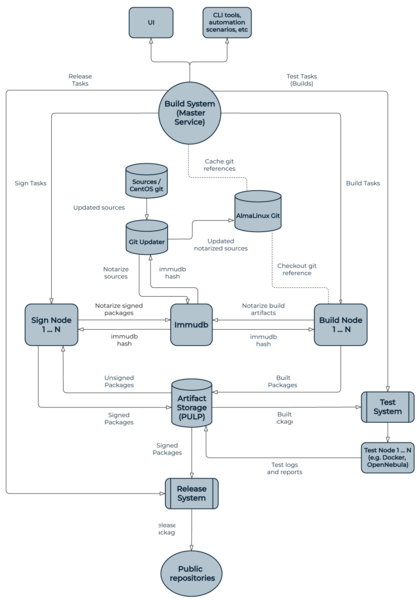 Figure 1: The AlmaLinux Build System at a glance.
At the center of the system is the Build System Master Service. The Master Service receives commands from the user and sets the process in motion, creating, restarting, and deleting builds and communicating with the rest of the system via API calls. Master Service responsibilities include requesting and receiving source code from the Git server and assigning tasks to the build nodes.
Another important component of the build system is Pulp, which provides artifact storage for newly-built packages and other products of the build process. According to AlmaLinux Community Manager Jack Aboutboul, “the Master Service is the brain, and Pulp is the heart” of the build system. As you can see in Figure 1, Pulp is essential to the later stages of the process, providing packages for signing and testing and forwarding finished packages for release. Much of the power of the AlmaLinux Build System is in its ability to oversee the testing, signing, and release phases of the development process.
Getting the Code
The development of AlmaLinux OS happens in the AlmaLinux Git service, an instance of the popular Gitea software development service. Gitea is described as an all-in-one service for managing a Git environment, including “code review, team collaboration, package registry, and CI/CD.”
The AlmaLinux Build System interacts with the AlmaLinux Git service to pull the source code of the packages to build. In the same way, the AlmaLinux Git service interacts with the Build System using webhooks to trigger builds whenever the sources of a package have been updated. In addition to building packages from the AlmaLinux Git service, the build system can also build from other Git repositories or from a given source RPM (SRPM).
First Look
When you log in to the AlmaLinux Build System, a view of configured builds appears in the main screen (Figure 2). A menu on the left offers options for creating a new build, new release, or new distribution.
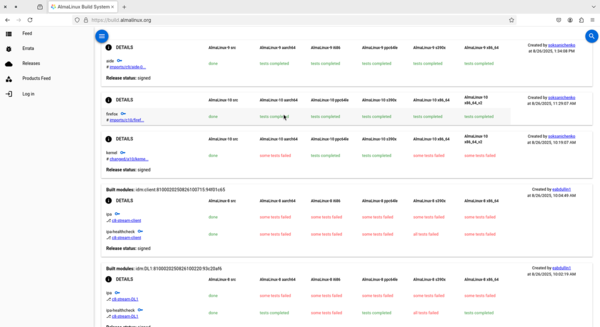 Figure 2: Your first view shows the builds configured for the system.
Click on the Details link for a configured build to view the build settings. You can choose an architecture (Figure 3) or view the artifacts associated with the build (Figure 4).
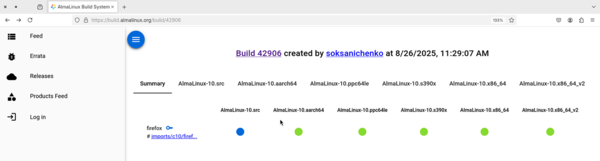 Figure 3: The AlmaLinux Build System supports the following hardware architectures: i686, x86_64, x86_64_v2, AArch64, ppc64le, s390x, and riscv64.
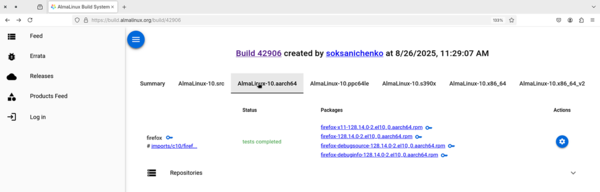 Figure 4: Viewing the artifacts associated with the build.
To create a new build, choose New build in the main view. In subsequent menus, you can select a platform and choose architecture(s), set options for the Mock build tool, and specify whether to build for a Secure Boot system.
Once you have configured the build settings, select the project (the packages) you would like to build (Figure 5) and click on Create Build.
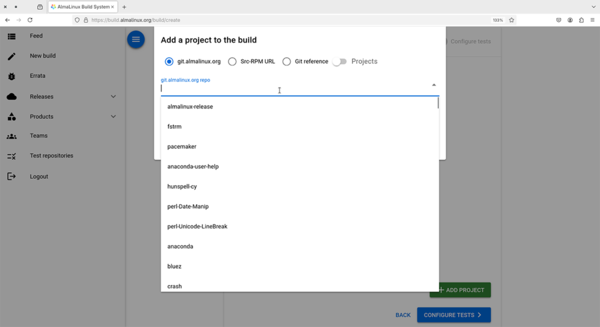 Figure 5: Adding a project to the build.
Testing and Later Steps
The AlmaLinux Test System (ALTS) included with the build environment automates package testing in realistic conditions. ALTS first launches a clean test environment (for instance, a Docker container) using Terraform to recreate a realistic setting that models actual production conditions. Once the environment is in place, ALTS attempts to install the package, and, if the installation is successful, begins a series of integrity checks predefined by the user.
Results of the tests are then forwarded to the Pulp artifacts store in the form of test logs and reports, and the results are then available to the user through the web interface. Approved packages are then signed and marked for release. The AlmaLinux Build System supports managing and releasing errata information for the packages as part of the release process.
The build system lets you define and select specific channels for the software release, and the verification system allows the receiver to trace the authenticity back to the original source code. The AlmaLinux Build System also supports releasing packages in the Fedora Community Repository Platform format (COPR), which makes it easy for users to add alternative repositories to the system.
Conclusion
The stability and versatility of the AlmaLinux Build System has given the developers a head start on achieving the project’s ambitious goals while avoiding much of the wheel spinning that often comes with putting a distribution together. AlmaLinux was recently chosen as a standard Linux distribution for Fermilab and the CERN European laboratory for particle physics. The AlmaLinux project was also the first enterprise Linux to offer a complete Software Bill of Materials (SBOM) for every package (see the box entitled “SBOMs”).
SBOMs
On May 12, 2021, the Biden administration released Presidential Executive Order 14028, “Improving the Nation’s Cybersecurity”. One of the important features of that order is the stipulation that software packages for software used by the US government should include a bill of materials for all the code provided in the package. This Software Bill of Materials (SBOM) is described as a “list of ingredients” for the software package. The idea is that providing an accurate list of ingredients used for building the package will help investigators identify and trace security risks that might affect the package. If a component used in building the package turns up with a critical vulnerability, it will be easy to spot the problem and to know that the package needs an update.
AlmaLinux was the first Linux distribution to notarize and provide an SBOM for all source and components. The AlmaLinux developers created an SBOM generation utility and integrated it into the AlmaLinux Build System. You can find the alma‑sbom utility on GitHub.
The AlmaLinux team is busy right now using the AlmaLinux Build System to create, sign, test, and release the next version of AlmaLinux, but the developers also want to make sure the system is available to other users and other projects. The user interface makes it easy to incorporate other source code repositories, and the testing, signing, and release components support customization for alternative projects and applications. An API-driven design with support for scripting opens a range of possibilities for adapting the build system for other projects.
This article was made possible by support from AlmaLinux OS Foundation through Linux New Media’s Topic Subsidy Program (https://www.linuxnewmedia.com/Topic_Subsidy).
Author
Joe Casad is the editor in chief of Linux Magazine.
Buy Linux Magazine
Subscribe to our Linux Newsletters
Find Linux and Open Source Jobs
Subscribe to our ADMIN Newsletters
Digital Autonomy
• The Answer Was Already on the Shelf
• Changing the Chip Industry: How Public Investment Has Grown Open Silicon
• United Nations Open Source Portal Goes Live
• EU Open Source Strategy Plays Key Role in Tech Sovereignty Package
• France Says “Au Revoir” to Microsoft
Support Our Work
Linux Magazine content is made possible with support from readers like you. Please consider contributing when you’ve found an article to be beneficial.

News
-
It’s Time to Test Fedora 45 Beta
Fedora 45 beta has been released with updated Gnome, KDE Plasma, and kernel.
-
Ubuntu Stonking Stingray Gets Even Rustier
Ubuntu 26.10 has completed its migration to the Rust-based coreutils.
-
AI Fixes Linux Bottlenecks Using “Hideous” Code
A Linux developer used AI to fix bottlenecks that caused problems when building the kernel. The resulting AI-generated code needed a lot of work.
-
Advanced Video Coding Still Under Patent
Brazilian patent BRPI0109962B1 has expired, which means that DivX and Xvid are no longer problematic for Linux, but it doesn’t mean that video is all of a sudden fully unleashed.
-
2,000 Vulnerabilities per Linux Release
Thanks to AI bug hunters, the Linux kernel is seeing record numbers of vulnerabilities, and it's overwhelming developers.
-
Linux Exempt from California’s Age Verification Law
So long as Linux is distributed under the GPL, MIT, BSD, and Apache licenses, the OS is exempt from being required to verify the age of its users in California.
-
Roll Out the Cake: Linux Turns 35
35 years ago, a Finnish student began a humble project that would forever change the course of technology.
-
China Switching from Windows to Linux
China has ordered several government agencies to drop a Chinese-developed version of Windows 10 in favor of either KylinOS or UOS.
-
Pine64 Halts Production of Linux Devices
With continued DRAM and eMMC shortages, Pine64 has decided to discontinue production of Linux devices.
-
The Bullet-Proof KDE Software Initiative Is Coming
KDE, Techpaladin, and Kubuntu Focus have announced a new initiative that will provide at least three years of support for KDE Plasma 6.6 LTS and related software.