


Set up OpenVPN in four steps

Howto for OpenVPN: Configure Windows computers to allow secure surfing when on the road
ByThis article explains in four simple steps how you can use a home-based Windows PC to secure a notebook and circumvent systems such as the "Great Firewall of China". With OpenVPN, mobile users can surf without fear of the restrictions that might otherwise affect them on the local network to which they are connected, and can access all Internet content without danger of being bugged or censored.
Travelers to China suffer from a censored Internet connection, which blocks access to many web sites and spies on every piece of network traffic generated by their computer. In the western world, too, many employees are faced with restricted Internet access as their companies block attempts to reach social networking sites such as Facebook, for example. Any notebook owner knows the problems all too well - that general feeling of a lack of security that hits your stomach as you have to access the web, but do not have confidence in the security of the network providing your connection, irrespective of whether you are connecting via a web cafe in a strange city, your company's LAN, a spare machine in your customer's offices, or an easily intercepted link via wireless networks such as WLAN, Bluetooth, UMTS or GPRS. Many users view anonymity and unrestricted access as a basic right, but accept the restrictions placed on them as a necessary evil.
OpenVPN makes it better
Restrictions do not have to be the order of the day, however. The open-source VPN software, OpenVPN, is available for Windows, Linux and Mac OS X, and has proven its stability in many years of real-life usage. A great many users swear by it to surf anonymously and without fear of having their data intercepted. Military-grade encryption technologies guarantee confidentiality, and the comprehensive options allow you to establish a secure connection, a so-called tunnel, to your own server in almost any situation. Typically, administrators use Linux servers, firewall appliances or a Linux root server from one of the usual-suspect providers that can be accessed from all over the world.
In contrast, this article describes an amazingly simple configuration that will suit a great many users: A Windows server acts as the access node to the Internet, via a broadband DSL connection. Users out and about with their notebooks simply hook up to their home connection, establishing a secure, encrypted tunnel. They can then surf through their own home DSL connection, as though they were connected to it physically by a massive invisible cable.
Setting up this sample scenario is done in just four steps.
Step 1: Dyndns
First of all the DSL connection needs a flexible entry in the world's Domain Name System. This dynamic DNS address means that your Windows computer at home can always be accessed from outside, even if it is allocated a new IP address every few hours, as is often the case with most DSL providers. There are many providers such as dyndns.org, no-ip.com or others who offer an easy-to-use, free, web-based solution that gives users an entry in the format feilner.dyndns.org. Whenever the local IP address changes, a small client software application running on Windows or on the DSL router itself automatically updates the entry at dyndns.org. Almost all the currently available routers and Linux-based systems incorporate this function out of the box, while dyndns.org has its own original client software, which is recommended for use with Windows.
Step 2: Configuring the DSL router
Now your home network can be found using the selected domain name (e.g. feilner.dyndns.org). The next step is to tell your router that it should forward any attempts to connect through to the Windows PC. This, too, is a standard function that is implemented in all currently available routers. Different router vendors call the function by different names, but typical names as "Port forwarding", "NAT" or "Masquerading". In the best case, it is simply a matter of specifying port 443 (TCP) and the Windows computer's IP address in the router's web-based management interface. All OpenVPN packets sent through the Internet will then be forwarded straight to the Windows PC, while undesired attempts to access other ports on the Microsoft system will remain blocked. Your Windows PC should have a fixed address on your home LAN, rather than obtaining an address via DHCP, otherwise you may experience problems. However, this setting too is generally very easy to configure, either on the router or in the properties of the network device on the computer. Figure 1 shows how you do this for Windows XP.
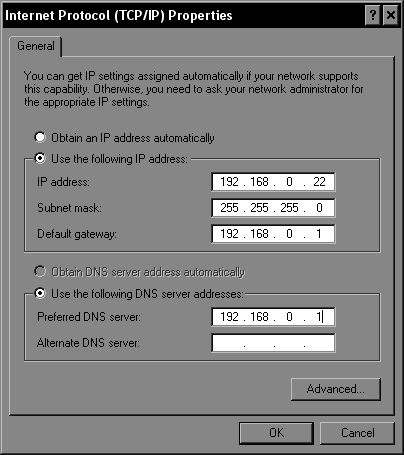 You can specify a fixed IP address for the Windows XP machine at home on the Properties sheet of the network connection that connects to the router. The router address and DNS server address must also be entered here.
Step 3: Install OpenVPN on the Windows server and generate the certificates
Download the OpenVPN software from the project web site and install it on the Windows machine. Your firewall on Windows XP may display a dialog window asking permission for OpenVPN to access the Internet and allow connections from outside. In order for the encryption function to work correctly, you also need to run a couple of commands on the Windows command line. These commands are used to generate the certificates and keys that OpenVPN needs for its configuration. The developers of OpenVPN have simplified this quiet complex step by including some practical scripts in their software package, which can be found in the "easy-rsa" sub-directory of the installation directory. (Figure 2).
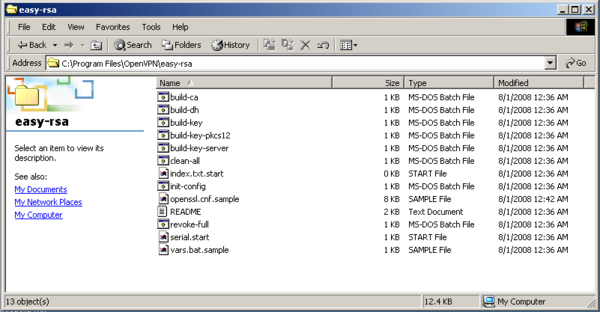 In Easy-rsa, OpenVPN provides a number of scripts that make complex topics such as encryption, keys, certificates and PKI accessible to everyday users. At the same time, administrators can use these scripts to manage complete encryption infrastructures.
You should make sure your current user has administrator rights, and create a new sub-directory called "keys". Copy the files index.txt.start and serial.start into this new sub-directory and change their names to index.txt and serial (without a file extension), respectively. Now you have to run the programs provided by OpenVPN. Open a Windows command prompt and switch to the easy-rsa directory. Now, enter the following commands: "vars", "init-config", "build-dh", "build-ca", "build-key-server server", "build-key client". Once you have answered a few questions about your computer name, organization and e-mail address, you will find the "keys" directory contains all the files you need for your OpenVPN tunnel. You now need to copy the files "ca.crt", "server.crt" and "server.key" and "dh1024.pem" to the OpenVPN "config" directory, while you should also copy "ca.crt", "client.crt" and "client.key" to a USB stick for use on your notebook. If you want, before running the "vars" script you can open up the "vars.bat" file in a text editor and set the desired key length in the "set KEY_SIZE" line. Anything over 1024 is secure, but the longer the key, the slower the connection. As an option, you can also enter your location, city and organizational unit here, instead of being prompted by the other scripts later.
Step 4: Configuration
The fourth and final step is concerned with configuring the OpenVPN server and client software. You must modify the standard OpenVPN server configuration files, and connect the tunnel to your local Ethernet adapter. Since standard installations of Windows XP require a bit more work to set up simple masquerading functions, this step is a little more complex than on Linux, for example. A solution is available in the OpenVPN "bridging mode", however. This makes your notebook appear on your home network as though it was connected by a long, invisible cable, with automatic access to the Internet. In order for this to work, however, you must bridge the two network devices (local Ethernet and the tunnel device) using the context menu in Windows Control Panel. Figure 3 shows how you do this for Windows XP. It is often worthwhile verifying that the OpenVPN service is set to "Automatic" as well, since this is not always done by the installation process.
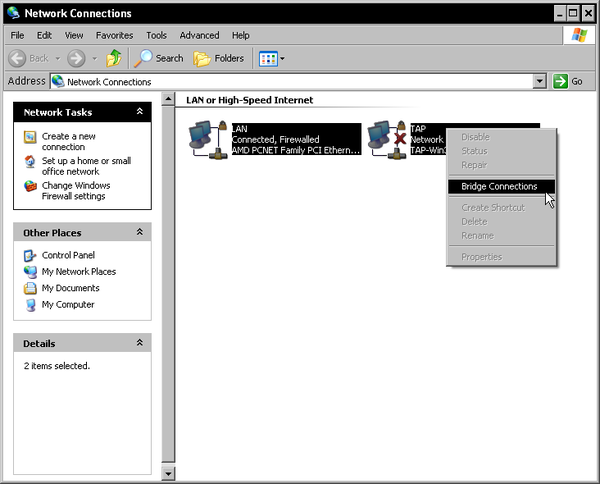 In Windows, you can bridge two network devices using the context menu in Control Panel. This bridge function ensures that a Wireless LAN, for example, and the OpenVPN tunnel on the notebook are connected, so that the notebook can obtain access to your home network and DSL connection.
On the server, the minimum configuration is all you need, saved in a file called "server.ovpn" for example. The "port" setting is already defined as using the HTTPS port, 443, which many other security-sensitive online services also use.
port 443
proto tcp-server
dev tap
ca ca.crt
cert server.crt
key server.key
dh dh1024.pem
server-bridge local_address_of_the_Windows_PC 255.255.255.0 192.168.0.240 192.168.0.250
push "redirect-gateway"
push "route 0.0.0.0 0.0.0.0 IP_of_the DSL_router"
push "dhcp-option DNS IP_of_the_DSL_router"
keepalive 10 120
comp-lzo
persist-key
persist-tun
All you have to do is enter the local IP address of your Windows computer at home in the "server-bridge..." line, and enter the local IP address of your DSL router in the two lines that start with "push route..." and "dhcp-option..." - normally this address is 192.168.0.1. On the server, you should save the configuration to the "config" directory, in a file called "server.ovpn" for example. All tunnels that are described in files ending in ".ovpn" are started automatically by OpenVPN when the computer next reboots. Now you just have to install OpenVPN on the notebook and install the client key from your USB drive into the configuration directory. The configuration on the client can be saved to a file, such as "client.ovpn":
client
dev tap
proto tcp-client
remote feilner.dyndns.org 443
resolv-retry infinite
nobind
persist-key
persist-tun
ca ca.crt
cert client.crt
key client.key
comp-lzo
route-up myroute.cmd
Only two modifications are required here. In the line starting "remote..." you need to enter the dyndns name that you selected earlier. In addition, you need to know and enter the IP address of the DSL router in your home network. OpenVPN uses the "myroute.cmd" script for this purpose, which you should also save to the configuration directory. In this file you must enter a Windows route command, with the IP address of your Windows computer (e.g. 192.168.0.71):
route delete 0.0.0.0 MASK 0.0.0.0 Local_IP_address_of_the_Windows_computer
Restart the machine and the tunnel should work without problems, with the notebook accessing the Internet solely via the VPN tunnel. There is an OpenVPN GUI available for Windows to make it easier for you to switch the VPN connection on and off. You can find it here.
Limited bandwidth
The obvious disadvantage of this solution is the bandwidth. Most domestic DSL connections have a limited upload, normally no more than 1 Mbit, which equates to just a little more than 128 Kilobytes per second (figure 4). If that is not sufficient, you need a faster connection to the Internet or a root server located at one of the large hosting companies. Whichever, both your DSL connection or the root server will represent a new point of attack for complete, undesired surveillance by eavesdroppers. If you want to avoid that, you should either install anonymizing services such as Tor, or rent a root server in a country that does not permit customer IP data to be monitored, as will be mandatory in Germany from next year.
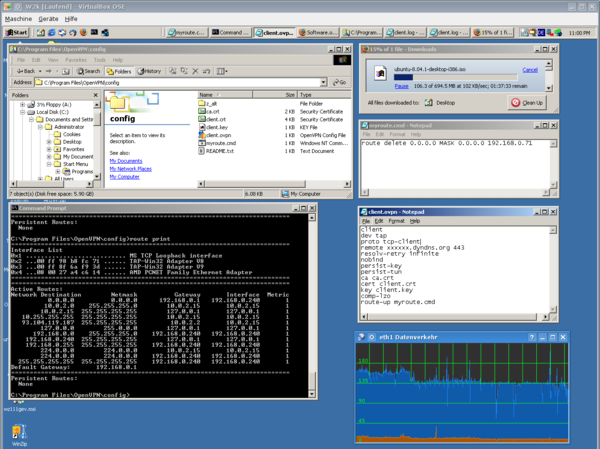 A (virtual) Windows system can run as a VPN client, using an encrypted connection to a Windows VPN server behind a DSL connection. Downloading the latest Ubuntu CD image over this tunnel ran at a permanent speed of between 100 and 120 Kilobytes per second - in other words it used the full upload bandwidth of the test 16 Mbit connection. The overhead created by encryption is minimal for OpenVPN.
Users of Windows Vista will probably have a number of other hoops to jump through to get this to work. In our tests with Vista, the bridging setup described above was unsatisfactory and unstable. Only the latest version of OpenVPN (2.1. RC8) is updated to deal with the new mechanisms in Microsoft's latest product. Linux systems and Linux-based embedded systems such as OpenWRT or FreeWRT can be used for secure tunnels even without needing to configure a bridge. Users of Linux servers face even less work, since they need neither to create certificates nor configure the bridge with their own custom routes. All you need then is a simple key and password, and a command that activates the forwarding on the VPN server. And with a rented root server, your encrypted communications will find their destinations securely and quickly.
next page » 1 2 3
Comments
comments powered by DisqusSubscribe to our Linux Newsletters
Find Linux and Open Source Jobs
Subscribe to our ADMIN Newsletters
Support Our Work
Linux Magazine content is made possible with support from readers like you. Please consider contributing when you’ve found an article to be beneficial.

News
-
Three Lines of Code Improve Linux Storage Performance
A developer changed three lines of code, giving Linux storage performance a 5% bump.
-
AUR Hit Again with Malicious Packages
Once again the Arch User Repository is plagued by a high volume of malicious packages.
-
Alpine Linux 3.24 Features Fresh Desktops and a Newer Kernel
If you're a fan of Alpine Linux, it's time to upgrade because the latest version has been released with KDE Plasma 6.6, Gnome 50, and Linux kernel 6.18 LTS.
-
EU Open Source Strategy Plays Key Role in Tech Sovereignty Package
Comprehensive measures adopted by the European Commission aim to reduce dependency on non-EU countries.
-
Linux Foundation Report Indicates AI Driving Tech Hiring
Within growing security and skills gaps, AI has been found to be a positive driving force behind tech hiring trends in Europe.
-
United Nations Open Source Portal Goes Live
A new open source portal seeks to coordinate and scale open source efforts across the United Nations system.
-
KDE Linux Drops AUR
KDE Linux developers have dropped the Arch User Repository from the build pipeline due to security concerns; other distributions should consider doing the same.
-
California May Exempt Linux from Its Age-Verification Law
After backlash from the Linux community, California may be backing off on its promise to force all operating systems to verify age, but one platform may still have to comply.
-
Another Logic Bug Found in Linux Kernel
Qualys has discovered a vulnerability in the Linux kernel that can be used to elevate standard user privileges.
-
Ubuntu Core 26 Offers Game-Changing Enterprise Features
Ubuntu Core 26 could be a game-changer for organizations looking for increased security and reliability.
Nice guide!
winsows setup?