


Collecting Data from Web Pages with OutWit

Productivity Sauce
Web scraping is a clever idea, but extracting data from a Web page manually can be a real chore. The new OutWit extension provides a solution to this problem. Better yet, it allows you to save and export the scraped data, which makes it a great research tool. Although the extension is still at a very early stage of development, it has the potential to turn your favorite browser into a powerful tool for extracting and organizing data. The current version already boasts an impressive list of features, including data structure recognition, page and image link extraction, e-mail extraction, table and list extraction, and more.
Although OutWit is a rather advanced tool, using it for simple Web scraping is not particularly difficult. Let's say you want to extract data from the Population of the 5 largest cities in the EU table and export the data for use in a Calc spreadsheet. Press the OutWit button in the Firefox toolbar to open the OutWit Hub window. The left pane contains a tree of data types supported by the OutWit Hub. Navigate to page -> data -> tables, and you should see the data from the tables on the Wikipedia page. Locate and select the rows containing the city data (see screenshot below) and drag them onto the Catch pane at the bottom.
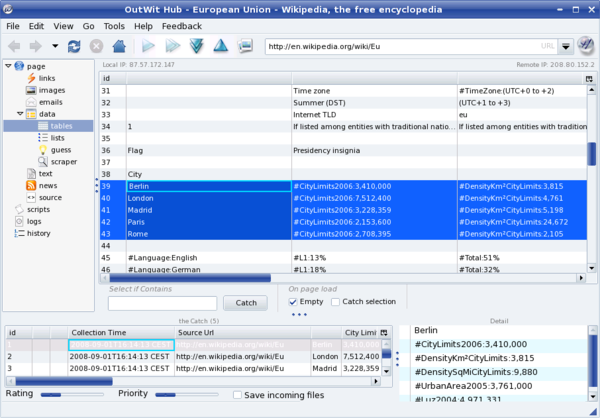
To save the selected data, choose the File -> Save Catch as command. To export the data for use in a spreadsheet, select all the rows in the Catch pane, right-click on the selection, and choose the Export Selection as command. OutWit can export the data in the Excel format only, but since OpenOffice.org Calc can read .xls files, that's not a big issue. In a similar manner, you can collect other types of data, including lists, email addresses, RSS feeds, images, and much more.
OutWit is actually more than just a mere Firefox extension. It is a platform that allows you to create your own Web data collection solutions called outfits. In fact, the OutWit Hub is an outfit built upon the OutWit kernel. Besides catching all sorts of data from a Web page, you can use OutWit Hub to create your own scrapers, and the following post on the OutWit blog shows you how to do that.
Comments
comments powered by DisqusSubscribe to our Linux Newsletters
Find Linux and Open Source Jobs
Subscribe to our ADMIN Newsletters
Support Our Work
Linux Magazine content is made possible with support from readers like you. Please consider contributing when you’ve found an article to be beneficial.

News
-
EU Open Source Strategy Plays Key Role in Tech Sovereignty Package
Comprehensive measures adopted by the European Commission aim to reduce dependency on non-EU countries.
-
Linux Foundation Report Indicates AI Driving Tech Hiring
Within growing security and skills gaps, AI has been found to be a positive driving force behind tech hiring trends in Europe.
-
United Nations Open Source Portal Goes Live
A new open source portal seeks to coordinate and scale open source efforts across the United Nations system.
-
KDE Linux Drops AUR
KDE Linux developers have dropped the Arch User Repository from the build pipeline due to security concerns; other distributions should consider doing the same.
-
California May Exempt Linux from Its Age-Verification Law
After backlash from the Linux community, California may be backing off on its promise to force all operating systems to verify age, but one platform may still have to comply.
-
Another Logic Bug Found in Linux Kernel
Qualys has discovered a vulnerability in the Linux kernel that can be used to elevate standard user privileges.
-
Ubuntu Core 26 Offers Game-Changing Enterprise Features
Ubuntu Core 26 could be a game-changer for organizations looking for increased security and reliability.
-
AI Flooding the Linux Kernel Security Mailing List
AI is giving Linus Torvalds a headache, but not in the way you might think.
-
Top Priorities for Open Source Pros Seeking a New Job
Professional fulfillment tops the list, according to LPI report.
-
Container-Based Fedora Hummingbird Designed for Agent-First Builders
Fedora Hummingbird brings the same approach to the host OS as it does to containers to level up security.
World coins
INCREDIBLE STUFF!
Very cool FF3 version
Great Add-On! Thanks for the tip.
Outwit
I'll stick to good old scrapbook for now...