


Using Data Sources with Calc

Productivity Sauce
Say you use a simple OpenOffice.org Base database to keep track of your invoices and you want to analyze the invoicing data. One way to do this is to create reports and SQL queries, but this requires skill and a lot of time. Another approach is to pull database records into a Calc spreadsheet and then use Calc's tools to analyze the data. To do this, you have to register the invoice database as a data source in OpenOffice.org. Choose Tools -> Options, select OpenOffice.org Base -> Databases and press the New button. Select then the database and give the new connection a name. Press OK -> OK to save the settings and close the window.
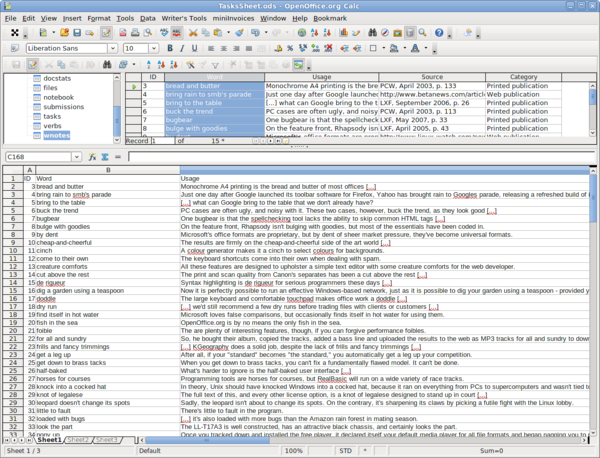
Create a new Calc spreadsheet and press F4 to show the Data Sources pane. Select the table or query you want from the registered data source, and drag it onto the spreadsheet. This imports records from the table or query as rows into the spreadsheet, and you can then use Calc's tools to analyze and manipulate the imported data range. When using this technique, OpenOffice.org creates a live link between the database table or query and the data in the spreadsheet. This means that if you make changes in the database (i.e., add a new record or modify an existing one), you can update data in the spreadsheet by refreshing it. To do this, click on any cell in the imported data range and choose -> Data Refresh Range. Keep in mind, though, that the created link works only one way -- from database to spreadsheet -- so any changes you made to the data in the spreadsheet will not be saved back in the database.
Instead of linking to a table or query, you might want to import data into the spreadsheet. To do this, click on the table or query you want in the Data Sources pane, select then all records by clicking on the top-left empty gray box in the Record Browser pane. Drag then the selected records set onto the spreadsheet.
comments powered by DisqusSubscribe to our Linux Newsletters
Find Linux and Open Source Jobs
Subscribe to our ADMIN Newsletters
Support Our Work
Linux Magazine content is made possible with support from readers like you. Please consider contributing when you’ve found an article to be beneficial.

News
-
Gnome Working on Test Center App to Make Testing Easier
It's now possible to test experimental features on the Gnome desktop without worrying that you'll break things.
-
New Vulnerability Discovered in Linux Kernel
Hiding out for nearly 15 years, the Ghostlock vulnerability allows a standard logged-in user to gain root privileges.
-
New Linux Flaw Lets Attackers Escape VMs
A 16-year-old vulnerability allows an attacker to escape a virtual machine, gain access to the host, and execute malicious code.
-
Hannah Montana Linux Is Back!
Developer Noah Cagle decided the world needed the once obscure but beloved Linux distribution and gave it a decidedly pink refresh.
-
System76 Refreshes the Lemur Laptop
If you're looking for a laptop with tons of power and battery, look no further than the latest iteration of the System76 Lemur Pro.
-
More than 43 Million Lines of Code in Linux Kernel 7.2
Using the cloc utility, Michael Larabel of Phoronix discovered that Linux kernel 7.2 has over 43 million lines of code.
-
Kubuntu Focus Goes Ultra
The Kubuntu Focus team has upped the performance ante of its M2 and Zr laptops with the latest, greatest CPUs from Intel.
-
Linux Gamers May Soon See Less Mouse Lag in KDE Plasma
Gamers using KDE’s Plasma desktop have been suffering from a slight input delay in mouse movement that could lead to getting fragged.
-
Three Lines of Code Improve Linux Storage Performance
A developer changed three lines of code, giving Linux storage performance a 5% bump.
-
AUR Hit Again with Malicious Packages
Once again the Arch User Repository is plagued by a high volume of malicious packages.