


Collecting Data from Web Pages with OutWit

Productivity Sauce
Web scraping is a clever idea, but extracting data from a Web page manually can be a real chore. The new OutWit extension provides a solution to this problem. Better yet, it allows you to save and export the scraped data, which makes it a great research tool. Although the extension is still at a very early stage of development, it has the potential to turn your favorite browser into a powerful tool for extracting and organizing data. The current version already boasts an impressive list of features, including data structure recognition, page and image link extraction, e-mail extraction, table and list extraction, and more.
Although OutWit is a rather advanced tool, using it for simple Web scraping is not particularly difficult. Let's say you want to extract data from the Population of the 5 largest cities in the EU table and export the data for use in a Calc spreadsheet. Press the OutWit button in the Firefox toolbar to open the OutWit Hub window. The left pane contains a tree of data types supported by the OutWit Hub. Navigate to page -> data -> tables, and you should see the data from the tables on the Wikipedia page. Locate and select the rows containing the city data (see screenshot below) and drag them onto the Catch pane at the bottom.
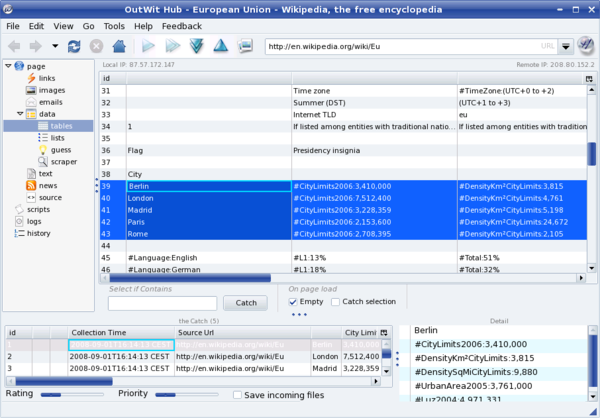
To save the selected data, choose the File -> Save Catch as command. To export the data for use in a spreadsheet, select all the rows in the Catch pane, right-click on the selection, and choose the Export Selection as command. OutWit can export the data in the Excel format only, but since OpenOffice.org Calc can read .xls files, that's not a big issue. In a similar manner, you can collect other types of data, including lists, email addresses, RSS feeds, images, and much more.
OutWit is actually more than just a mere Firefox extension. It is a platform that allows you to create your own Web data collection solutions called outfits. In fact, the OutWit Hub is an outfit built upon the OutWit kernel. Besides catching all sorts of data from a Web page, you can use OutWit Hub to create your own scrapers, and the following post on the OutWit blog shows you how to do that.
Comments
comments powered by DisqusSubscribe to our Linux Newsletters
Find Linux and Open Source Jobs
Subscribe to our ADMIN Newsletters
Support Our Work
Linux Magazine content is made possible with support from readers like you. Please consider contributing when you’ve found an article to be beneficial.

News
-
So Long Neofetch and Thanks for the Info
Today is a day that every Linux user who enjoys bragging about their system(s) will mourn, as Neofetch has come to an end.
-
Ubuntu 24.04 Comes with a “Flaw"
If you're thinking you might want to upgrade from your current Ubuntu release to the latest, there's something you might want to consider before doing so.
-
Canonical Releases Ubuntu 24.04
After a brief pause because of the XZ vulnerability, Ubuntu 24.04 is now available for install.
-
Linux Servers Targeted by Akira Ransomware
A group of bad actors who have already extorted $42 million have their sights set on the Linux platform.
-
TUXEDO Computers Unveils Linux Laptop Featuring AMD Ryzen CPU
This latest release is the first laptop to include the new CPU from Ryzen and Linux preinstalled.
-
XZ Gets the All-Clear
The back door xz vulnerability has been officially reverted for Fedora 40 and versions 38 and 39 were never affected.
-
Canonical Collaborates with Qualcomm on New Venture
This new joint effort is geared toward bringing Ubuntu and Ubuntu Core to Qualcomm-powered devices.
-
Kodi 21.0 Open-Source Entertainment Hub Released
After a year of development, the award-winning Kodi cross-platform, media center software is now available with many new additions and improvements.
-
Linux Usage Increases in Two Key Areas
If market share is your thing, you'll be happy to know that Linux is on the rise in two areas that, if they keep climbing, could have serious meaning for Linux's future.
-
Vulnerability Discovered in xz Libraries
An urgent alert for Fedora 40 has been posted and users should pay attention.
World coins
INCREDIBLE STUFF!
Very cool FF3 version
Great Add-On! Thanks for the tip.
Outwit
I'll stick to good old scrapbook for now...