


Debian: 14 Seconds to Boot

An article from the Debian-Administration.org community describes how to boot up Debian much faster on an Asus Eee 901. Its author, Phil Endecott, claims to do it within 14 seconds using his method.
Endecott is still far from the record of five seconds set by his role models Arjan van den Ven and Auke Kok (video here). The two Intel developers had started the same device under Fedora and Linux Moblin at September's Plumbers Conference. Even so, Endecott presented a number of programs and measures to significantly speed up the Debian bootup process. Some of them are specific to the Asus Eee, but others are transferable to other Linux systems.
Work begins with diagnosing the ist status with help from Bootchart (available as a Debian package) or Bootgraph. The result: from Grub to opening the xdm login dialog takes 33 seconds.
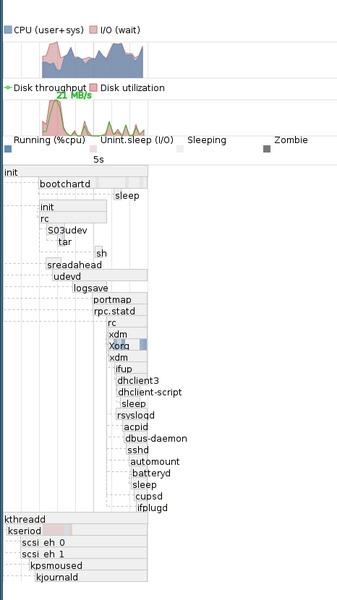 Phil Endecott recommends the Bootchart tool among others in diagnosing bootup times.
The first measure, therefore, is to reduce the Grub timeout to a minimum, get rid of any unused tasks and boot up with the highest CPU frequency (wherever possible).
Kernel tuning is the next step at speeding things up. Here a kernel lacking initrd or initramfs and with compiled hardware drivers comes into play so as to eliminate the time sink of loading kernel modules. The article also alludes to some brand-named kernel patches that are supposed to save time, among them a patch from Arjan van den Ven.
As a rule, even coldplugging, in which udev enumerates all the devices at boot time, contributes to the time sink. In the "Eliminating coldplugging" section of his article, Endecott presents a script which prevents udev intrusions in subsequent bootups.
Further measures include disk read-ahead, either through Debian's own package or through Super ReadAhead, albeit with no great time savings. Even Debian setting the system clock (twice) with hwclock takes some time, for which Endecott has a countermeasure. He starts X a bit sooner than is standard with Debian, and starts networking later than usual. The combined result: 19 of the 33 seconds saved.
Endecott's article goes into much greater detail, including configuration data, scripts and boot diagrams to download. He hopes that Debian developers might pick up on some of these tuning tips, possibly enhancing them and including them in distros. He hopes also to satisfy users who don't have kernel experience or other access to the innards of the system.
Subscribe to our Linux Newsletters
Find Linux and Open Source Jobs
Subscribe to our ADMIN Newsletters
Digital Autonomy
• The Answer Was Already on the Shelf
• Changing the Chip Industry: How Public Investment Has Grown Open Silicon
• United Nations Open Source Portal Goes Live
• EU Open Source Strategy Plays Key Role in Tech Sovereignty Package
• France Says “Au Revoir” to Microsoft
Support Our Work
Linux Magazine content is made possible with support from readers like you. Please consider contributing when you’ve found an article to be beneficial.

News
-
Pine64 Halts Production of Linux Devices
With continued DRAM and eMMC shortages, Pine64 has decided to discontinue production of Linux devices.
-
The Bullet-Proof KDE Software Initiative Is Coming
KDE, Techpaladin, and Kubuntu Focus have announced a new initiative that will provide at least three years of support for KDE Plasma 6.6 LTS and related software.
-
Linux Mint Shares a Possible Kernel Cleanup Solution
For those on Linux Mint who like to keep multiple kernels around but don't want them to take up too much space, you might be getting a new automated tool.
-
CachyOS Gets an Update
CachyOS August 2026 release is now available with the latest version of KDE, some new features, and plenty of improvements.
-
The Linux Kernel Dev Staging Area Now Rejects AI-Generated Patches
Unless a kernel patch is a valid security fix, it will be rejected if it was created using AI.
-
Linux Surpasses Double-Digit Market Share
According to two sources, the Linux operating system has hit a major milestone in market share that naysayers thought would never happen.
-
AI Helped Develop a Linux Exploit
A use-after-free race exploit was discovered and exploited on CentOS Stream 9.
-
Yet Another Linux Kernel Vulnerability Discovered
Affecting millions of systems, a kernel flaw discovered by Qualys could allow users to gain root privileges.
-
Ubuntu 26.10 to Include Ubuntu Certified Hardware Check
If you've ever wondered if your laptop or PC is officially certified to run Ubuntu, that curiosity will soon be met.
-
Substantial Update to IPFire Now Available
The lastest version of IPFire features a fundamental change to how the system handles DNS.