


New Graphical Interface for Ubuntu on ARM

Linux is the operating system of choice for devices with ARM processors. Unfortunately problems with graphics appear in most cases. Ubuntu wants to fix this with a new GUI.
No matter if a smartphone, smart netbook or embedded device, most hardware with an ARM CPU is currently running Linux. It's natural that Ubuntu therefore wants a large slice of the ARM pie, but, like many GUIs, is running into resistance from graphics drivers that in many cases don't support direct rendering
To address the problem, a team at Ubuntu around developer Jamie Bennett is working in Ubuntu 10.04 on a new netbook interface based on the Enlightenment Foundation Libraries (EFL). The ARM port from Lucid Lynx checks during installation whether the computer is running with active 3D acceleration. If so, the normal netbook interface gets applied, if not, the new 2D GUI comes into action.
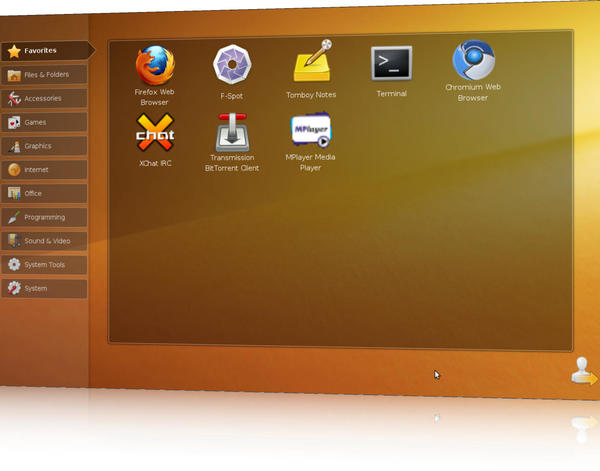 Any difference from the standard UNR interface is hard to tell at first glance.
Apart from the classic netbook interface, the new EFL-based GUI provides at least one other benefit. Thanks to themes files in Edje format, fairly attractive themes can be generated without much programming. The EFL 2D launcher also provides a few very nice effects.
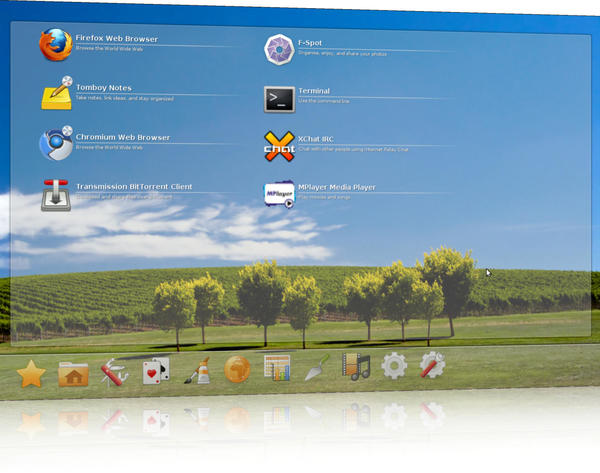 A few lines of code can produce an attractive theme for the EFL launcher.
As is the case with many free software projects, the EFL launcher is not restricted to a particular architecture, so that it's available for i386 and x86_64 systems as well. To try out the new interface with Ubuntu's upcoming alpha version, use the command
sudo apt-get install netbook-launcher-efl
Changing back to the standard launcher simply requires
sudo apt-get remove netbook-launcher-efl
Details on the new GUI are in Jamie Bennett's blog.
Subscribe to our Linux Newsletters
Find Linux and Open Source Jobs
Subscribe to our ADMIN Newsletters
Digital Autonomy
• How the Fediverse Found Parts for Its Platforms
• The Answer Was Already on the Shelf
• Changing the Chip Industry: How Public Investment Has Grown Open Silicon
• United Nations Open Source Portal Goes Live
• EU Open Source Strategy Plays Key Role in Tech Sovereignty Package
• France Says “Au Revoir” to Microsoft
Support Our Work
Linux Magazine content is made possible with support from readers like you. Please consider contributing when you’ve found an article to be beneficial.

News
-
openKylin 3.0 Released with Expanded AI Integration
The latest release features a pre-installed AI agent to help perform tasks.
-
DigitalOcean Ends Open Source Credits Program
In a change that has surprised many open source developers, DigitalOcean has decided to sunset its Open Source Credits Program.
-
Office 365 Available for Testing on Linux via Bottles
Linux users can now test the official Office 365, thanks to Mirko Brombin's work on Bottles.
-
Dutch Government Turns to Open Source for Digital Sovereignty
Following in the footsteps of other European countries, the Netherlands is looking to increase its sovereign digital infrastructure with open source software.
-
Linux May Soon Work on Snapdragon X2-Based PCs
If you're thinking about buying a Snapdragon X2-based desktop or laptop, Linux may soon be an option.
-
KDE for People Initiative Calls for AI Ban in Plasma
A new community of KDE wants the project to adopt a strict no-AI policy for KDE Plasma.
-
KDE Sets Ambitious Goals for 2026 and Beyond
KDE Connect reveals the goals for the Linux desktop darling, with one of those goals long overdue.
-
It’s Time to Test Fedora 45 Beta
Fedora 45 beta has been released with updated Gnome, KDE Plasma, and kernel.
-
Ubuntu Stonking Stingray Gets Even Rustier
Ubuntu 26.10 has completed its migration to the Rust-based coreutils.
-
AI Fixes Linux Bottlenecks Using “Hideous” Code
A Linux developer used AI to fix bottlenecks that caused problems when building the kernel. The resulting AI-generated code needed a lot of work.