


Exploring the Firefox AI Kill Switch and Mozilla's Default Behavior with Trackers and Ads

Thin Line

© Lead Image © creativestocks, 123RF.com
Firefox 148 introduced an option called "Block AI enhancements." What does that mean, is it really a "kill switch" for AI, and does Firefox live up to its reputation as a browser that exists beyond corporate control? We decided to start up Wireshark and find out.
Ajit Varma, Head of Firefox, wrote in a recent blog post [1]: "AI is changing the web, and people want very different things from it." The solution, he says, is to offer clear and easy simple choices. One choice Firefox is offering users is a so-called AI kill switch, which they say "provides a single place to block current and future generative AI features in Firefox." This feature, which Mozilla calls Block AI enhancements (Figure 1), officially rolled it out in Firefox 148 [2] [3]. I used Wireshark, TLS decryption, and a series of controlled tests to explore what the kill switch actually does – and to study how Firefox is doing in general with protecting its users from corporate meddling. Note that I'm only looking at Firefox – I'm not comparing Firefox to other browsers. The types of problems uncovered in this article are not confined to a single browser or company, but then again, Mozilla presents Firefox as being better than other browsers at protecting openness and privacy, and that assertion sets the stage for this investigation.
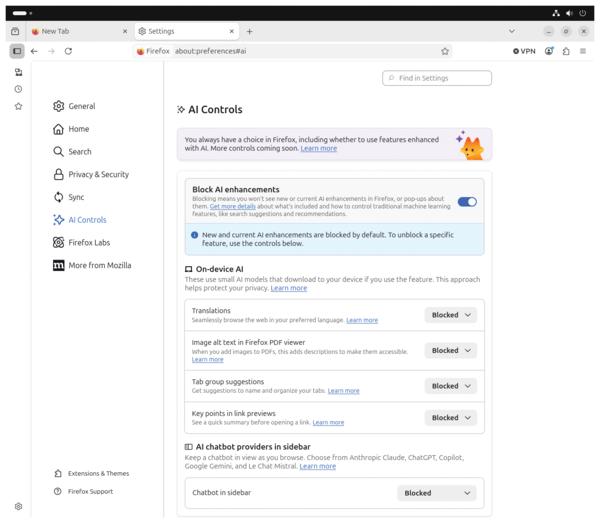 Figure 1: You'll find the new Block AI enhancements toggle under AI Controls.
What Mozilla Promises Its Users
According to Mozilla, the toggle in Settings | AI Controls blocks six generative AI features: translations, PDF alt-text generation, tab group suggestions (Smart Tab Groups), link previews with key points, the sidebar chatbot, and AI link previews (Figure 2). Mozilla explicitly clarifies in the documentation [4]: "The AI Controls settings panel does not include features that use traditional machine learning, such as systems that classify, rank, or personalize an experience."
[...]
Buy this article as PDF
(incl. VAT)
Buy Linux Magazine
Subscribe to our Linux Newsletters
Find Linux and Open Source Jobs
Subscribe to our ADMIN Newsletters
Digital Autonomy
• The Answer Was Already on the Shelf
• Changing the Chip Industry: How Public Investment Has Grown Open Silicon
• United Nations Open Source Portal Goes Live
• EU Open Source Strategy Plays Key Role in Tech Sovereignty Package
• France Says “Au Revoir” to Microsoft
Support Our Work
Linux Magazine content is made possible with support from readers like you. Please consider contributing when you’ve found an article to be beneficial.

News
-
Dutch Government Turns to Open Source for Digital Sovereignty
Following in the footsteps of European countries, the Netherlands is looking to increase its sovereign digital infrastructure with open source software.
-
Linux May Soon Work on Snapdragon X2-Based PCs
If you're thinking about buying a Snapdragon X2-based desktop or laptop, Linux may soon be an option.
-
KDE for People Initiative Calls for AI Ban in Plasma
A new community of KDE wants the project to adopt a strict no-AI policy for KDE Plasma.
-
KDE Sets Ambitious Goals for 2026 and Beyond
KDE Connect reveals the goals for the Linux desktop darling, with one of those goals long overdue.
-
It’s Time to Test Fedora 45 Beta
Fedora 45 beta has been released with updated Gnome, KDE Plasma, and kernel.
-
Ubuntu Stonking Stingray Gets Even Rustier
Ubuntu 26.10 has completed its migration to the Rust-based coreutils.
-
AI Fixes Linux Bottlenecks Using “Hideous” Code
A Linux developer used AI to fix bottlenecks that caused problems when building the kernel. The resulting AI-generated code needed a lot of work.
-
Advanced Video Coding Still Under Patent
Brazilian patent BRPI0109962B1 has expired, which means that DivX and Xvid are no longer problematic for Linux, but it doesn’t mean that video is all of a sudden fully unleashed.
-
2,000 Vulnerabilities per Linux Release
Thanks to AI bug hunters, the Linux kernel is seeing record numbers of vulnerabilities, and it's overwhelming developers.
-
Linux Exempt from California’s Age Verification Law
So long as Linux is distributed under the GPL, MIT, BSD, and Apache licenses, the OS is exempt from being required to verify the age of its users in California.