


Monitor Raspberry Pi with RPi-Monitor

Productivity Sauce
When it comes to keeping an eye on your Raspberry Pi server, you have several tools to choose from, including RPi-Monitor. This simple application can give you a quick overview of the key info, such as CPU load, memory and storage usage, network activity, temperature, and uptime.
RPi-Monitor is distributed as a regular DEB package, and deploying it on Rasberry Pi requires only a few simple steps. First, install the required packages using the following command:
sudo apt-get install librrds-perl libhttp-daemon-perl libhttp-daemon-ssl-perl
Next, grab the latest .deb package from https://github.com/XavierBerger/RPi-Monitor-deb/tree/master/packages and install it using the sudo dpkg -i rpimonitor_x.x-x_all.deb command. Run then the sudo apt-get update && sudo service rpimonitor update command to update RPi-Monitor. Once you've done that, point your browser to http://127.0.0.1:8888 (replace 127.0.0.1 with the actual IP address or domain name of the Raspberry Pi server), hit the Start button, and you should see RPi-Monitor's interface in all its glory.
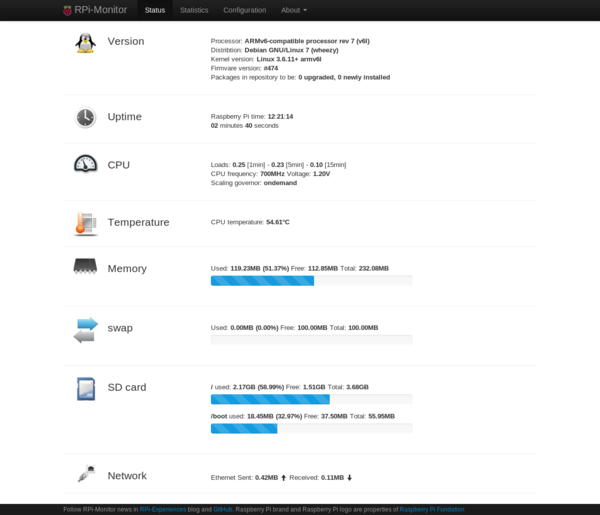
Besides the basic info in the Status section, RPi-Monitor displays monitored resources as graphs in the Statistics section. The clever part is that you can add custom resources to RPi-Monitor. For example, you can configure RPi-Monitor to monitor the disk usage of an external hard disk and display the collected data as a graph. The Advance usage and customization article provides a description of how to do that, along with a handful of other useful tricks.
comments powered by DisqusSubscribe to our Linux Newsletters
Find Linux and Open Source Jobs
Subscribe to our ADMIN Newsletters
Digital Autonomy
• How the Fediverse Found Parts for Its Platforms
• The Answer Was Already on the Shelf
• Changing the Chip Industry: How Public Investment Has Grown Open Silicon
• United Nations Open Source Portal Goes Live
• EU Open Source Strategy Plays Key Role in Tech Sovereignty Package
• France Says “Au Revoir” to Microsoft
Support Our Work
Linux Magazine content is made possible with support from readers like you. Please consider contributing when you’ve found an article to be beneficial.

News
-
Linux 7.4 is "Much Healthier" Thanks to AI
At nearly 42 million lines, Linux 7.4 is the largest merge in the kernel’s history.
-
Working Exploit for a Linux Kernel Flaw Made Public
Even before a bug received its CVE identifier or an upstream fix, the local privilege escalation vulnerability exploit found its way into the wild.
-
r/opensource Bans AI-Assisted and AI-Related Projects
The de facto subreddit for all things open source has not only banned AI-related projects but also users who "don't speak English."
-
Bottlenecks Discovered by Meta Engineers Lead to Scalability Improvements
Thanks to a small group of engineers at Meta, the Linux kernel module kernfs has been improved, which has led to some serious gains.
-
PwnEscape Poses VM Vulnerability
A guest-to-host escape flaw in Linux KVM, named PwnEscape, might be yet another means of attacking Linux.
-
Linux Mint 27 Set for a Christmas Release
The developers behind Linux Mint have announced a Christmas release, and it looks like Santa's sack will be brimming with features.
-
Is Linus Torvalds Vibe Coding?
The creator of Linux has added AI into his process for Linux kernel development, and it's more than just for debugging.
-
openKylin 3.0 Released with Expanded AI Integration
The latest release features a pre-installed AI agent to help perform tasks.
-
DigitalOcean Ends Open Source Credits Program
In a change that has surprised many open source developers, DigitalOcean has decided to sunset its Open Source Credits Program.
-
Office 365 Available for Testing on Linux via Bottles
Linux users can now test the official Office 365, thanks to Mirko Brombin's work on Bottles.