


bauh

All-in-One Package Manager

Photo by Curology on Unsplash
The bauh package manager provides a single interface to manage all of your Linux software. Despite a few issues, bauh goes a long way in simplifying package management.
Ever since package managers added automatic dependency resolution, installing software in Linux has been easy. The greatest difficulties arose from attempts to use different package formats, such as Debian’s Alien. These attempts were never fully successful and widely ignored. However, with the popularity of universal formats like AppImage, Snap, Flatpak, and web applications, package management has become more complex, with each format using its own commands for administration. Formerly known as fpakman, bauh is designed to simplify package management by using a single interface for all formats. In addition, bauh is one of the easiest interfaces available for package management either on the desktop or at the command line, despite the fact that some of the interface’s details need to be improved.
Currently at release 0.10.7, bauh has far to go before general release. As I write, it supports Arch, AppImage, Snap, Flatpak, and native web applications, covering the most popular formats, but likely others will be added as development continues. Also, for some reason, the top half of package release numbers are obscured in bauh’s tables, but other columns are perfectly legible (Figure 1). As well, a few of the buttons on the right side of the main window seem needlessly redundant (possibly to accommodate varying user preferences), while, in an effort to avoid jargon, the functions of some fields are obscure. Fortunately, though, such problems do not stop bauh from being already functional. Package installation and removal are already implemented. In addition, bauh can also use Timeshift for backup before making changes and can be installed in the system tray. Already, bauh supports custom themes. Written in Qt, bauh supports all these features with a responsiveness that makes it usable even in the early release stage.
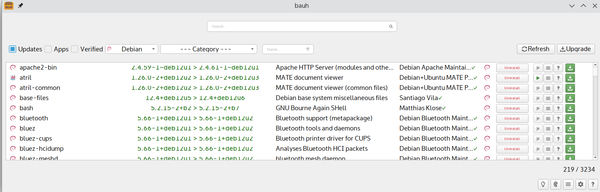 Figure 1: Bauh’s interface has a few problems, but they do not affect functionality.
[...]
Buy Linux Magazine
Subscribe to our Linux Newsletters
Find Linux and Open Source Jobs
Subscribe to our ADMIN Newsletters
Digital Autonomy
• How the Fediverse Found Parts for Its Platforms
• The Answer Was Already on the Shelf
• Changing the Chip Industry: How Public Investment Has Grown Open Silicon
• United Nations Open Source Portal Goes Live
• EU Open Source Strategy Plays Key Role in Tech Sovereignty Package
• France Says “Au Revoir” to Microsoft
Support Our Work
Linux Magazine content is made possible with support from readers like you. Please consider contributing when you’ve found an article to be beneficial.

News
-
openKylin 3.0 Released with Expanded AI Integration
The latest release features a pre-installed AI agent to help perform tasks.
-
DigitalOcean Ends Open Source Credits Program
In a change that has surprised many open source developers, DigitalOcean has decided to sunset its Open Source Credits Program.
-
Office 365 Available for Testing on Linux via Bottles
Linux users can now test the official Office 365, thanks to Mirko Brombin's work on Bottles.
-
Dutch Government Turns to Open Source for Digital Sovereignty
Following in the footsteps of other European countries, the Netherlands is looking to increase its sovereign digital infrastructure with open source software.
-
Linux May Soon Work on Snapdragon X2-Based PCs
If you're thinking about buying a Snapdragon X2-based desktop or laptop, Linux may soon be an option.
-
KDE for People Initiative Calls for AI Ban in Plasma
A new community of KDE wants the project to adopt a strict no-AI policy for KDE Plasma.
-
KDE Sets Ambitious Goals for 2026 and Beyond
KDE Connect reveals the goals for the Linux desktop darling, with one of those goals long overdue.
-
It’s Time to Test Fedora 45 Beta
Fedora 45 beta has been released with updated Gnome, KDE Plasma, and kernel.
-
Ubuntu Stonking Stingray Gets Even Rustier
Ubuntu 26.10 has completed its migration to the Rust-based coreutils.
-
AI Fixes Linux Bottlenecks Using “Hideous” Code
A Linux developer used AI to fix bottlenecks that caused problems when building the kernel. The resulting AI-generated code needed a lot of work.