


The de facto Linux sound-mixing system
Doing the Routing
To record the output of Firefox into Audacity, start by making sure that both applications are running.
One problem that you might run into is that, regardless of your chosen backend, Audacity only adds itself to the audio system when it is recording or playing. For this reason, press the Record button and then press Pause to be able to find it within qpwgraph. It was called PipeWire ALSA [audacity]/ALSA Capture [audacity] [ALSA Capture] on my setup.
As soon as you open a website that can play back sound in Firefox, it should appear on the graph, and each tab has its own node on the graph. In qpwgraph, drag from the green output connectors on the appropriate output node to the input connectors on the Audacity node (Figure 5). In all likelihood, the inputs of your sound device will already be connected to the inputs of Audacity. There's a chance that these might introduce some unwanted background noise. For this reason, disconnect them (left-click on the connection wire, and the right-click and select disconnect).
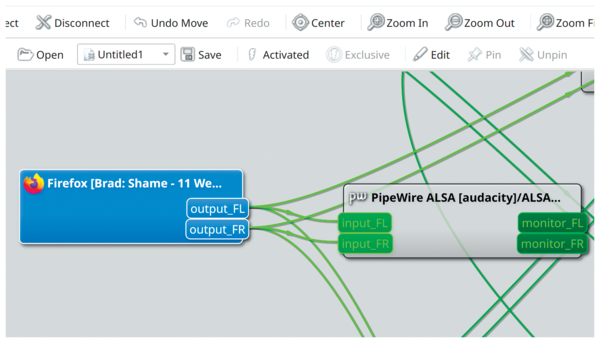 Figure 5: Plugging the audio outputs from a Firefox tab into the inputs of Audacity.
You should now be ready to start recording Firefox's audio output. In Audacity, press the Pause button to recommence the recording. In Firefox, press the Play button to begin playback. Switch back to Audacity and you should see the waveform filling up the window. Thankfully, this panel resizes itself in real time. When the audio that you wanted to capture has concluded, press the Stop button in Audacity.
Because I had to start the recording before I started playback in Firefox, there is a gap at the beginning (see Figure 6) that you'll probably want to erase. Zoom in to the beginning of the recording (Ctrl+mouse wheel) and use the scrollbar at the bottom of the screen to make sure you're at the beginning, drag over the silent part at the beginning of the waveform, and press Delete to remove it.
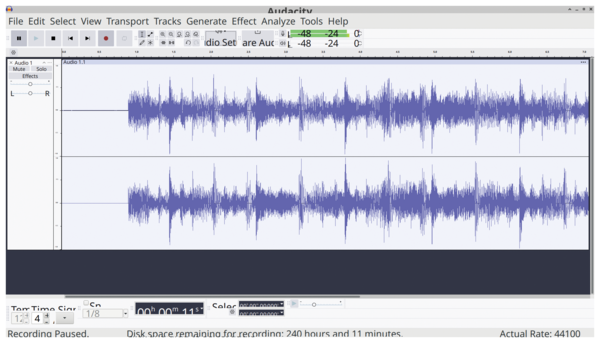 Figure 6: This audio was recorded into Audacity from a Firefox tab.
Conclusion
Hopefully, this article has provided an overview of PipeWire's abilities and how you can use it. PipeWire even has facilities for routing video, but I didn't cover that subject this time around because I don't feel there are as many essential use cases for video and PipeWire at this stage of its evolution.
Years ago, PulseAudio caused a bit of turbulence when it was added to popular distros like Ubuntu. The inclusion of PipeWire seems to have gone much more smoothly, to the extent that most users probably don't even know they're using it. That's the strength of PipeWire: It transparently handles the routing for ALSA, PulseAudio, and JACK-based applications, plus it has the configuration complexity and advanced features professional users require.
Michael Reed
Little did Michael Reed know where purchasing those "Winter 1996" Linux CD-ROMs would lead. He's been knocking about in computer publications since the mid-2000s. In his spare time, he's out on his bicycle, doing some DIY, dancing in clubs, and singing and guitar slinging, though not all at once.

Infos
- PipeWire: https://pipewire.org
- cpupower-gui: https://github.com/vagnum08/cpupower-gui
- Ardour: https://ardour.org/
- Qtractor: https://www.qtractor.org/
- Audacity: https://www.audacityteam.org/
« Previous 1 2 3 4
Buy this article as PDF
(incl. VAT)
Buy Linux Magazine


US / Canada
UK / Australia
Subscribe to our Linux Newsletters
Find Linux and Open Source Jobs
Subscribe to our ADMIN Newsletters
Support Our Work
Linux Magazine content is made possible with support from readers like you. Please consider contributing when you’ve found an article to be beneficial.

News
-
Linux Mint 22.3 Now Available with New Tools
Linux Mint 22.3 has been released with a pair of new tools for system admins and some pretty cool new features.
-
New Linux Malware Targets Cloud-Based Linux Installations
VoidLink, a new Linux malware, should be of real concern because of its stealth and customization.
-
Say Goodbye to Middle-Mouse Paste
Both Gnome and Firefox have proposed getting rid of a long-time favorite Linux feature.
-
Manjaro 26.0 Primary Desktop Environments Default to Wayland
If you want to stick with X.Org, you'll be limited to the desktop environments you can choose.
-
Mozilla Plans to AI-ify Firefox
With a new CEO in control, Mozilla is doubling down on a strategy of trust, all the while leaning into AI.
-
Gnome Says No to AI-Generated Extensions
If you're a developer wanting to create a new Gnome extension, you'd best set aside that AI code generator, because the extension team will have none of that.
-
Parrot OS Switches to KDE Plasma Desktop
Yet another distro is making the move to the KDE Plasma desktop.
-
TUXEDO Announces Gemini 17
TUXEDO Computers has released the fourth generation of its Gemini laptop with plenty of updates.
-
Two New Distros Adopt Enlightenment
MX Moksha and AV Linux 25 join ranks with Bodhi Linux and embrace the Enlightenment desktop.
-
Solus Linux 4.8 Removes Python 2
Solus Linux 4.8 has been released with the latest Linux kernel, updated desktops, and a key removal.