


Keep Files in Sync

Perfect Harmony

© Photo by Colton Sturgeon on Unsplash
FreeFileSync and Syncthing let you keep your files in sync between two computers on your local network or across the Internet.
Linux users are spoiled for choice when it comes to backups and file syncing. Rsync has been around forever, cron jobs are just a config file away, and most desktops ship with some sort of backup app baked in. But once your needs go beyond "copy this folder once a week," things get complicated fast.
That's where FreeFileSync and Syncthing come in. They solve related problems, but in very different ways, and that's exactly why it makes sense to use both.
FreeFileSync is your heavy-duty backup and synchronization workhorse. It's perfect for scheduled backup jobs, mirroring drives, or when you need fine-grained control over exactly how files get synced.
Syncthing, on the other hand, is all about keeping files synchronized across multiple devices in real time. It's decentralized, encrypted, and quietly works in the background. It's perfect for keeping your documents, photos, or project files available on your laptop and workstation.
Let's dig into both.
Backup Command Center
FreeFileSync is one of those apps that looks intimidating at first glance, but once you understand its logic, it quickly becomes indispensable. The interface is packed with options, but everything's laid out sensibly once you know where to look.
First things first, head over to the FreeFileSync website [1] and download the installer tarball. Once you've got it, extract and run it with
$ tar zxvf FreeFileSync_*.tar.gz
$ ./FreeFileSync_*.run
The installer will ask you a few questions. By default, it installs to /opt/FreeFileSync and makes the application available to all users on your system. If you're the only user or prefer a different location, you can change these settings during installation. Once it's done, the app will anchor itself in the Applications menu.
When you first launch FreeFileSync, you're greeted with what looks like a busy control panel. Don't let it overwhelm you. The layout is actually pretty logical. The two main panels show the two locations that you want to work with (Figure 1). These could be local folders, external drives, or even remote locations. Use the Browse button at the top of each panel to navigate to any folder in your filesystem.
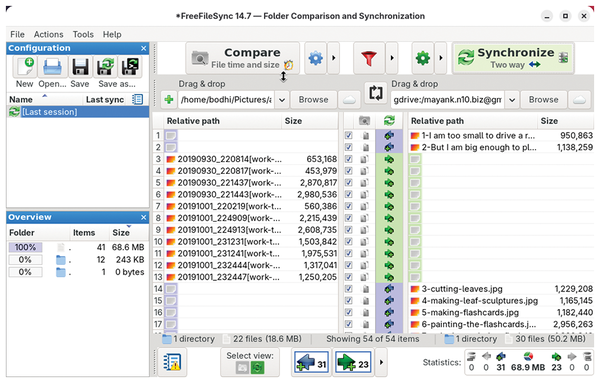 Figure 1: Always select Compare before syncing in FreeFileSync to catch unintended deletions or overwrites.
In addition to the local folders, FreeFileSync also works with remote locations. Clicking the cloud icon next to the Browse button opens a new window that helps you configure remote access (Figure 2). FreeFileSync can connect to remote folders via FTP or SFTP. Just select the one that you want to use and enter the connection details, including the server address, username, and password or SSH key. There's also support for Google Drive. For this, you'll need to authenticate through your browser the first time, but after that your Google Drive appears just as another folder available for syncing.
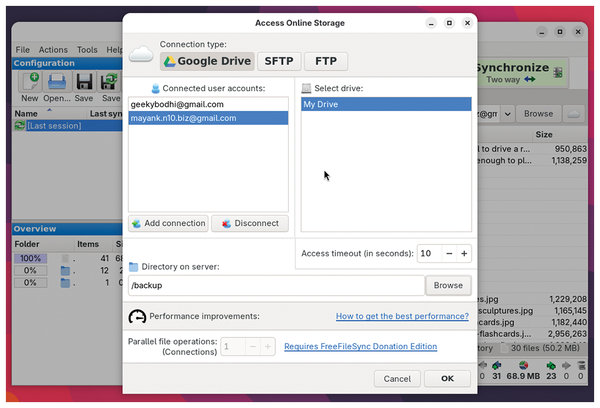 Figure 2: FreeFileSync can sync with remote servers and Google Drive directly, without needing third-party mount tools or FUSE filesystems.
Sync Methods
The most important decision in FreeFileSync is choosing a synchronization variant. This determines how changes flow between folders. Use the arrow key next to the green gear icon to select the sync mechanism:
- Two-Way, the default option, treats both the left and the right folders as equals. Files added, modified, or deleted in either location are reflected in the other, making it useful for keeping two working directories identical. However, it can be dangerous if you're not paying attention: If you delete a file on one side, it will also disappear on the other side.
- Mirror is the classic backup behavior, where the left folder is treated as the source. FreeFileSync copies all new and updated files to the right and deletes anything on the right that no longer exists on the left. The source folder is left untouched.
- Update is a safer, additive backup option. New and changed files from the left are copied to the right, but nothing is ever deleted on the backup side.
The Mirror option works best as a set-and-forget backup where you want your backup drive to be an exact replica of your computer. The Update option works best for archival backups. For instance, it's ideal for backing up photos and videos from your smartphone. You can then delete them from your phone to save space, without worrying they'll be zapped from the backup drive on subsequent runs.
One of FreeFileSync's smarter features is how it handles deletions and overwrites. For local drives, you can just enable the Recycle bin option in the synchronization settings (the green gear icon).
For more advanced control, you can enable the Versioning option, which allows you to keep multiple versions of old files by moving them into a timestamped folder. You can also set a retention period for FreeFileSync to automatically clean up old versions and save space (Figure 3).
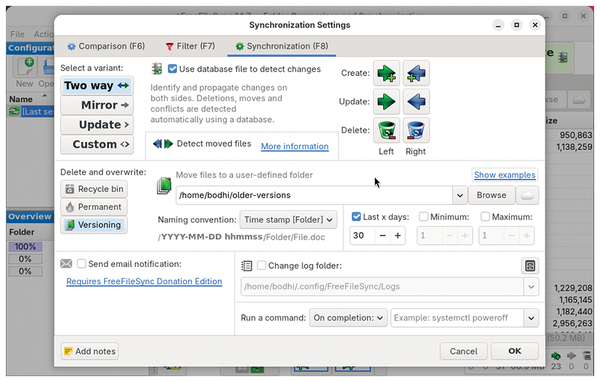 Figure 3: Enabling file versioning in FreeFileSync creates a safety net, allowing you to restore files if they are accidentally overwritten or deleted during a sync.
Once everything is configured, you can save the entire setup as a batch job by heading to File | Save as batch job. To run the backup job, you can double-click on the batch file or set up a cron job to have it run on a schedule.
Real-Time Sync Without the Middleman
Syncthing takes a completely different approach to file synchronization. Instead of scheduled backups or manual syncs, it maintains continuous synchronization between devices. Change a file on your desktop, and, within seconds, it's updated on your laptop – no cloud service, no central server, just peer-to-peer encrypted connections between your devices.
You can download the tarball for Linux from Syncthing's website [2] and extract it with
$ tar zxvf syncthing-*
$ cd syncthing-*
$ ./syncthing
Instead of using a traditional graphical user interface (GUI) app, Syncthing runs as a service and provides a web-based administration interface.
The first time you run it, Syncthing will generate some configuration files and encryption keys (stored under ~/.local/state/syncthing). Then, Syncthing will automatically open your default browser to http://localhost:8384, which is your Syncthing control panel. You will come back here whenever you need to configure anything (Figure 4).
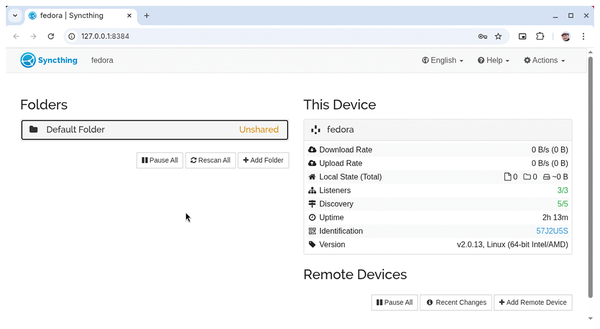 Figure 4: Syncthing's web interface runs locally by default, keeping management access private unless you explicitly expose it.
By default, the interface is only accessible from the same machine, which is sensible. If you want to manage it from another machine, go to Actions | Settings and switch to the GUI tab. In the GUI listen address text box, change the address to 0.0.0.0:8384. While you're here, it's also a good idea to define a username and password to lock access.
Buy this article as PDF
(incl. VAT)
Buy Linux Magazine
Subscribe to our Linux Newsletters
Find Linux and Open Source Jobs
Subscribe to our ADMIN Newsletters
Digital Autonomy
• How the Fediverse Found Parts for Its Platforms
• The Answer Was Already on the Shelf
• Changing the Chip Industry: How Public Investment Has Grown Open Silicon
• United Nations Open Source Portal Goes Live
• EU Open Source Strategy Plays Key Role in Tech Sovereignty Package
• France Says “Au Revoir” to Microsoft
Support Our Work
Linux Magazine content is made possible with support from readers like you. Please consider contributing when you’ve found an article to be beneficial.

News
-
Linux Mint 27 Set for a Christmas Release
The developers behind Linux Mint have announced a Christmas release, and it looks like Santa's sack will be brimming with features.
-
Is Linus Torvalds Vibe Coding?
The creator of Linux has added AI into his process for Linux kernel development, and it's more than just for debugging.
-
openKylin 3.0 Released with Expanded AI Integration
The latest release features a pre-installed AI agent to help perform tasks.
-
DigitalOcean Ends Open Source Credits Program
In a change that has surprised many open source developers, DigitalOcean has decided to sunset its Open Source Credits Program.
-
Office 365 Available for Testing on Linux via Bottles
Linux users can now test the official Office 365, thanks to Mirko Brombin's work on Bottles.
-
Dutch Government Turns to Open Source for Digital Sovereignty
Following in the footsteps of other European countries, the Netherlands is looking to increase its sovereign digital infrastructure with open source software.
-
Linux May Soon Work on Snapdragon X2-Based PCs
If you're thinking about buying a Snapdragon X2-based desktop or laptop, Linux may soon be an option.
-
KDE for People Initiative Calls for AI Ban in Plasma
A new community of KDE wants the project to adopt a strict no-AI policy for KDE Plasma.
-
KDE Sets Ambitious Goals for 2026 and Beyond
KDE Connect reveals the goals for the Linux desktop darling, with one of those goals long overdue.
-
It’s Time to Test Fedora 45 Beta
Fedora 45 beta has been released with updated Gnome, KDE Plasma, and kernel.