


BoZoN: Slick and Simple File Sharing Web App for Your Server

Productivity Sauce
When it comes to self-hosted file sharing web apps, you are spoiled for choice. But if you are looking for a simple and user-friendly app that is dead easy to deploy, you can do much worse than giving BoZoN a try. Written in PHP 5, BoZoN doesn't use any database back end and it has no dependencies. Deploying BoZoN on a server requires a few simple commands. Assuming that you have Git installed on the machine, switch to the document root of the web server, clone the project's GitHub repository, and make it writable by the server:
cd /var/www
git clone https://github.com/broncowdd/BoZoN.git bozon
chown www-data -R bozon/
Point then your browser to http://127.0.0.1/bozon/admin.php (replace 127.0.0.1 with the actual IP address or domain name of the server), and create a new account. Log in, and add the files you want to share by dropping them onto the upload area. To share an uploaded file, get the shared link by clicking on the appropriate icon, and send the link to the recipients. If you want to protect a file with a password, press the hamburger icon in the upper-left corner of BoZoN's main window to expand the sidebar and press the Manage Links button. Click then the Padlock icon next to the file you want to protect, and specify a password.
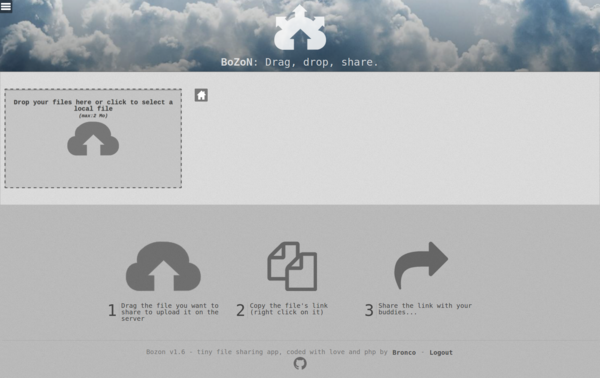
To keep tabs on the uploaded files, you can organize them into folders. To create a folder, enter the desired name into the Create a subfolder field in the sidebar and press OK. To move uploaded files into the created folder, press the Move file button in the sidebar and move the desired files. You can also upload files directly to a specific folder by first switching to it and then dragging files onto the upload area.
comments powered by DisqusSubscribe to our Linux Newsletters
Find Linux and Open Source Jobs
Subscribe to our ADMIN Newsletters
Digital Autonomy
• How the Fediverse Found Parts for Its Platforms
• The Answer Was Already on the Shelf
• Changing the Chip Industry: How Public Investment Has Grown Open Silicon
• United Nations Open Source Portal Goes Live
• EU Open Source Strategy Plays Key Role in Tech Sovereignty Package
• France Says “Au Revoir” to Microsoft
Support Our Work
Linux Magazine content is made possible with support from readers like you. Please consider contributing when you’ve found an article to be beneficial.

News
-
Linux 7.4 is "Much Healthier" Thanks to AI
At nearly 42 million lines, Linux 7.4 is the largest merge in the history of the kernel.
-
Working Exploit for a Linux Kernel Flaw Made Public
Even before a bug received its CVE identifier or an upstream fix, the local privilege escalation vulnerability exploit found its way into the wild.
-
r/opensource Bans AI-Assisted and AI-Related Projects
The de facto subreddit for all things open source has not only banned AI-related projects but also users who "don't speak English."
-
Bottlenecks Discovered by Meta Engineers Lead to Scalability Improvements
Thanks to a small group of engineers at Meta, the Linux kernel module kernfs has been improved, which has led to some serious gains.
-
PwnEscape Poses VM Vulnerability
A guest-to-host escape flaw in Linux KVM, named PwnEscape, might be yet another means of attacking Linux.
-
Linux Mint 27 Set for a Christmas Release
The developers behind Linux Mint have announced a Christmas release, and it looks like Santa's sack will be brimming with features.
-
Is Linus Torvalds Vibe Coding?
The creator of Linux has added AI into his process for Linux kernel development, and it's more than just for debugging.
-
openKylin 3.0 Released with Expanded AI Integration
The latest release features a pre-installed AI agent to help perform tasks.
-
DigitalOcean Ends Open Source Credits Program
In a change that has surprised many open source developers, DigitalOcean has decided to sunset its Open Source Credits Program.
-
Office 365 Available for Testing on Linux via Bottles
Linux users can now test the official Office 365, thanks to Mirko Brombin's work on Bottles.