


Rainloop: Lightweight Webmail Client

Productivity Sauce
Instead of relying on the web-based interface offered by your email provider, you can deploy your own webmail client using Rainloop. This fast and lightweight application is easy to deploy and features a polished interface. Deploying Rainloop on a server is easy. Run the following commands to create the rainloop directory in the server's root (in this case, it's /var/www), set the correct permissions and owner, and install Rainloop:
mkdir /var/www/rainloop
cd /var/www/rainloop
find . -type d -exec chmod 777 {} \;
find . -type f -exec chmod 666 {} \;
chown -R www-data:www-data .
wget -qO- http://repository.rainloop.net/installer.php | php
Once you've done that, point your browser to http://127.0.0.1/rainloop/?admin (where 127.0.0.1 is the actual IP address or domain name of the server), and log in using the admin user name and the 12345 password. This drops you into the administration interface, where you can configure Rainloop's settings. The web-based mail client can handle multiple domains (i.e., you can use Rainloop to access email accounts from different email providers), and the application has a couple of domains preconfigured and ready to go, including Gmail and Yahoo! Mail. To add other domains, switch to the Domains section, press the Add Domain button and provide the required information. Rainloop doesn't provide native support for multiple users, but the application uses Facebook, Google, and Twitter for authentication, thus allowing users to log into Rainloop via these social services. In addition to that, Rainloop can be intergrated with Dropbox for attaching files directly from the Dropbox storage. To enable this functionality, switch to the Social section and configure the required settings (see Rainloop documentation for further info).
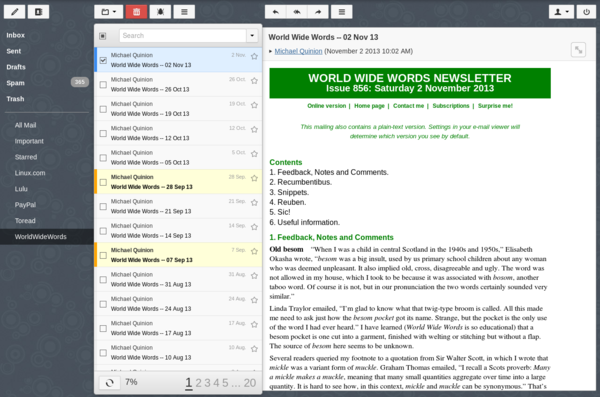
Using Rainloop couldn't be easier. Point your browser to http://127.0.0.1/rainloop, log in using your email credentials, and you should see Rainloop's interface in all its beauty. Since the application is not overloaded with features, you shouldn't have trouble figuring out how to use it. While Rainloop has a lot going for it, the application does have a couple of weaknesses. For exampe, the current version doesn't support identities, and the interface doesn't work well on mobile devices. This may well be dealbreakers for power users, but for those looking for a no-frills web-based email client, Rainloop can be just the ticket.
comments powered by DisqusSubscribe to our Linux Newsletters
Find Linux and Open Source Jobs
Subscribe to our ADMIN Newsletters
Digital Autonomy
• How the Fediverse Found Parts for Its Platforms
• The Answer Was Already on the Shelf
• Changing the Chip Industry: How Public Investment Has Grown Open Silicon
• United Nations Open Source Portal Goes Live
• EU Open Source Strategy Plays Key Role in Tech Sovereignty Package
• France Says “Au Revoir” to Microsoft
Support Our Work
Linux Magazine content is made possible with support from readers like you. Please consider contributing when you’ve found an article to be beneficial.

News
-
Office 365 Available for Testing on Linux via Bottles
Linux users can now test the official Office 365, thanks to Mirko Brombin's work on Bottles.
-
Dutch Government Turns to Open Source for Digital Sovereignty
Following in the footsteps of other European countries, the Netherlands is looking to increase its sovereign digital infrastructure with open source software.
-
Linux May Soon Work on Snapdragon X2-Based PCs
If you're thinking about buying a Snapdragon X2-based desktop or laptop, Linux may soon be an option.
-
KDE for People Initiative Calls for AI Ban in Plasma
A new community of KDE wants the project to adopt a strict no-AI policy for KDE Plasma.
-
KDE Sets Ambitious Goals for 2026 and Beyond
KDE Connect reveals the goals for the Linux desktop darling, with one of those goals long overdue.
-
It’s Time to Test Fedora 45 Beta
Fedora 45 beta has been released with updated Gnome, KDE Plasma, and kernel.
-
Ubuntu Stonking Stingray Gets Even Rustier
Ubuntu 26.10 has completed its migration to the Rust-based coreutils.
-
AI Fixes Linux Bottlenecks Using “Hideous” Code
A Linux developer used AI to fix bottlenecks that caused problems when building the kernel. The resulting AI-generated code needed a lot of work.
-
Advanced Video Coding Still Under Patent
Brazilian patent BRPI0109962B1 has expired, which means that DivX and Xvid are no longer problematic for Linux, but it doesn’t mean that video is all of a sudden fully unleashed.
-
2,000 Vulnerabilities per Linux Release
Thanks to AI bug hunters, the Linux kernel is seeing record numbers of vulnerabilities, and it's overwhelming developers.