


Trick Out a Fresh Lucid Lynx Installation with the Ubuntu 10.04 Start Script

Productivity Sauce
While it is possible to upgrade Ubuntu 9.10 to the latest 10.04 Lucid Lynx release, a clean install is the best way to go if you want to avoid update headaches. Usually this means reinstalling your favorite applications and applying tweaks all over again -- but now with Ubuntu 10.04. A clever script with the imaginative name Ubuntu 10.04 Start Script can help you to install software and tweak the system with a minimum of fuss.
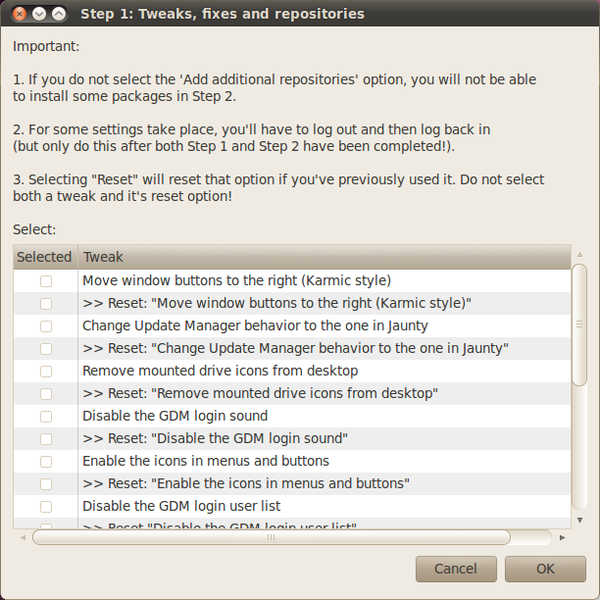
Despite the script's bare-bones appearance, it provides a wealth of options. Using the script, you can add popular repositories including Ubuntu restricted extras, Medibuntu, and Getdeb. With a few clicks, you can install a wide range of useful applications such as Dropbox, Google Earth, Google Chrome, VLC media player, Ubuntu Tweak and many others. The script also lets you install different codecs, Java runtime environment, Flash plugin as well as add support for various archive types and DVD playback. In addition to that, the script can apply an assortment of tweaks to the freshly installed system.
The Ubuntu 10.04 Start Script relies on the Zenity tool which is used to add graphical front-ends to scripts, so make sure that the zenity package is installed on your system. Grab then the latest tarball archive from the project's Web site and unpack it. In the terminal, switch to the resulting directory and run the script as root using the following command:
sudo ./ubuntu-10.04-script
Although the script doesn't offer any mind-blowing features, it can save you a lot of time and effort if you choose to move to Ubuntu 10.04 via the clean install path.
comments powered by DisqusSubscribe to our Linux Newsletters
Find Linux and Open Source Jobs
Subscribe to our ADMIN Newsletters
Digital Autonomy
• How the Fediverse Found Parts for Its Platforms
• The Answer Was Already on the Shelf
• Changing the Chip Industry: How Public Investment Has Grown Open Silicon
• United Nations Open Source Portal Goes Live
• EU Open Source Strategy Plays Key Role in Tech Sovereignty Package
• France Says “Au Revoir” to Microsoft
Support Our Work
Linux Magazine content is made possible with support from readers like you. Please consider contributing when you’ve found an article to be beneficial.

News
-
Office 365 Available for Testing on Linux via Bottles
Linux users can now test the official Office 365, thanks to Mirko Brombin's work on Bottles.
-
Dutch Government Turns to Open Source for Digital Sovereignty
Following in the footsteps of European countries, the Netherlands is looking to increase its sovereign digital infrastructure with open source software.
-
Linux May Soon Work on Snapdragon X2-Based PCs
If you're thinking about buying a Snapdragon X2-based desktop or laptop, Linux may soon be an option.
-
KDE for People Initiative Calls for AI Ban in Plasma
A new community of KDE wants the project to adopt a strict no-AI policy for KDE Plasma.
-
KDE Sets Ambitious Goals for 2026 and Beyond
KDE Connect reveals the goals for the Linux desktop darling, with one of those goals long overdue.
-
It’s Time to Test Fedora 45 Beta
Fedora 45 beta has been released with updated Gnome, KDE Plasma, and kernel.
-
Ubuntu Stonking Stingray Gets Even Rustier
Ubuntu 26.10 has completed its migration to the Rust-based coreutils.
-
AI Fixes Linux Bottlenecks Using “Hideous” Code
A Linux developer used AI to fix bottlenecks that caused problems when building the kernel. The resulting AI-generated code needed a lot of work.
-
Advanced Video Coding Still Under Patent
Brazilian patent BRPI0109962B1 has expired, which means that DivX and Xvid are no longer problematic for Linux, but it doesn’t mean that video is all of a sudden fully unleashed.
-
2,000 Vulnerabilities per Linux Release
Thanks to AI bug hunters, the Linux kernel is seeing record numbers of vulnerabilities, and it's overwhelming developers.