


Screenshots with Xfce

The Xfce Screenshooter for the Xfce desktop with the current Version 1.6.0 has no cause to fear the competition.
With Version 1.6.0 of Xfce4 Screenshooter, Xfce has gained considerable ground against Gnome and KDE when dealing with screenshot capabilities. The option to choose using the mouse pointer to hide or to display aspects over the graphic user interface is a new one.
When the user deselects the option „Close the application“, the tool remains open after the capture of the screenshot. This is a considerable advantage over Gnome’s screenshot tool, which closes automatically after every screen frame capture. With Gnome, the user is forced to open the application every single time he or she wants to take a new screenshot.
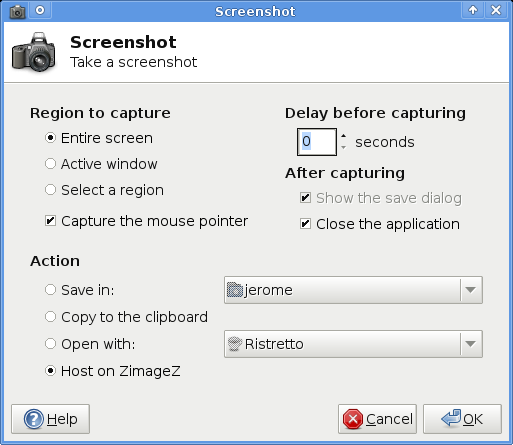 Nice shoot: Xfce Screenshooter. (from xfce.org)
Also, the array of options open to the user after taking a screenshot are nicely designed: the images can be automatically saved in a predetermined folder, opened with specific programs, and can be uploaded to online resource ZimageZ. In the announcement of the new version however, the developers have designated the latter feature as experimental at this point. The user has to create an account with ZimageZ to take advantage of this capability.
In addition, the Xfce4 screenshooter supports features which other desktops offer: the screenshooter can record either defined regions of active windows or from the entire monitor. The application also has an adjustable time invariant. Those who wish to download this tool may find the source code here.
Comments
comments powered by DisqusSubscribe to our Linux Newsletters
Find Linux and Open Source Jobs
Subscribe to our ADMIN Newsletters
Digital Autonomy
• How the Fediverse Found Parts for Its Platforms
• The Answer Was Already on the Shelf
• Changing the Chip Industry: How Public Investment Has Grown Open Silicon
• United Nations Open Source Portal Goes Live
• EU Open Source Strategy Plays Key Role in Tech Sovereignty Package
• France Says “Au Revoir” to Microsoft
Support Our Work
Linux Magazine content is made possible with support from readers like you. Please consider contributing when you’ve found an article to be beneficial.

News
-
Working Exploit for a Linux Kernel Flaw Made Public
Even before a bug received its CVE identifier or an upstream fix, the local privilege escalation vulnerability exploit found its way into the wild.
-
r/opensource Bans AI-Assisted and AI-Related Projects
The de facto subreddit for all things open source has not only banned AI-related projects but also users who "don't speak English."
-
Bottlenecks Discovered by Meta Engineers Lead to Scalability Improvements
Thanks to a small group of engineers at Meta, the Linux kernel module kernfs has been improved, which has led to some serious gains.
-
PwnEscape Poses VM Vulnerability
A guest-to-host escape flaw in Linux KVM, named PwnEscape, might be yet another means of attacking Linux.
-
Linux Mint 27 Set for a Christmas Release
The developers behind Linux Mint have announced a Christmas release, and it looks like Santa's sack will be brimming with features.
-
Is Linus Torvalds Vibe Coding?
The creator of Linux has added AI into his process for Linux kernel development, and it's more than just for debugging.
-
openKylin 3.0 Released with Expanded AI Integration
The latest release features a pre-installed AI agent to help perform tasks.
-
DigitalOcean Ends Open Source Credits Program
In a change that has surprised many open source developers, DigitalOcean has decided to sunset its Open Source Credits Program.
-
Office 365 Available for Testing on Linux via Bottles
Linux users can now test the official Office 365, thanks to Mirko Brombin's work on Bottles.
-
Dutch Government Turns to Open Source for Digital Sovereignty
Following in the footsteps of other European countries, the Netherlands is looking to increase its sovereign digital infrastructure with open source software.
the hide pointer feature is not new
But it's ok, I get the picture... Good review...