


A cross-platform password manager
Interface and Web Browser Integration
Bitwarden's interface is designed for simplicity and ease of use while maintaining a high level of functionality. The main application is divided into different sections that allow users to manage their stored credentials, generate passwords, and configure security settings (Figure 3).
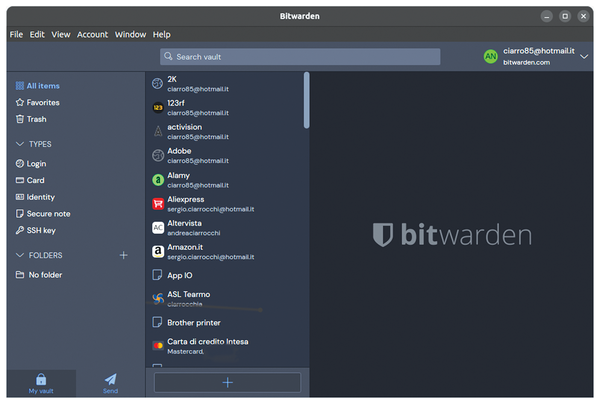 Figure 3: Bitwarden's three-pane layout.
Upon logging in, users are greeted with the vault, which serves as the central hub for accessing stored passwords. The vault is structured as a list of saved entries, each displaying the name of the associated service, a favicon if available, and a preview of the username. Users can search for specific credentials using the search bar at the top, which filters results in real time. The left sidebar provides navigation options, including access to folders, favorites, and organizational tools such as collections for enterprise users.
When opening a saved credential, the interface expands to display the full details, including the username, password, associated URL, notes, and any custom fields the user has added. Passwords remain hidden by default, but users can reveal them with a single click. Options for copying usernames and passwords, launching the associated website, or editing the entry are easily accessible.
The password generator is integrated into both the main application and the browser extensions. It allows users to create strong, random passwords with adjustable parameters such as length, character type, and whether to include special symbols. This feature is especially useful when signing up for new accounts or updating existing passwords.
Bitwarden integrates seamlessly with major web browsers through dedicated extensions, providing users with convenient access to their stored credentials while browsing. The extension is available for Chrome, Firefox, Edge, Safari, Brave, and other Chromium-based browsers, ensuring broad compatibility. Once installed, the extension appears as an icon in the browser's toolbar, acting as a gateway to the user's password vault. Clicking the icon opens a compact interface where users can log in and quickly access saved credentials. The extension automatically detects when a user visits a login page and offers to autofill stored usernames and passwords, eliminating the need for manual input. If multiple accounts are stored for a particular website, Bitwarden displays a list of available logins, allowing users to select the correct one. If no matching login exists, the extension offers an option to generate and save a new password on the spot. The browser integration also supports biometric unlocking on supported devices, allowing users to access their vault with fingerprint or facial recognition instead of manually entering their master password. For those who prefer keyboard shortcuts, Bitwarden provides configurable hotkeys to quickly invoke autofill or access the extension's interface. The browser extension syncs in real time with the user's Bitwarden account, ensuring that any changes made on other devices, such as a mobile phone or desktop application, are immediately available. This integration provides a streamlined, efficient way to manage credentials without interrupting the browsing experience.
The Settings menu offers customization options for security and usability. Users can enable 2FA, adjust auto-lock settings, configure biometric login for supported devices, and manage vault timeout settings.
Across all platforms – desktop, mobile, and browser extensions – Bitwarden maintains a clean and minimalist design, focusing on efficiency while ensuring that all essential features remain easily accessible. The consistency across different interfaces allows users to transition smoothly between devices without a learning curve.
Drawbacks
While Bitwarden is widely regarded as a robust and secure password manager, it is not without its drawbacks. One of the areas that may be a concern for some users is the user interface, which, while functional, can feel less polished or intuitive compared to some of its competitors. The design, though straightforward, may not appeal to users who prioritize aesthetics or a more modern, streamlined experience.
Additionally, while Bitwarden offers a free tier that is quite generous, some of its more advanced features, such as encrypted file storage and priority customer support, are locked behind its premium subscription. This can be a limitation for users who require these features but are unwilling or unable to pay for the upgrade.
Another potential drawback is the application's performance and speed. Some users have reported that Bitwarden can feel slower, particularly when syncing large vaults or when using browser extensions. This lag, though not universal, can be frustrating for those who need quick access to their credentials.
Bitwarden's sharing capabilities, while useful, are also somewhat limited in comparison to other password managers. For instance, sharing passwords with multiple users or managing shared folders can be less flexible or more cumbersome, which may pose challenges for teams or families looking for seamless collaboration. Additionally, while Bitwarden supports a wide range of platforms and devices, some users have reported occasional compatibility issues, particularly with less common browsers or operating systems. These inconsistencies can disrupt the user experience and require workarounds.
Lastly, while Bitwarden's security features are generally strong, some advanced users may find its options for customization and granular control over security settings to be lacking. For example, the ability to configure specific security policies or automate certain actions may not be as comprehensive as in other password managers. This could be a limitation for power users or organizations with highly specific security requirements. Despite these drawbacks, Bitwarden remains a highly capable and cost-effective password manager, though these issues are worth considering depending on individual needs and preferences.
Conclusion
Bitwarden stands out as a reliable, secure, and cost-effective password manager that caters to a wide range of users, from individuals to businesses. Its open source nature, strong encryption, and cross-platform compatibility make it a compelling choice for those prioritizing transparency and flexibility. The generous free tier ensures that essential password management features are accessible to everyone, while the premium offering provides additional functionality for users with more advanced needs. However, as with any tool, Bitwarden is not without its limitations. For users seeking a trustworthy and adaptable solution to manage their digital credentials, this application is undoubtedly a worthy option to consider.
Infos
- Bitwarden Flatpak: https://flathub.org/en/apps/com.bitwarden.desktop
- Bitwarden AppImage: https://bitwarden.com/
- Bitwarden CLI: https://bitwarden.com/help/cli/
- Salted hashing: https://en.wikipedia.org/wiki/Salt_(cryptography)
- Zero-knowledge architecture: https://en.wikipedia.org/wiki/Zero-knowledge_proof
- Bitwarden source code: https://github.com/bitwarden
« Previous 1 2
Buy this article as PDF
(incl. VAT)
Buy Linux Magazine
Subscribe to our Linux Newsletters
Find Linux and Open Source Jobs
Subscribe to our ADMIN Newsletters
Support Our Work
Linux Magazine content is made possible with support from readers like you. Please consider contributing when you’ve found an article to be beneficial.

News
-
UN Creates Open Source Portal
In a quest to strengthen open source collaboration, the United Nations Office of Information and Communications Technology has created a new portal.
-
Latest Linux Kernel RC Contains Changes Galore
Linux kernel 7.0-rc3 includes more changes than have been made in a single release in recent history.
-
Nitrux 6.0 Now Ready to Rock Your World
The latest iteration of the Debian-based distribution includes all kinds of newness.
-
Linux Foundation Reports that Open Source Delivers Better ROI
In a report that may surprise no one in the Linux community, the Linux Foundation found that businesses are finding a 5X return on investment with open source software.
-
Keep Android Open
Google has announced that, soon, anyone looking to develop Android apps will have to first register centrally with Google.
-
Kernel 7.0 Now in Testing
Linus Torvalds has announced the first Release Candidate (RC) for the 7.x kernel is available for those who want to test it.
-
Introducing matrixOS, an Immutable Gentoo-Based Linux Distro
It was only a matter of time before a developer decided one of the most challenging Linux distributions needed to be immutable.
-
Chaos Comes to KDE in KaOS
KaOS devs are making a major change to the distribution, and it all comes down to one system.
-
New Linux Botnet Discovered
The SSHStalker botnet uses IRC C2 to control systems via legacy Linux kernel exploits.
-
The Next Linux Kernel Turns 7.0
Linus Torvalds has announced that after Linux kernel 6.19, we'll finally reach the 7.0 iteration stage.