


Rescue Operation

Recovering LibreOffice Files

LibreOffice is a stable office suite, but accidents can happen.
LibreOffice is deservedly known for its stability. However, crashes and file corruptions do occasionally happen, most often when a system runs out of memory. Fortunately, there are several ways to recover a file, and if one fails, the chances are that another one will. Below are the recovery options, listed in order of how easy they are to use:
The easiest solution is to be proactive and prepare for recovery before it is needed. Before doing any work in LibreOffice, go to Tools | Options | LibreOffice | General | Save. There, select Save autorecovery information. The default to save every 10 minutes is usually good enough for most purposes, but you can change that as needed, or you can select Save the document instead. Note, however, that if you save too often, you suffer constant interruptions if you have limited memory. You should also select Always create backup. The backup location is defined in Tools | Options | LibreOffice | Path, and by default is /home/USER/.config/LibreOffice/4/user/backup. Alternatively, you can select Place backup in same folder as document. Probably the safest place for the backup is on another filesystem, or, best of all, an external drive. All of these options are turned off by default, presumably to save memory, but they can minimize the loss of data. By using worst, you will only lose a few minutes of work (Figure 1).
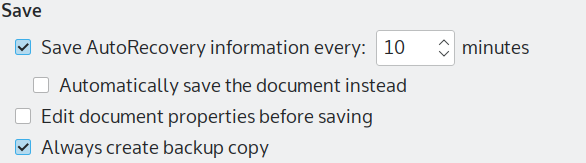 Figure 1: LibreOffice’s settings for recovery.
However, when working in LibreOffice, the first step in recovery should be to reopen the file. Upon restarting, LibreOffice will have the option to open any file that was not properly quit when the last session ended, regardless of whether it crashed or was simply overlooked when you exited. Given that the icon for closing a file is directly below the icon to close the whole of LibreOfffice, closing a file improperly can be all too easy.
File Surgery
If LibreOffice’s built-in recovery tools fail, you can try to dissect and perform surgery on the file itself. Although LibreOffice’s Open Document Format (ODF) is usually treated as an independent format, structurally it is simply a collection of zipped .xml files. That means that it can be opened in a file compression tool such as plasma’s Arch (Figure 2) or Gnome’s File Roller. For example, in a Writer file, if you only want the raw text, you can decompress content.xml (Figure 3) and run this bash command:
grep -C NUMBER ‘<text:span*’ content.xml
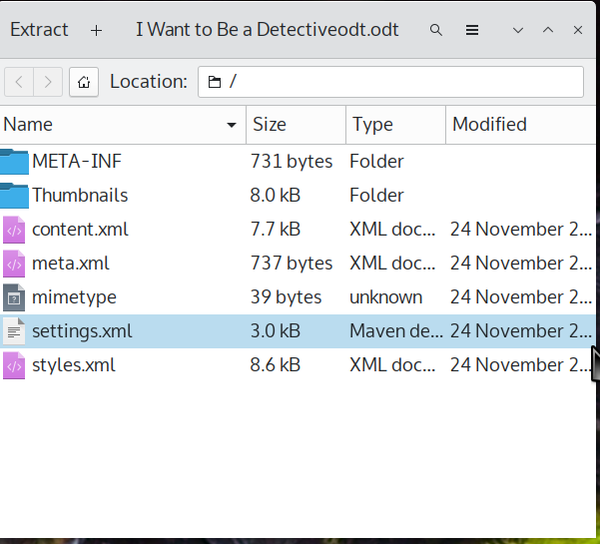 Figure 2: The contents of a LibreOffice file is a collection of .xml files.
 Figure 3: The lines of content.xml for a Writer file that hold content.
In this command, the -C option prints out lines that starts with the string ‘<text:span*>*’. The number is the number of instances that will be printed to output and may have to be adjusted several times before you get the entire contents. Once you have collected the entire text, copy it to a file, then search for ‘<text:span*’ and replace it and the corresponding end tag with nothing. You will be left complete, unformatted text, which is hardly ideal; although, most of the essential elements except for formatting and graphics are recovered. But of course if you have linked to graphics rather than embedded them in the file, you will still have them.
You can also transplant content.xml to another file, or else replace setting.xml and style.xml in the original document. However, this tactic will be hit and miss unless the original document is based on a template. Whether the effort is worth your time depends on how important the document is to you.
The Headache of File Deletion
But what if a file is deleted? In a desktop environment, the deleted file may still be in the Trash. However, if not, then your chances of success can be much lower. Extundelete may help if the deleted file is on an ext4 partition, and a better choice might be PhotoRec, which searches for file characteristics rather focusing on a particular filesystem. However, unless you attempt recovery immediately, your subsequent work might over-write a deleted file, especially on a filesystem whose memory is almost full.
Which brings me back to the beginning: The quickest and easiest way to recover files is be prepared. In addition to setting the options for autorecovery and backups in LibreOffice, always have a live disc available. Your chance of recovering a deleted file is improved with a live disc because you are less likely to overwrite the partition the deleted disk is on.
Buy Linux Magazine
Subscribe to our Linux Newsletters
Find Linux and Open Source Jobs
Subscribe to our ADMIN Newsletters
Digital Autonomy
• How the Fediverse Found Parts for Its Platforms
• The Answer Was Already on the Shelf
• Changing the Chip Industry: How Public Investment Has Grown Open Silicon
• United Nations Open Source Portal Goes Live
• EU Open Source Strategy Plays Key Role in Tech Sovereignty Package
• France Says “Au Revoir” to Microsoft
Support Our Work
Linux Magazine content is made possible with support from readers like you. Please consider contributing when you’ve found an article to be beneficial.

News
-
Is Linus Torvalds Vibe Coding?
The creator of Linux has added AI into his process for Linux kernel development, and it's more than just for debugging.
-
openKylin 3.0 Released with Expanded AI Integration
The latest release features a pre-installed AI agent to help perform tasks.
-
DigitalOcean Ends Open Source Credits Program
In a change that has surprised many open source developers, DigitalOcean has decided to sunset its Open Source Credits Program.
-
Office 365 Available for Testing on Linux via Bottles
Linux users can now test the official Office 365, thanks to Mirko Brombin's work on Bottles.
-
Dutch Government Turns to Open Source for Digital Sovereignty
Following in the footsteps of other European countries, the Netherlands is looking to increase its sovereign digital infrastructure with open source software.
-
Linux May Soon Work on Snapdragon X2-Based PCs
If you're thinking about buying a Snapdragon X2-based desktop or laptop, Linux may soon be an option.
-
KDE for People Initiative Calls for AI Ban in Plasma
A new community of KDE wants the project to adopt a strict no-AI policy for KDE Plasma.
-
KDE Sets Ambitious Goals for 2026 and Beyond
KDE Connect reveals the goals for the Linux desktop darling, with one of those goals long overdue.
-
It’s Time to Test Fedora 45 Beta
Fedora 45 beta has been released with updated Gnome, KDE Plasma, and kernel.
-
Ubuntu Stonking Stingray Gets Even Rustier
Ubuntu 26.10 has completed its migration to the Rust-based coreutils.